

Are you tired of constantly posting on Instagram and not getting the desired engagement and reach? Are you looking for a way to increase your Instagram account engagement? What you need is Instagram Collabs!
You can use the Collab feature to collaborate with other users on Instagram and double the reach of your posts.
Using this amazing feature, you can share Reels and posts that will be shown in all collaborators’ profiles, which means your followers and theirs will see the content at the same time.
Buy an Established Instagram Account
Skip starting from zero. Browse Instagram/TikTok accounts with audiences across many niches.
See Available AccountsThere are various ways to maximize your engagement rates on Instagram, such as paid advertising and giveaways; however, the Instagram collaboration feature is the easiest one with great results.
If you don’t know where to start, you are in the right place. In this article, we will explain all the necessary information you need to know about collaborating on Instagram, including how to request and accept a collab and more.
What Is a Collaboration on Instagram
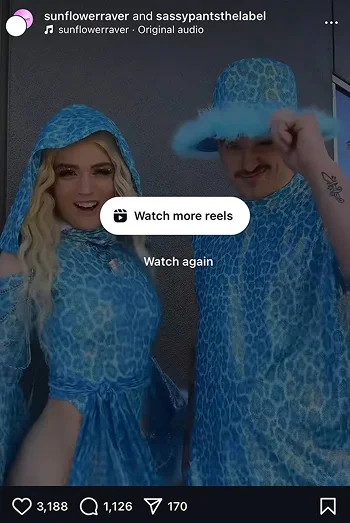
The Instagram Collab feature was launched in 2021. It allows users to co-author content with other accounts.
The original content creator requests collaboration with another account, and if they accept the invitation, their username will be added to the content, and the post will be shown in both accounts’ feeds.
Before accepting a collaboration on Instagram, note that the post’s author can add or remove their collaborator at any time.
As a business owner, influencer, or content creator, you can request or accept a collab on Instagram to increase engagement, attract more followers, and boost your visibility on the platform.
Reasons to Accept a Collaboration on Instagram
Accepting or rejecting a collaboration on Instagram is up to you, so it is normal if you don’t know why you should take a collab.
Here is a short list of common reasons you may want to accept an Instagram collaboration request.
To boost profile visibility
When you accept a collaboration post on Instagram, your username will be added to the content, and followers of the original content creator can visit your profile.
As you know, the more users visit your profile, the more chances you have to boost your visibility on the platform, which means more engagement rates and reach.
Increasing engagement
Accepting a collab means your followers and the other account followers will like, save, share, and comment on the content, and the engagement rates will be counted for both parties.
Saying so, your account engagement increases quickly, which means your future posts are more likely to go viral.
Attract new followers
Want to attract more target followers on Instagram? Accept the next collaboration request, and you will see how people follow your account.
Besides, accepting and sharing a collab post requires no paid advertising, and I think it’s the best part of this feature!
Networking opportunities
Being active on social media without building a solid network and connection is not worthy because social media connects people from all over the world.
Accepting a collaboration on Instagram provides various network opportunities and is the best way to grow your social network.
To build trust
If you are a small business owner or a nano influencer and want to build trust among your audience, accepting a collab is what you need.
Collaborating with a well-known influencer or brand builds trust among your followers, and people will give you more credit for your partnership with a valid individual.
Increasing sales
One of the best ways to increase sales is to collaborate with an influencer or a brand in your niche.
For example, if you have an online shop selling shoes, you can collaborate with another online shop that sells clothes.
Your partnership slogan can be something like this: “Complete your style with us!”
This will bring brand awareness and potential customers for both parties.
How to Accept a Collaboration on Instagram
I guess this section is where you’ve been looking to learn how to accept an Instagram collaboration.
First, note that you will receive a notification whenever someone invites you to a collaboration on Instagram.
Follow the steps below to accept a collaboration on Instagram:
Step 1- Open Instagram and go to the DMs.
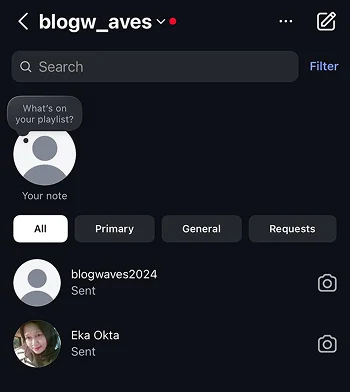
Step 2- Open the chat that includes the invitation.
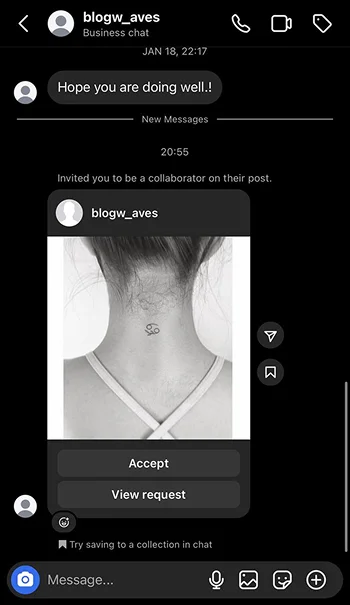
Step 3- You can accept the request immediately or click on the “View request” option to check the content.
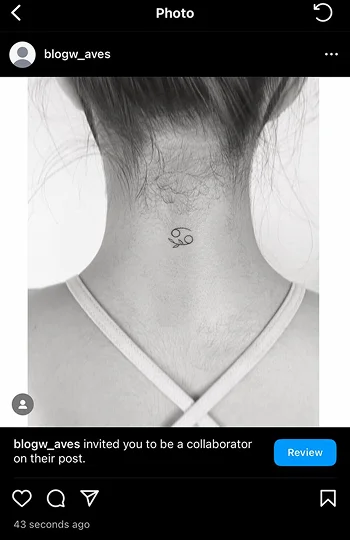
Step 4- Tap “Accept” to finish the process.
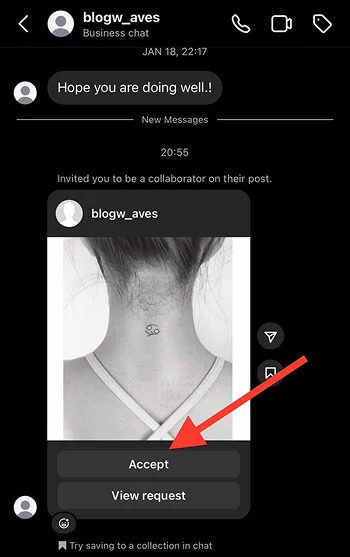
That’s how easily you can accept a collaboration request on Instagram; the good thing is that the process is the same for accepting a collab on a Reel or feed post.
How to Respond to a Collaboration on Instagram
Do you remember when I said one reason to use Instagram’s collaboration feature is to grow your network on the platform? Well, you can have successful collaborations only if you know how to respond to them, regardless of whether you accept or reject the invitation.
Here, I prepared a list of possible answers you can use to respond to a collaboration request on Instagram.
Answers to pleasantly accept the collaboration request
- Thank you for your invitation! I’m sure this collaboration brings various opportunities for both of us.
- Thank you for your invitation! I’m sure this collaboration brings various opportunities for both of us.
- Thank you for your invitation! I’m sure this collaboration brings various opportunities for both of us.
- Thank you for your invitation! I’m sure this collaboration brings various opportunities for both of us.
- Thank you for your invitation! I’m sure this collaboration brings various opportunities for both of us.
- Thank you for your invitation! I’m sure this collaboration brings various opportunities for both of us.
Answers to nicely reject the collaboration request
- Thank you for your invitation; however, I’m afraid this collab won’t give us the desired results as our niches are different.
- Unfortunately, we don’t accept new collaborations because our latest collection has not yet been launched.
- I appreciate your invitation, but we don’t share similar audiences, so I have to reject this request, as it won’t work for us.
- I’m sorry, but your account doesn’t have enough followers for us to accept this request.
- Your account is great, but we are two different categories and I don’t think this collab benefits any of us!
These are just some examples of how you can nicely accept or reject a collaboration on Instagram to save opportunities for the future!
How to Request a Collaboration on Instagram
Requesting a collaboration on Instagram is a piece of cake! However, you should be aware of the account you want to invite for a collab.
Follow these steps to invite someone to collaborate on Instagram.
Step 1- Take the usual steps to create your content. (It can be a feed post, Reel, image, etc.)
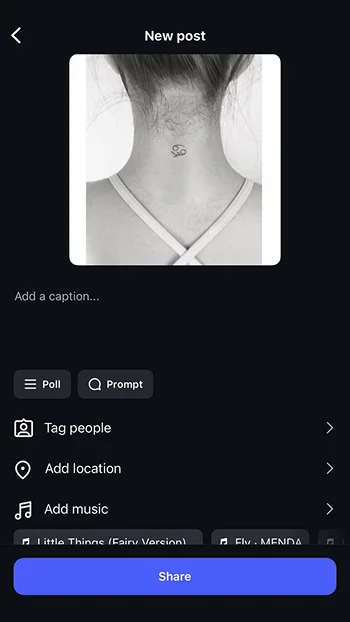
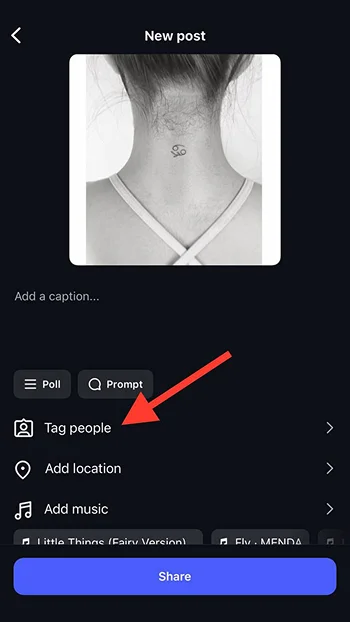
Step 2- Tap on the “Tag people” option before sharing the post.
Step 3- Click on the “Invite collaborators” button.
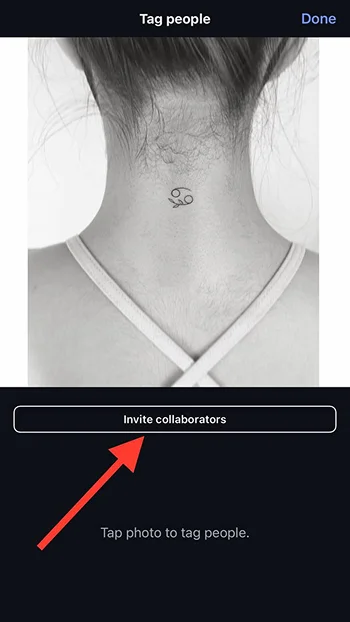
Step 4- Select the desired account from the followers’ list or search for their username.
Step 5- Tap “Done” and the request will be sent.
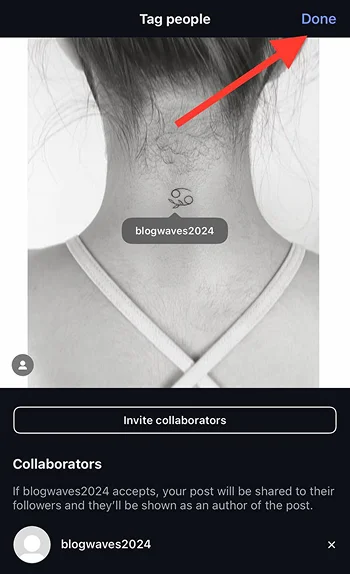
Note that your content will be shared whether the other account accepts the request or not.
Best Practices for Collaborating on Instagram
You may now wonder what are the best ways to collaborate with someone on Instagram. These are some of the best and most common ways you can try!
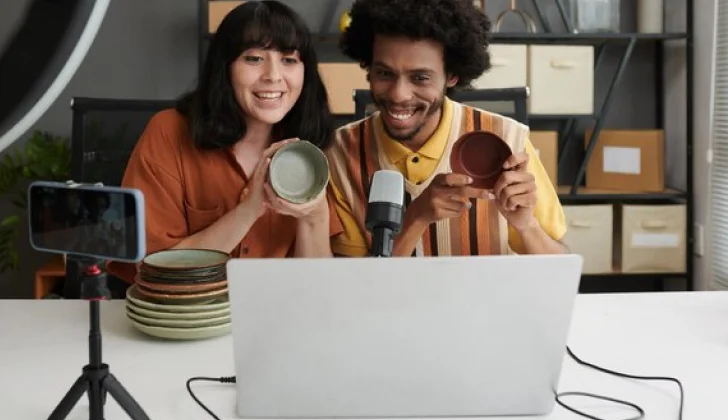
Collaborate with similar accounts in your niche
The whole point of collaborating on Instagram is attracting your target audiences, so collaborating with brands or influencers irrelevant to your niche is meaningless.
Reach out to similar accounts, influencers, and brands in your niche to have a successful collaboration that helps you grow your business.
Collaborate for giveaways
One of the best ways to collaborate on Instagram is to plan a collab for giveaways. This will bring results that blow your mind away!
People like to receive gifts or even coupons, and what is the best way to spread the news of a great giveaway than running a collaboration?
Collaborate with satisfied customers

This method is a great opportunity to show how your customers support your business and build trust among your audiences.
If you see a post of your satisfied customers, ask them nicely for a collaboration so you can share the same post on your feed.
Collaborate with yourself
Yup! That’s correct! If you run multiple brands or accounts, you can share a post or Reel as a collab post.
This method is great to announce a new launch, product, or service to your community.
Conclusion
Instagram and its fabulous features! Right? Collaboration on Instagram has various features that help grow your business and connections on the platform.
To get the best results from accepting a collaboration request on Instagram, you should be aware of what content you want to share on your feed and ensure you collaborate with a similar account in your niche.
I hope you enjoy reading this article and that it helps you to request or accept a collaboration!
FAQs
Why can’t I accept a collaboration on Instagram?
You can only accept collaboration requests from public accounts.
How many collaborators can I invite on Instagram?
You can invite up to six collaborators on each post.
Can I delete a collaboration post on Instagram?
Only the original content creator is allowed to delete or remove collaborators on a collab post.

Emi Daniel
Buy an Established Instagram Account
Skip starting from zero. Browse Instagram/TikTok accounts with audiences across many niches.
See Available AccountsRelated articles
-
Instagram Hashtags That Actually Work in 2025: Strategy, Research & Reels
Instagram posts with hashtags see 70% higher engagement rates and 12.6% more reach than those without. Yet most Instagram users struggle with hashtag strategy in its complex…
25 min readEmi Daniel
-
Top 30 Black Instagram Models to Follow in 2025
Black models are among the most followed in the industry on Instagram. A great example is “Naomi Campbell,” who has over 15 million followers. The main reason…
22 min read -
Good Times to Post on IG: Maximize Engagement and Reach in 2025
Your Instagram posts are getting lost in the noise. Since 2020, engagement rates have dropped by 30% across the platform. This means timing your posts has never…
27 min read