


Instagram is one of the most user-friendly social media platforms, and millions of people use it every day worldwide. But unfortunately, Instagram is well-designed for mobile phones and only works like old-school websites. Therefore, it can be challenging for some people to find the URL of their or other people’s Instagram accounts. But fortunately, the process of finding the Instagram profile link is straightforward.
If you use Instagram daily, you must know how to share your URL or profile link. Sharing Instagram URLs is helpful when sharing your page’s Link on other social media platforms such as YouTube or Facebook. However, sharing Instagram URLs can be challenging because people usually search for friends, family, or whomever they want to find by their usernames instead of profile links.
An Instagram profile link is a specific web address that can lead you to an Instagram user page. There are different methods for getting Instagram profile links. For example, sharing your Instagram URLs with other social media platforms can expose your account to a new audience and gain more followers.
Buy an Established Instagram Account
Skip starting from zero. Browse Instagram/TikTok accounts with audiences across many niches.
See Available AccountsThis blog will discuss how to find, copy, and share Instagram URLs on desktop, Android, or iOS mobile phones. We will also explain different methods for sharing Instagram profile links to other social media platforms, such as Facebook and YouTube.
How to Find Your Instagram Profile Link on Android and iPhone
The Instagram app doesn’t provide the feature to copy your Instagram profile link on any iPhone or Android device. But, some strategies can help you to create a link that leads people to your Instagram profile.
You can make your Instagram profile link by writing down the Instagram website address, adding a forward slash, and then adding your username after the IG website address. This way, you can generate your Instagram URL, which will look like this: instagram.com/username.
You can copy this Link to your other social media platforms. However, many people don’t know their username or may forget it. In that case, you can find your username from your profile by following the below steps:
For iPhone
- Log in to the Instagram mobile app on your iPhone.
- Click on your profile photo on the down-right side of the App
- You will be forwarded to your profile page.
- From there, write down your Instagram username at the top left of the page.
- Another option is to go to Edit profile; you can find your username in the username section.

- Write down your Instagram profile link in this format: instagram.com/username.
- Then copy and paste it anywhere you wish
For Android
- Log in to the Instagram app on your Android device
- Click on your Profile photo on the down-right side of the App.
- You will be forwarded to your profile page.
- From there, write down your Instagram username at the top left of the page.
- Another option is to go to Edit profile; you can find your username in the username section.
- Write down your Instagram profile link in this format: instagram.com/username.
- Then copy and paste it anywhere you wish
How to Find Your Instagram Profile URL on Mac or PC
You can follow the same process on a PC. If you use Instagram Web more than the App, you should know that copying your Instagram profile URL is very easy.
- Go to www.instagram.com.
- Tap on your profile icon.
- Copy the URL from the URL bar.
- Click once on it and copy it by pressing CTRL + C, or right-click your mouse and copy it.
- Paste the copied Link wherever you want.
How to Share Your Instagram Profile Link with QR Code
Instagram has added the QR code feature to its platform. This feature is available for all Android and iOS users. You can share your profile by QR code and find other people’s profiles by scanning their QR code.
Whatsapp also supports the same feature; you can add contacts to it by scanning their QR code. Facebook also added this feature to its messenger.
To share your Instagram QR code:
- Log in to Instagram.
- Click on your profile picture in the down-right corner of the screen and go to your profile
- Tap on the three lines menu in the top right corner
- Select the QR Code from the menu.
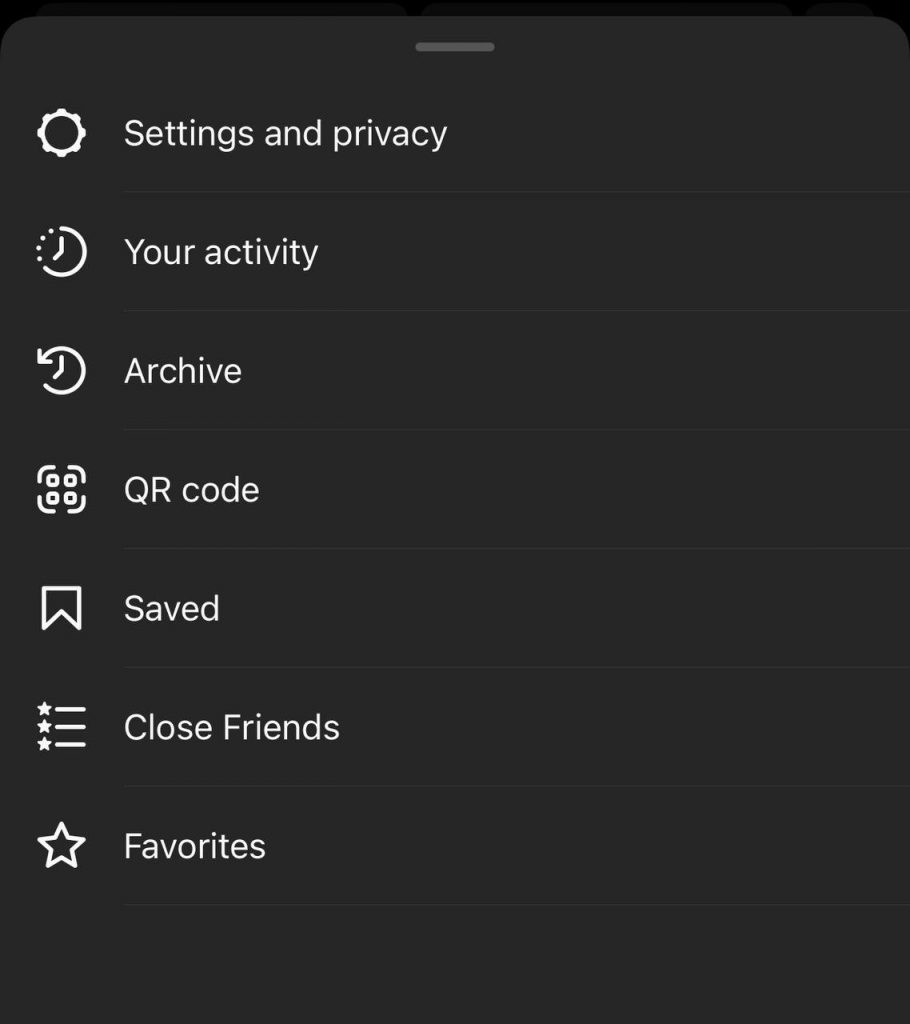
- Your QR code will be displayed on the screen.

- Take a screenshot of the QR code and share it.
- You can also choose the share icon and send it to other social media or DM.
How to Share Your Instagram Profile Link With Nametag
Nametags are another method for sharing your Instagram profile link. This feature will generate a code you can share with others who can scan it. When other people scan the code, they can find the user profile on Instagram and follow them. Instagram users can share their Nametag via email, text, and other social media platforms. To share your Instagram URL with Nametag, follow the below steps.
- Log in to Instagram
- Go to your profile page
- Tap on the three-line menu in the top right corner.
- Choose Nametag.
- There are three options for your nametag background
- You can edit Color, Emoji, or Selfie for your Nametag
- Download Nametag.
- Send it as a picture to others or print it
Use your Second Instagram Account to Get the Link
If you have more than one account on Instagram, you can get your Instagram profile link below:
- Log in to your second account
- Go to your first Instagram page
- Tap on the three dots menu in the top right corner
- Choose Copy profile URL
You can get someone else Instagram profile link by following precisely the above steps. After that, you can paste the copied Link wherever you want. On your mobile device, tap once where you want to copy it and then hold. The paste option will appear in a second.
How to Share an Instagram Profile with Social Media Platforms and Messengers?
You can share your Instagram URL on other social media platforms and messengers. This method will help you to gain more followers on your other platforms. You can send your Instagram profile link to the Instagram story, Facebook, YouTube, Whatsapp, and direct messages. You can also turn the Link into a QR code we already discussed and share it offline. You can also turn the Link into a QR code we already discussed and share it offline.
How to Share Instagram Profile Link on Instagram Story
You can share your Instagram URL on your Instagram story in two methods:
Method 1: Sharing Profile
- Go to the profile where you want to share a story.
- Click on the three-dot at the top right and choose Share this profile.
- Click on Add the profile to the story. Then, edit the story as you like and share it.
Method 2: Copy the Link
If you don’t see the option to share your profile in your story, use the steps below to share your Instagram profile. In this case, you must add the profile’s Link to your IG story.
- Find the Instagram link and copy it using any of the above methods.
- Now, make a new story. To do that, click the + (Add) icon on the Instagram main screen page and select a story.
- Get a new picture or select an image from your gallery and use it as a background for your story. Edit the story as you wish.
- Click on the sticker icon and choose the Link from the menu.
- Paste the profile link you copied before and click the Done button. Then, share the story.
How to Share Instagram Profile Link in Direct Message
You can share an Instagram profile in a direct message in two methods.
Method 1: Copy-Paste the Link
- Copy your profile link or someone else’s Link, as explained before.
- Open the Instagram direct message where you want to share the Link.
- Touch and hold the blank area, select paste, and click the send button to share it.
Method 2: Share Profile
- Open the Instagram profile you want to share.
- Click the three-dot icon on the top right and choose Share this profile.
- From there, you can see your following list with people you recently contacted at the top.
- Find the person you want to share the Link with and click the send button.
- You can use the search bar to find your desired person.
How to Share Instagram Profile Link on Facebook
You can link your Instagram account to your Facebook account. This feature is beneficial for digital marketers. You can share stories on Instagram and Facebook at the same time. But you can also manually add a link to your Instagram profile and Facebook page.
You can create a Facebook post including your Instagram profile link or copy your Instagram URL to your Facebook About section or bio.
If you are familiar with making a Facebook post, you can share your Instagram profile by following simple steps. First, add your Instagram username to your Instagram web address and generate your Instagram profile link. Then, if you are using a PC, you can copy the Link from the address bar on the browser. After that, follow the below steps.
- log in to your Facebook account.
- Post on your Facebook page from the “What’s on Your Mind” section.

- Introduce your Instagram profile by writing some words and pasting the Link to it.
- Choose Post.
How to Share Your Instagram Profile in Facebook’s “About” Section
First, you must find and copy your Instagram Profile link, which we discussed. After that, follow the below steps:
- Log into your Facebook account on a PC or Mac.
- Tap on your profile picture at the top of the page.
- Choose the “About” under your cover photo and choose “Contact and Basic Info” on the menu on the left side.
- Under Website and Social links, choose “+ Add a website.”

- Choose Instagram from the pulldown menu, which will show you a list of social media platforms (the default is usually Instagram).

- Copy and paste your Instagram profile link, then click “Save Changes.”
Your Instagram URL will be shown when someone visits your Facebook “About” section.
How to Share Your Instagram Profile Link to YouTube Channel
Adding your Instagram URL to your YouTube channel can promote your brand and gain more audience. When you add your Instagram profile link to your YouTube channel, the audience will be encouraged to check and follow your Instagram account. Follow the below steps to add your Instagram URL to your YouTube channel.
- Write down your Instagram username somewhere.
- Login to your YouTube channel.
- Click on your profile icon at the top right of your channel.
- Click on the customized blue channel button.
- Go to the primary info tab.
- Move down to the links section, and click on Add Link.
- Add ‘Instagram’ in the title field and your Instagram profile link in the URL field.
- Click Done and choose to Publish, and you are all set.
How to Share Instagram Profile Link on WhatsApp
If you want to send your Instagram profile link to any of your contacts on Whatsapp, follow the below steps:
- Find and copy the Instagram profile link
- Open the WhatsApp chat and choose the contact which whom you want to share the Instagram link.
- Touch and hold the blank typing section and select paste.
- Click the Send button.
How to Share Your Instagram Profile Link on Whatsapp Status
Sharing an Instagram URL on Whatsapp status is easy. This feature is an excellent method that can help you promote your business and get your audience’s attention. To share your Instagram profile link to your Whatsapp status, follow the below steps:
- Find your Instagram username and write it down somewhere.
- Now copy the https://www.instagram.com/ and paste it to the WhatsApp status.
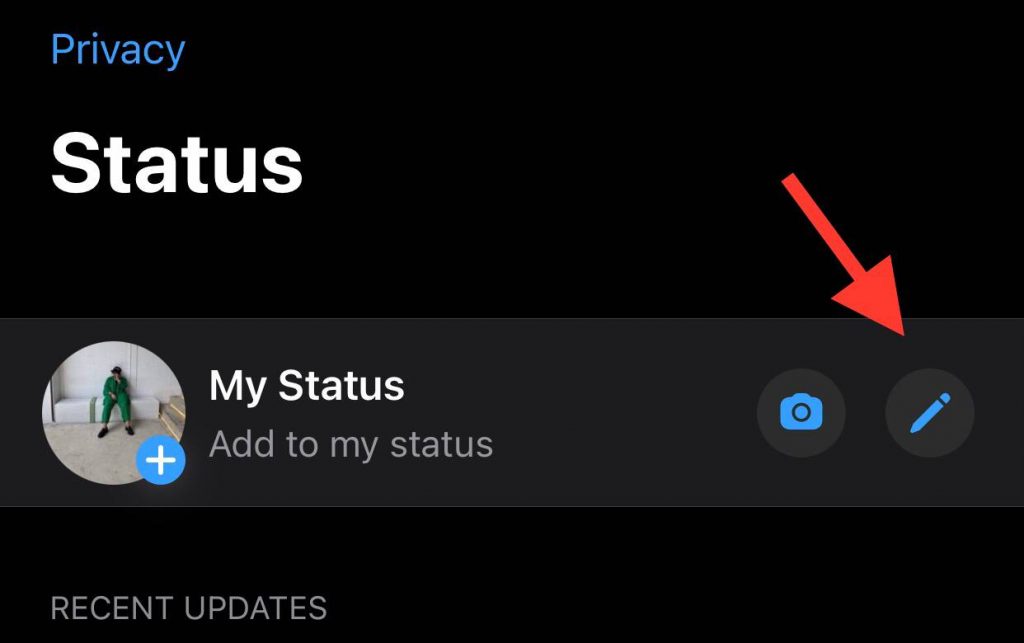
- Then add your Instagram username after the URL. It will look like this: https://www.instagram.com/username/.
- For the last step, click on the green send button.
- All of your WhatsApp contacts will see your new status
Final Thoughts
Sharing your Instagram URL is easy, but it can be challenging if you need help finding your IG profile link. Moreover, Instagram features change over time because it is constantly updated. Therefore, ensure that your Instagram is always updated and that you can use all the recently released features.
Sharing your Instagram profile URL can be helpful for many people. For example, some people want to link to a specific Instagram post from their page to their website, and they don’t know how, or other users wish to get more people to find out about their latest fashion design or a book they just published. So they want to share the profile link.
Regardless of what you want to do with your Instagram profile link, you can share it easily with other people through other social media platforms or different messenger apps.
There are different methods that you can use to copy your Instagram URL. For example, you can type the Link or copy it from the Instagram web. You can also use a QR code or Nametag to generate your Instagram profile link and share it with others. You can also use your other accounts if you have multiple accounts on Instagram and share your URL with other people and platforms.
Just update your email address and phone number in your Instagram setting to recover your account whenever possible. If you do this occasionally, in case you get hacked or blocked for any reason, you don’t need to make a new page and send people your new Instagram profile link. Instead, you can recover your account by following some steps and keeping your account for as long as you want.

Emi Daniel
Buy an Established Instagram Account
Skip starting from zero. Browse Instagram/TikTok accounts with audiences across many niches.
See Available AccountsRelated articles
-

How to Use Instagram: The Creator’s Guide to Building an Audience
Instagram in 2026 is no longer just a place to collect followers. The creators who grow consistently are the ones who understand how to earn attention, turn…
17 min readEmi Daniel
-

How to Go Live on Instagram: A Step-by-Step Guide
Going live can feel more stressful than posting a Reel. You cannot remove a pause, rewrite a sentence, or start over after an awkward moment. But that…
17 min read -

Instagram Instants Feature: What It Is, How It Works, and How to Turn It Off
The first time I opened Instagram Instants, I almost backed out. I had taken a normal photo. Nothing worth editing. Nothing worth posting. Nothing that needed an…
11 min read