


In recent years, the TikTok app has become one of the most popular platforms for sharing educational, funny, and creative videos.
The people who are active in the TikTok app and have become famous are called TikTokers, and they work hard for their videos to get significant likes, comments, views, and shares.
Now imagine what would happen as a TikToker if you accidentally deleted one of the videos that had significant views. You must be upset and wish to recover deleted TikTok videos or see them again.
Buy an Established Instagram Account
Skip starting from zero. Browse Instagram/TikTok accounts with audiences across many niches.
See Available AccountsThis article will explain how you can see deleted TikTok videos in your TikTok account and others.
How to Recover Your Deleted TikTok Videos?
As mentioned, accidentally deleting a TikTok video is one of the biggest fears of TikTokers and those active on TikTok. The following explains how you can recover deleted TikTok videos and rewatch them.
Each method has its tips, so read the content carefully to catch one.
Recover Liked TikTok Videos
One of the methods that you can use to recover deleted TikTok videos is to recover liked TikTok videos.
In this case, you should note that this method only applies to public videos because they are shown to all people, and they can like it, so you cannot find and recover private videos in this way.
To do this, follow the steps below:
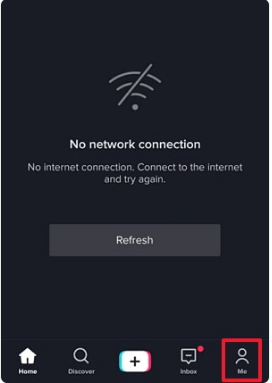
Step 1- Open the TikTok app and click on the profile icon shown as “Me” in the bottom right corner of the screen
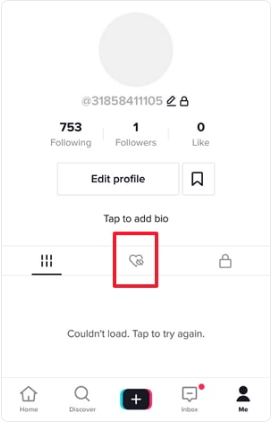
Step 2- You will see a “heart” icon on your profile; select the heart icon to move to the liked videos
Step 3- Now, you need to choose the video you want to recover
Step 4- You will see a “three-dot” menu on the right side of the deleted video screen; click on it
Step 5- Choose the “Save video” option, and now your video comes back to your gallery
Recover the Draft TikTok Video
Sometimes when you make a video and want to share it on TikTok, it gives you options such as whether you wish to upload the video or save it as a draft.
If you choose the save as draft option, these videos will be saved in your mobile memory, and if you forget or don’t want to upload the video, you can quickly recover it from the draft section.
The critical thing to remember is that if you don’t select the “Save to Album” option when you want to save the video as a draft, you won’t be able to use this feature, and the draft video won’t be recoverable.
Follow the steps below to recover deleted TikTok videos in the draft section:
Step 1- Open your mobile “album” or “gallery”
Step 2- Search for the TikTok folder among your files
Step 3- Choose the draft video you want to recover
Restore TikTok Backup Videos
The backup section is the first place to check when looking for deleted TikTok videos on your mobile phone.
The settings of your mobile phone may automatically save your video files in default photo apps like Android Google Photos App or iOS Photos App.
These are one of the best ways to recover deleted TikTok videos; we will examine each below.
Recover Deleted TikTok Videos on the iOS Photos App
Step 1- Enable the iCloud backup option on your mobile settings
Step 2- Go to iCloud.com and sign in to your account
Step 3- Tap on “settings”
Step 4- Now, you need to find the “advanced” section and then choose “recover files”
Step 5- Select the video files you want to recover
Step 6- Tap on “restore” to finish the process
Recover Deleted TikTok Videos on the Android Google Photos App
To recover deleted TikTok videos and images in this way, you must first ensure your backup is active. For this, follow these simple steps:
- Open the Google Photo app
- Go to your profile account; the icon is at the top right of the screen
- Select the photo settings option from the menu
- Ensure that the backup and sync are on
Now, you can follow the steps below to find the deleted TikTok videos on the Google Photo app:
Step 1- Open the “Google photo app”
Step 2- Choose “library” in the bottom left corner of the screen
Step 3- Then tap on “trash” or “bin”

Step 4- Now, you can see all the deleted TikTok videos and images that have been deleted in the last 60 days
Step 5- Select the TikTok videos you want to recover and tap “restore” in the bottom right corner to recover them to your library or gallery so you can repost them on TikTok.
The important thing that you should pay attention to in this section is that when you recover deleted TikTok video files this way, you can only recover the last version of that video.
Unfortunately, if your video has other parts, you cannot restore deleted TikTok videos.
Recover Deleted Videos Using Video Recovery Software
Some people save their TikTok content on an SD card or their computer, which is more secure, but what if your TikTok video is accidentally deleted from your SD card or computer and flash drive? What can be done? Is it possible to restore deleted TikTok videos, or are they gone forever?
If you find yourself in such a situation, you should know that using recovery software is your best option.
Some apps are free, and some are paid, allowing you to recover multiple files on USB, computer, etc. These apps will scan the folders and drives where you have saved your files, then prepare the files in your chosen format.
To use these applications, first download and install one according to your needs and specify the source where you want to scan your files.
How to See Others Deleted TikTok Videos?
In the previous part, we have thoroughly explained how you can recover and post your TikTok videos that have been deleted.
This section provides essential tips to help you see deleted videos from other people’s accounts.
Ask the Video Owner for the Video
If you saw and liked a video on TikTok, but after some time, you did not see it on the owner’s TikTok account, you can simply send them a direct message through TikTok and ask them to send you the video file if possible.
Note that to use TikTok’s direct messaging feature, both parties must have their mobile numbers connected to their accounts to message each other.
Check Your Phone to See if the Video is Cached
You can also see other people’s deleted TikTok videos by checking your mobile. If you still need to clear the cache of your mobile phone, likely, the video is still in your mobile memory or your favorite videos.
Look for the Deleted Video on Your Watch History
TikTok automatically saves the videos you watch for seven days in the Watch History section so that you can see the deleted videos again. Follow these steps to find deleted videos on Watch History:
Step 1- Open the TikTok application and go to your profile
Step 2- Go to the menu by clicking the three dash lines in the top right corner of the screen
Step 3- Find “watch history” and tap on it, then look for the video you want to watch

Use a Third-Party Archive Site
There are some third-party archive websites, such as Urlebird.com, that you can use to archive popular TikTok videos so that you can recover them and watch them again if needed.
Note that most of these archive sites only archive videos with high likes, comments, views, and shares, so this option is probably unsuitable if you are looking for videos with few views.
Ask Other TikTok Users for the Deleted Video
Another way to find deleted videos of other TikTok accounts is to ask other TikTok users or your friends to send you the video if they have already saved it so you can see it.
The noteworthy point is that other users can only access the video and send it to you if they have saved it or used a third-party tool such as Google Photos or Archive Site.
So always save the videos yourself or do the other mentioned methods.
Conclusion
As mentioned, TikTok is one of the most popular applications for sharing video content, and these videos easily become a trend, which shows numerous users of this platform.
In this article, we have fully explained how you can recover your TikTok videos that have been deleted and watch or upload them again. We also shared some tips which you can use to recover other account-deleted TikTok videos.
With the help of the contents mentioned in this article, you will be able to recover your deleted TikTok video, and you will be able to find and watch the videos of other accounts again.

Emi Daniel
Buy an Established Instagram Account
Skip starting from zero. Browse Instagram/TikTok accounts with audiences across many niches.
See Available AccountsRelated articles
-

Best Influencer Marketing Software in 2026: Top Platforms to Grow Your Brand
Influencer marketing used to feel optional, something you tried after you’d “done” everything else. Now it’s often the first place customers hear about a brand. The problem…
18 min readEmi Daniel
-

The Ultimate Digital and Social Media Marketing Playbook: From Basic to Advanced Tactics
Are you tired of trying different methods and realizing your brand doesn’t get the attention it deserves? If so, you need to come up with the right…
23 min read -

Social Media Competitor Analysis: Tools, Benchmarks, and Strategy Guide
Are you getting fewer likes lately? You’re not alone. On Instagram, the average engagement dropped to about 0.45% in 2025, down 24% from last year. Still, the…
26 min read