


Contacting Instagram is really important if you ever have issues with your account, run into technical problems, need to report something, or just want some support. Having a good guide on all the different ways you can contact Instagram makes it a lot easier to get the help you need.
If you can’t log in, get hacked, or lose access to your account, the support group at Instagram can help get you back in. They’ll walk you through recovering your account and enhancing security. Moreover, if you see something inappropriate or sketchy, reporting it to Instagram helps them monitor and strengthen the app’s safety measures.
They will review what you reported and take action, like removing content or disabling accounts. when the app crashes, or has other tech issues, contacting Instagram Support brings it to their attention.
Buy an Established Instagram Account
Skip starting from zero. Browse Instagram/TikTok accounts with audiences across many niches.
See Available AccountsReporting problems like that can help get them fixed and make things run smoother. Instagram has guidelines and rules to follow. Reaching out lets you ask questions and get clarification so you can make sure you’re following the policies. If someone harasses you, you feel unsafe, or your privacy gets violated, don’t hesitate to contact Instagram. They take that stuff seriously and can help you protect yourself and feel more secure.
Instagram support center plays a big role in helping users who run into issues on the platform. Here’s a quick rundown of what their team does and the kinds of problems they can help with.
What Instagram Support Is All About

Instagram Support group aims to help all users on the platform. Their main goal is to address any concerns people have, fix issues that come up, and ensure everyone has a great experience on Instagram. They work hard to keep the community safe by enforcing Instagram’s guidelines.
You can contact Support through the Help Center. The team tries to respond to questions and reports quickly so they can provide assistance whenever needed. The following are some examples of cases Instagram Support can help with:
- Account problems: If you have trouble logging in, need to recover your account, or want to deactivate, Instagram support can assist. They can also help with username changes, getting verified, and account security.
- Inappropriate content: If you come across spam, harassment, hate speech, bullying, or anything else violating Community Guidelines, you can report it to Support. They will address it by removing content and taking action on accounts.
- Technical difficulties: If you have issues uploading, problems with features, errors, crashes, etc., Support can provide troubleshooting and help get things working properly again.
- Privacy/safety concerns: If you have questions about privacy settings, account security, or unauthorized access, you can reach out to Support for assistance. They can also help if someone forges your identity or you have other safety issues.
- Business account help: For those using Instagram for marketing or advertising, Support can lend a hand in setting up business profiles, utilizing Instagram’s business tools, and dealing with any issues around promotions or ads.
Different methods to contact Instagram
There are various simple and effective ways to contact Instagram directly. In this section, we’ll show you how to contact Instagram’s customer service team.
Contacting Instagram Support through the App
According to Instagram guidelines, if you think you’ve found a technical problem with the Instagram app, you can report it from within the app. However, you can contact Instagram support through the app for many other reasons as well.
To access Support in the Instagram app:
- Open up the Instagram app on your phone.
- Tap on your profile picture at the bottom right corner.

- Hit the three-dot menu button at the top right of your profile.
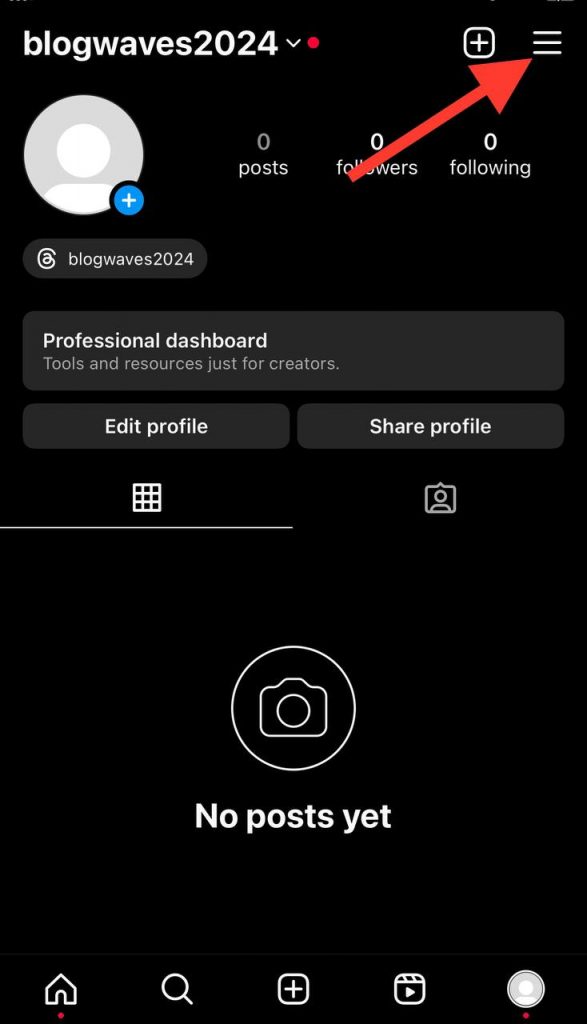
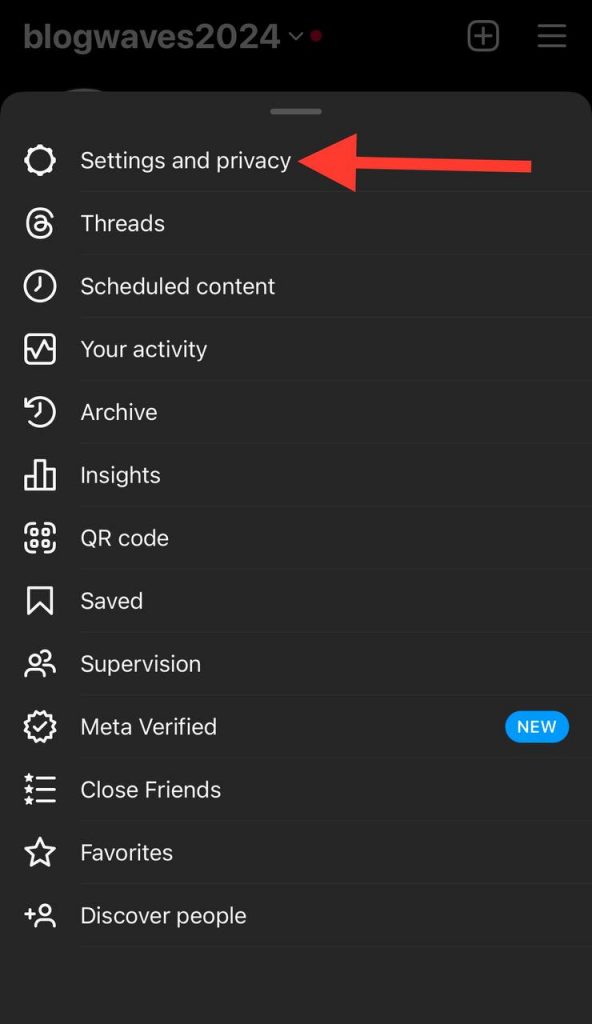
- Scroll down and tap “Settings.”
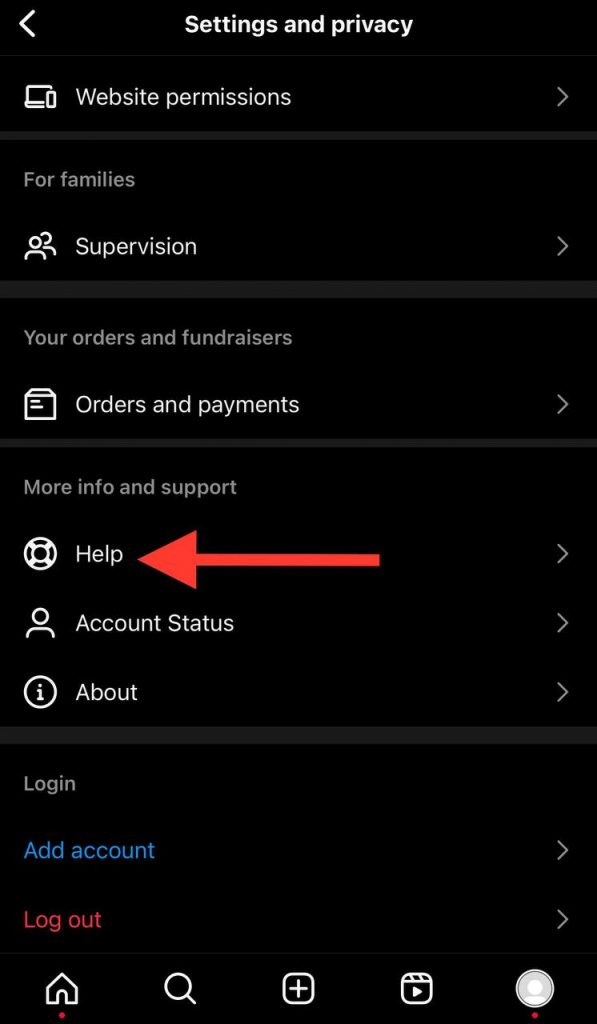
- In Settings, scroll down again and tap “Help.”
- Tap “Help Center.”
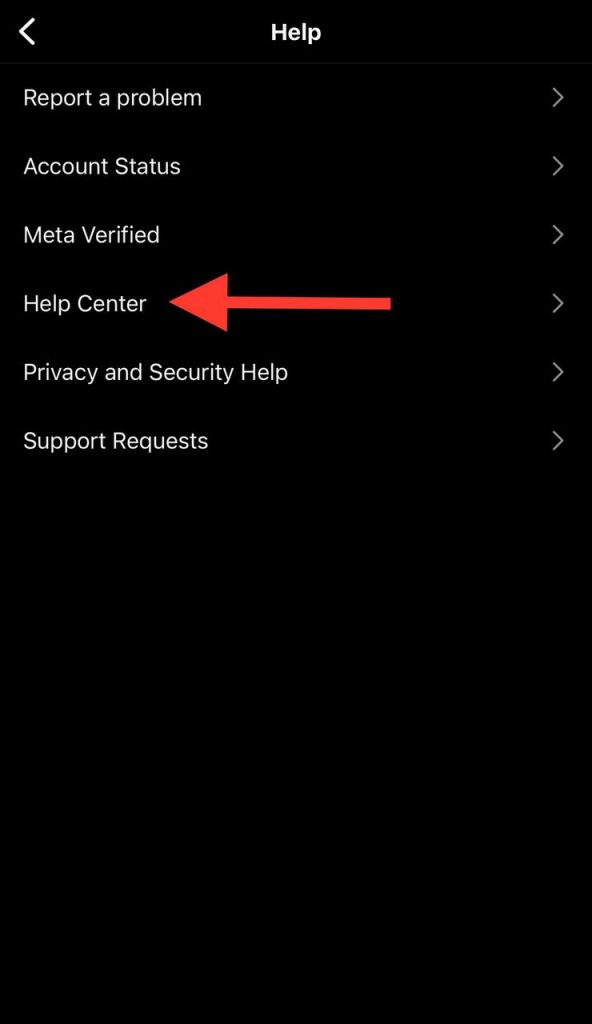
To submit a request or report an issue:
- In the Help Center, you can search for answers by typing keywords in the search bar.
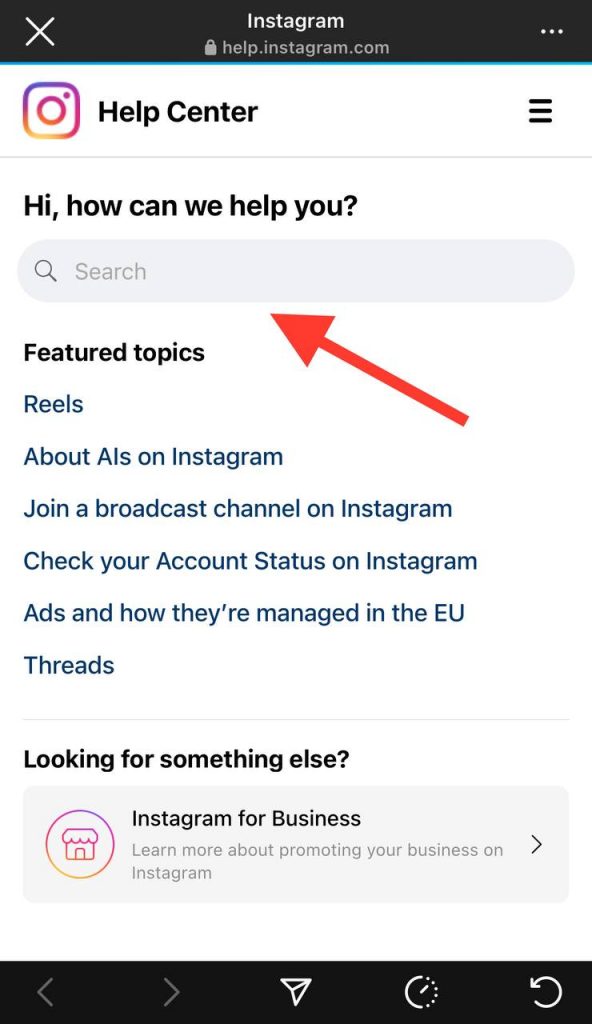
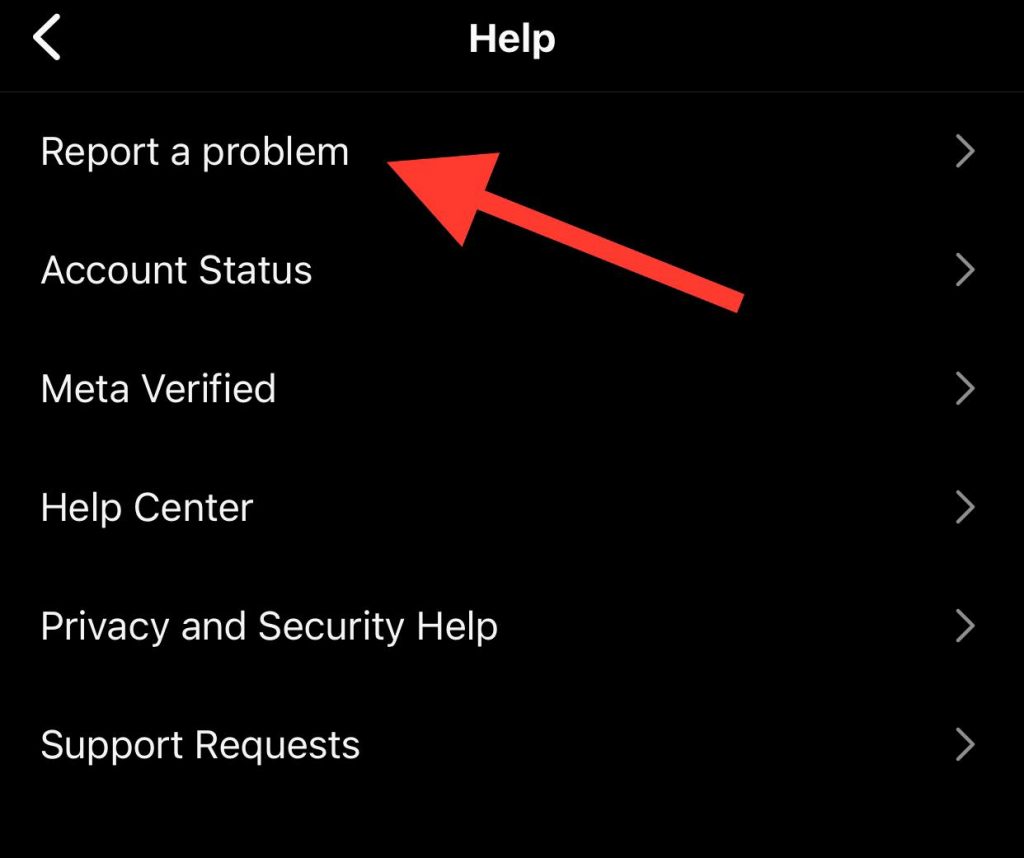
- If you can’t find a solution, tap “Report a Problem” to submit a request or report an issue directly to Support.
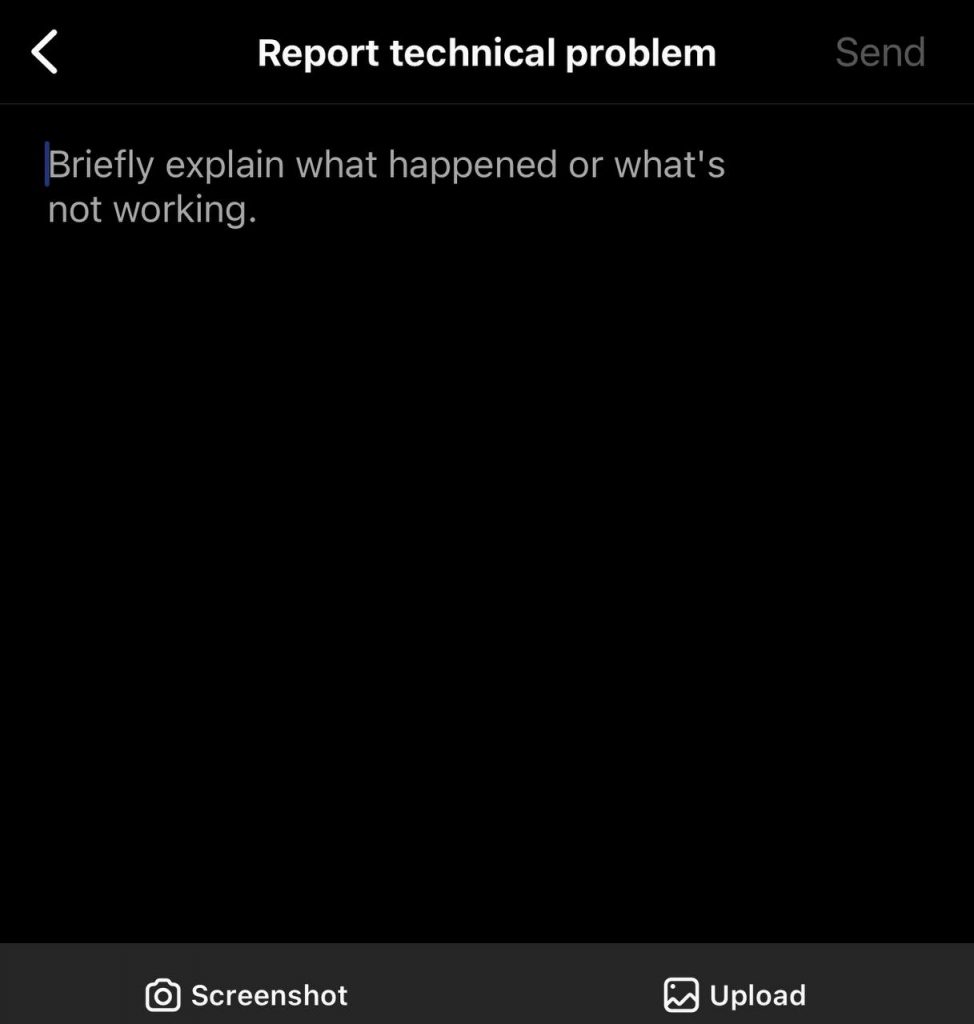
- Give plenty of details about the problem you’re having. Include any error messages, screenshots, or other useful information to help them understand the situation.
- After you submit your request or report, the Support team will review it and get back to you. Response times vary based on how many requests they’re getting.
Contacting Instagram through the Help Center
The Instagram Help Center is a great resource for users. It provides helpful information, guidelines, and solutions to common issues. It’s designed to help you understand how Instagram works, learn the features, and fix any problems that come up.
The Help Center covers a ton of topics — managing your account, privacy settings, content rules, reporting issues, and many more. The goal is to give you the knowledge and tools to have a positive and safe experience on Instagram.
To get to the Help Center
- Open the Instagram app or website.
- Tap your profile picture in the bottom right.
- Hit the three-dot menu button at the top right.
- Scroll down and tap “Help.”
- In the Help Center, browse categories or use the search bar to find topics related to your question.
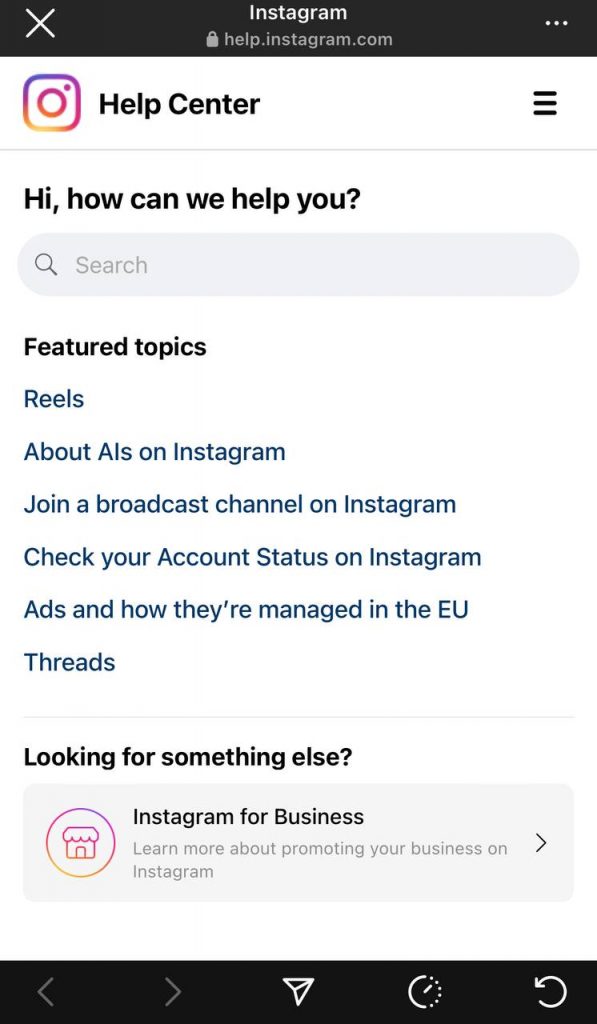
- When you see a relevant article, tap it to access detailed information and instructions.
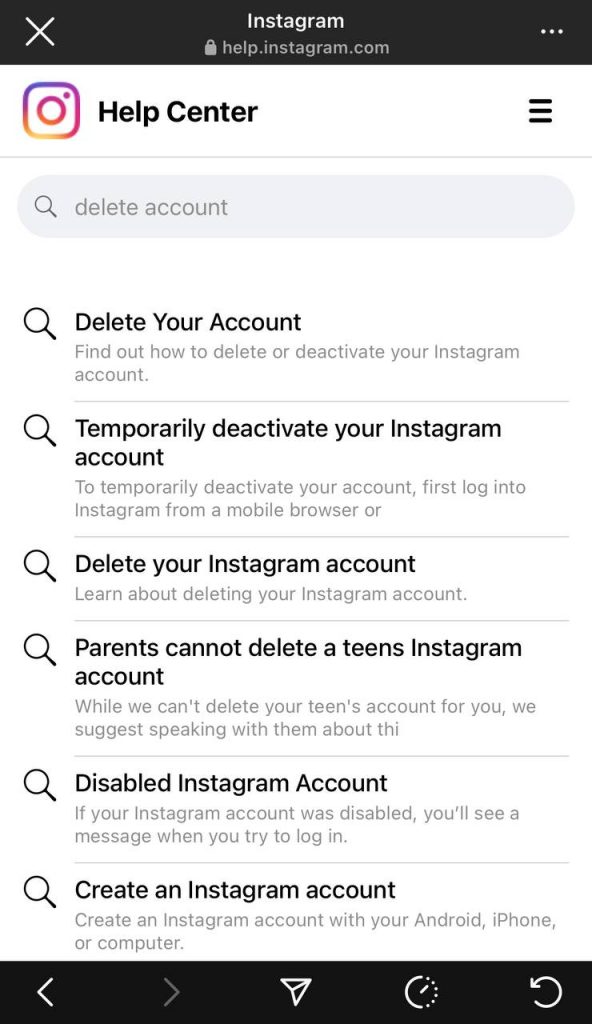
If you still need help, here’s how to submit a request to Support
- At the bottom of a Help Center page, tap “Need More Help?”
- Choose the category that best fits your issue.
- Browse the suggested articles to see if they help. If not, tap “Something Else.”
- You’ll see options to contact Support — submit a report, provide feedback, or get additional support.
- Pick what you need and follow the prompts to send your request or report.
Contacting Instagram Support by Email

Instagram doesn’t have a direct email for support. But you can still contact them by email by submitting a request through the Help Center. Follow the previously mentioned steps to get to the Help Center and send a request. Instagram will get back to you via email tied to your Instagram account.
When emailing Support, it’s really important to give clear and concise details about your issue. Include useful information like your username, a full description of the problem, any error messages, and steps you already tried to fix it. The clearer you can be, the better they will understand your issue and can give you an accurate, helpful response faster.
Some specifics to mention
- Account username
- Full problem description
- Error messages
- Steps already taken
Contacting Instagram Support on Social Media

Instagram has official accounts on Twitter, Facebook, etc. You may not be able to DM them directly, but you can still try to reach them by mentioning or tagging them in a public post or tweet.
This can help bring attention to an issue or get general assistance. But social media may not be the best for complex or private issues since it’s all public.
Tips for communicating on social media
- Be clear and concise in explaining your problem or question.
- Use relevant hashtags or keywords so your post is more visible.
- Avoid sharing personal information publicly. Wait for Support to respond privately if needed.
- Be patient since response times vary based on the volume of requests.
- Maintain a respectful, professional tone when interacting with Support.
Contacting Instagram Support Online

You can contact Support through the Help Center website at help.instagram.com. The site has a search bar to find articles about common issues by entering keywords.
If you can’t find an answer, click “Report a Problem” to submit a request or report an issue. Fill in the required information, give details about your problem, and submit the form.
Benefits of the website for certain issues
- The website allows for more detailed communication for complex or specific issues.
- You can submit in-depth reports, attach screenshots or files, and provide extra details needed to fix the problem.
- The Help Center online also has a wider range of articles and resources to address more topics and frequently asked questions.
What You Can Report on Instagram

You can report inappropriate posts, comments, or people that aren’t following Instagram Community Guidelines or Terms of Use when you see them. Here is an overview of reportable content:
- Abusive behavior – Report posts or profiles that harass, bully, or threaten others.
- Inappropriate content – Report posts with nudity, sexual content, or anything violating Instagram’s guidelines.
- Offensive content – Report posts or profiles with hate speech, discrimination, or content promoting harm.
- Spam – Report excessive spam or accounts spamming others.
Reporting inappropriate or harmful stuff is key to keeping the community safe and positive. Reporting helps enforce Instagram’s rules and protects you and others from abuse, offensive content, and spam.
How to Report Content on Instagram
The Instagram app gives users a greater degree of control over sensitive content. Here is how to report content on Instagram.
A step-by-step guide
- Open the Instagram app and go to the post or profile you want to report.
- Tap the three dots in the top right corner.

- Select “Report” from the menu.
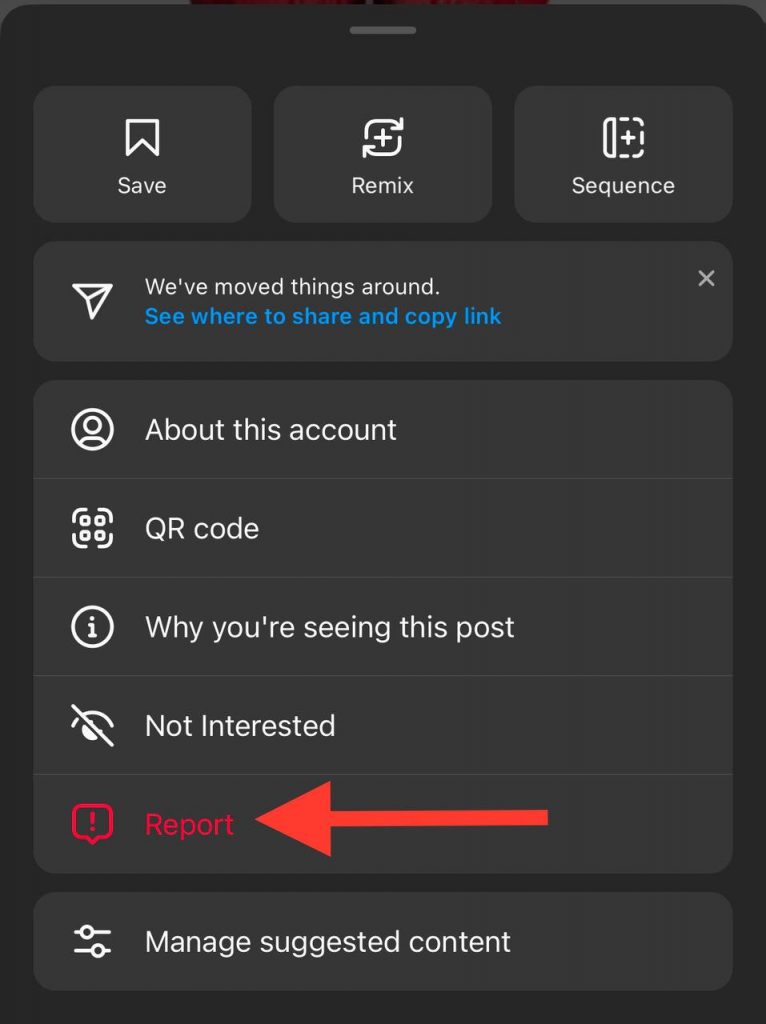
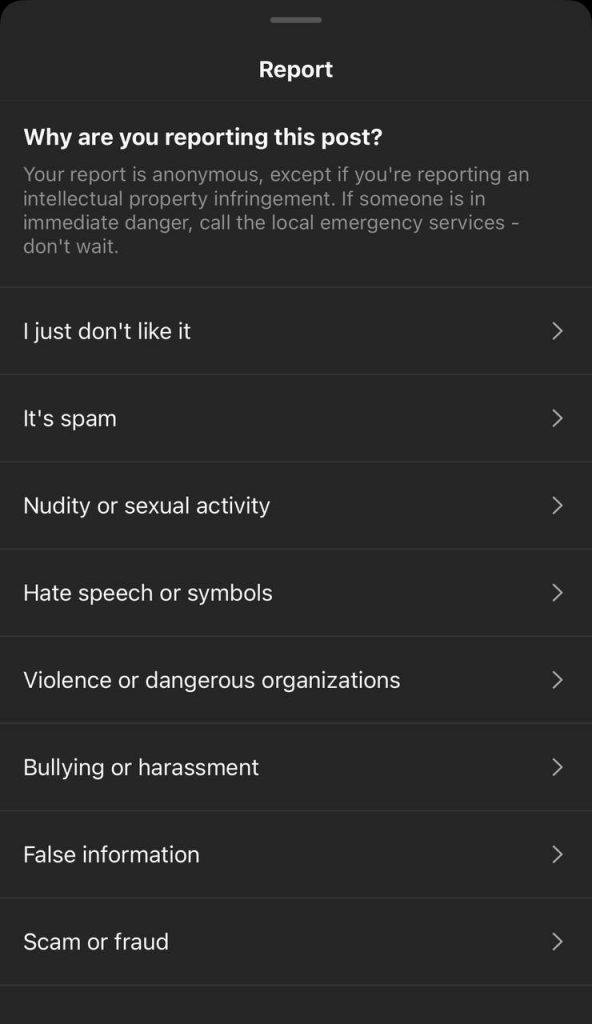
- Choose why you’re reporting – “Inappropriate,” “Spam,” etc.
- Add any extra details or context if needed.
- Tap “Submit” to send the report to Instagram.
The reporting process
- Instagram provides different reporting options based on the issue – abuse, inappropriate content, offensive content, spam.
- When reporting, pick the reason that best fits from the options given.
- You can provide extra context to help Instagram understand the problem.
- Reporting is anonymous, except for reporting intellectual property infringement.
Other Methods to Contact Instagram Support
When you want to contact someone at a big company like Instagram, there are several other methods:
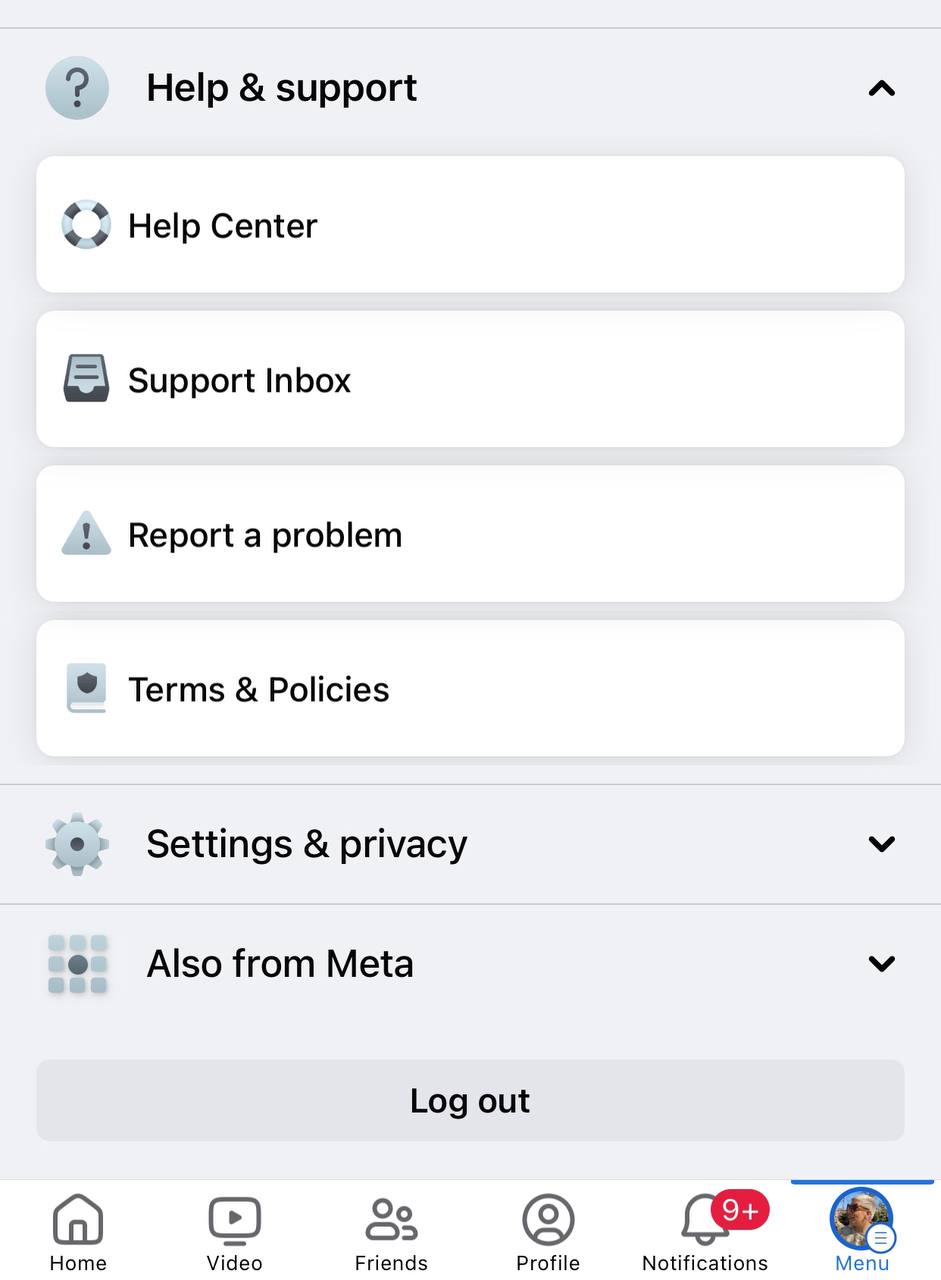
Through Facebook’s Help Center
Since Facebook owns Instagram, you can use their Help Center to get Instagram support. The Facebook Help Center is a one-stop shop for all Facebook-owned apps. There you can find information, troubleshoot problems, and submit questions or reports related to Instagram.
How to contact Instagram via Facebook’s Help Center
- Log into your Facebook account.
- Click the arrow in the top right corner.
- Select “Help & Support” from the menu.
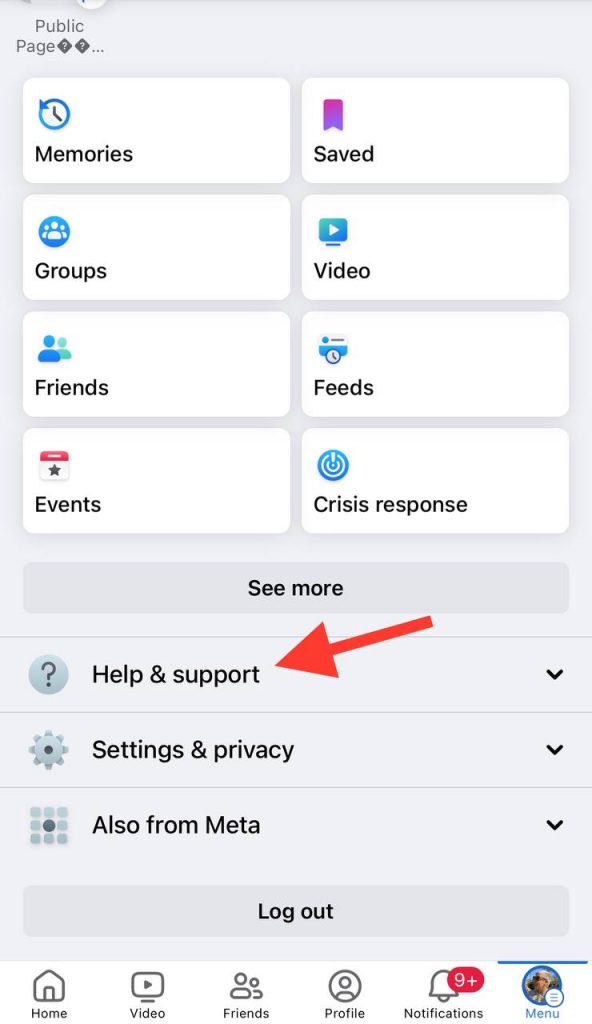
- Search for Instagram topics or browse categories to find relevant information.
- If you still need help, follow the prompts to submit a request or report.
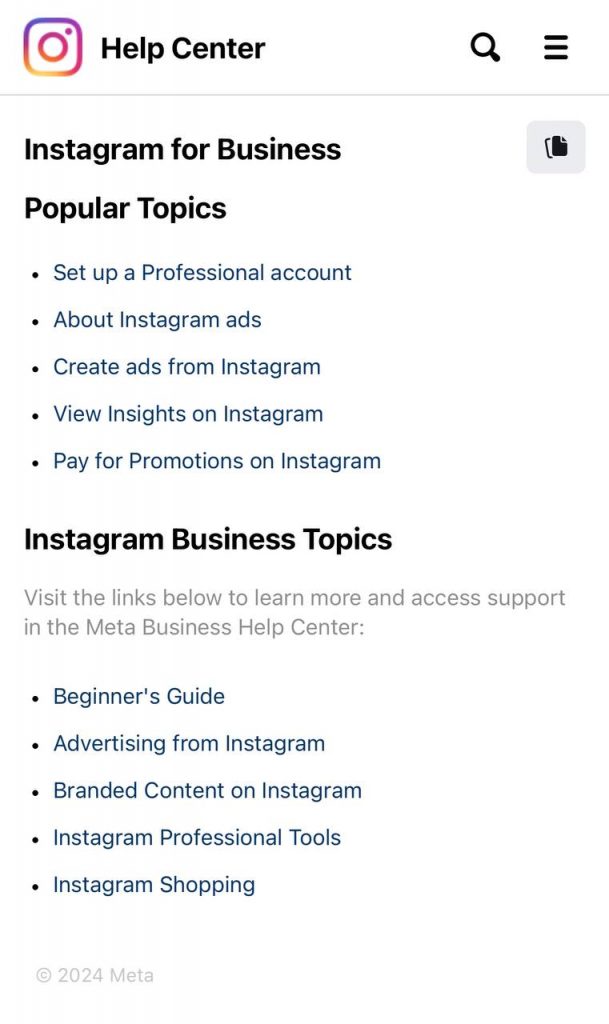
Through Instagram’s Business Help Center
Instagram’s Business Help Center is designed for businesses using Instagram. It provides resources, guides, and support for marketing, advertising, Instagram shopping, and more business-related topics.
Accessing the Business Help Center
- Open the Instagram app or website.
- Tap your profile pic.
- Hit the three-dot menu button.
- Scroll down and tap “Help.”
- Scroll to the bottom and tap “Business Help Center.”

- Search topics or browse categories related to your business question.
Through Instagram’s Community Forums

Instagram’s forums let users ask questions, get help, and connect with the community. It’s a place to troubleshoot issues, learn about features, and engage with other Instagram users.
Posting on the forums
- Visit Instagram’s Community Forums website.
- Check existing topics to see if your question was already answered.
- If not, click the relevant category or create a new post.
- Give your post a clear, concise title summarizing your question/issue.
- In the post, explain your issue in detail and provide relevant information/screenshots.
- Submit it and wait for community members to help out.
How to communicate effectively when contacting Instagram Support
Here are some tips for communicating effectively when contacting the Instagram Support Center:
Be Clear and Concise
Clearly explain your issue or request right away, using simple language. Avoid technical jargon so it’s easy for Support to understand. Stick to the main points. Focus on being straightforward. Use plain language to describe the problem or ask your question directly. The more precise you can be, the better they can understand and assist you.
Provide Relevant Details

Give useful details like your username, device, Instagram app version, etc. This context helps Support grasp your situation and troubleshoot appropriately. If applicable, include screenshots or evidence demonstrating the problem visually. Support can better understand the issue and assist if they can see it.
Be Patient and Persistent
Understand that high request volumes mean varied response times from Support. Be patient for their reply. Allow reasonable time before following up. If your issue remains unresolved after initial contact, politely follow up by referencing previous exchanges. Providing details again helps move things along.
The clearer and more focused you can be, while also giving Support relevant context, the faster they can help resolve your questions, issues, or requests.
FAQs
Here are some frequently asked questions about contacting Instagram:
Q: How long does it take for Instagram Support to respond?
A: Instagram Support typically responds within a few business days. However, response times may vary depending on the volume of requests they receive.
Q: Can I contact Instagram Support for a hacked account?
A: Yes, you can contact Instagram Support if your account has been hacked. They have specific procedures to help users regain access to their accounts and secure them.
Q: What information should I provide when contacting Instagram Support?
A: When contacting Instagram Support, it is essential to provide relevant details such as your username, email associated with the account, a clear description of the issue, and any supporting evidence like screenshots.
Q: Can I contact Instagram Support for issues related to a business account?
A: Yes, Instagram has a dedicated Business Help Center where you can find resources and contact support for issues specific to business accounts, such as advertising, insights, and promotions.
Q: Is it possible to contact Instagram Support if I am not an Instagram user?
A: Yes, even if you don’t have an Instagram account, you can still reach out to Instagram Support for general inquiries or to report content that violates their guidelines.
Q: Can I report multiple pieces of content in a single report?
A: Yes, Instagram allows you to report multiple pieces of content within a single report. This helps streamline the reporting process for situations where you come across multiple violations.
Q: What should I do if I’m not satisfied with Instagram Support’s response?
A: If you’re not satisfied with Instagram Support’s response or the resolution provided, you can follow up on your initial request or report. Be persistent and provide additional information or evidence if necessary.
Q: Are there alternative methods to contact Instagram Support besides the ones mentioned?
A: The methods mentioned in the blog post are the primary channels for contacting Instagram Support. However, you may also find helpful information and resources from the Instagram Help Center and community forums.
Q: Can I contact Instagram Support in a language other than English?
A: Yes, Instagram Support provides assistance in multiple languages. You can choose your preferred language when contacting them through the app, email, or web interface.
Q: Is there a phone number to contact Instagram Support?
A: Currently, Instagram does not provide a direct phone number for customer support. The recommended channels for contacting them are through the app, email, web interface, or social media.
Final Thoughts
Let’s do a quick rundown of how you can get in touch with Instagram if you need help or have questions. You can use Facebook’s Help Center since they own Instagram. Just log into your Facebook account and you can find info, submit reports, and ask questions related to Instagram.
If it’s related to an Instagram business account, the Business Help Center has guides on setting up a business profile, advertising, Instagram shopping, etc. Moreover, the forums let you post questions, get input from other users, and discuss different Instagram topics. It’s great for troubleshooting or learning about features.
When you do reach out, make sure to clearly explain your issue or question using simple language. Provide useful details like your username and screenshots showing the problem. This gives Support what they need to understand the situation and help out.
Be patient since response times vary based on how many requests are coming in. But follow up if you still need assistance — refer back to previous contacts and re-share details.

Emi Daniel
Buy an Established Instagram Account
Skip starting from zero. Browse Instagram/TikTok accounts with audiences across many niches.
See Available AccountsRelated articles
-

How to Go Live on Instagram: A Step-by-Step Guide
Going live can feel more stressful than posting a Reel. You cannot remove a pause, rewrite a sentence, or start over after an awkward moment. But that…
17 min readEmi Daniel
-

Instagram Instants Feature: What It Is, How It Works, and How to Turn It Off
The first time I opened Instagram Instants, I almost backed out. I had taken a normal photo. Nothing worth editing. Nothing worth posting. Nothing that needed an…
11 min read -

How to Clear Instagram Cache on iPhone, Android & Desktop
Instagram can quietly build up a lot of temporary files while you scroll through Reels, watch Stories, save posts, and upload your own content. You may not…
12 min read