


You may notice that an account you used to follow on TikTok has vanished. The first thing that comes to mind is, did they block me, or they’ve just deleted their account?
Well, today we’re going to talk about how to know which is the case for you.
Whether you’re a casual viewer, an active participant, or somewhere in between, you have special accounts in mind to check every time you log in to your TikTok account.
Buy an Established Instagram Account
Skip starting from zero. Browse Instagram/TikTok accounts with audiences across many niches.
See Available AccountsBut if one day they’re gone?
Let’s dive in and see the truth behind disappearing that TikTok account!
Deletion or Deactivation?
Saying which is the case for each TikTok account is different because both actions appear similar at a glance.
Deletion and Deactivation Look Similar
Whether a user has deleted or temporarily deactivated their account, their profile might appear absent from your follower list, and their content could be unavailable for viewing.
But they’re not truly similar!
Deactivating an account means temporarily taking a break from TikTok and saving the chance to return later.
But deleting an account is a permanent step that removes all content, engagement, and the account itself from the platform. FOREVER!
Methods to Determine Deletion
Here are some methods to use and find out which is the case for your favorite account that has disappeared:
Method 1: Search them by Username
The first step is to search for the user’s username within the TikTok app.
If their account doesn’t appear in search results, this could mean that the account has been deleted.
Sometimes, it happens to inactive accounts, too. So, try other methods to confirm it.
Method 2: Search via Search Engines

Look up the TikTok account you’re looking for using search engines like Google.
If their TikTok account doesn’t appear in the search results, it could be a sign showing thatit has been deleted.
Inactive accounts usually appear on the search engine results when you look them up, but you don’t see anything when you click on results.
Method 3: Get Help From Direct Messages
Those DMs in your inbox are great evidence!
If you have any previous conversations with the user, you can take a look at your DMs.
If the user has deleted their account, their name and profile picture may be replaced with a generic TikTok icon.
This means that they haven’t blocked you; they’re just on a break!
Method 4: Review Comments
Go to the user’s comments if they have left you any. If their content is no longer visible, it means that their account has been probably deleted.
Method 5: Seek Verification from a Friend
Ask your friends if they can see that TikTok account. If they can’t see it, too, the account has been deleted.
But if they can see it, maybe you’ve been blocked.
Method 6: Directly Reach Out
Reach out to the user directly and ask them about the status of their TikTok account if you know them outside of the TikTok world. They can all the guessing games!
Navigating Account Deletion
Are you considering to delete your TikTok account?
You can always delete or inactive your account, too! TikTok has enabled its users to navigate account deletion whenever they want to autonomously!
So, if you still want to delete that account, keep scrolling!
How to Delete Your TikTok Account
Let us walk you through the process if your decision has been made before.
Step 1: Open TikTok
Open the TikTok app on your device. Whether you’re using a smartphone, tablet, or laptop,\ you should first find the TikTok app icon and tap to open it. Easy!
Step 2: Go to Settings and Privacy

TikTok app opened? Good!
Now, look at the three dots at the right corner! This is TikTok’s sign for options.
Tap on it!
Now, you must be in the “Settings and Privacy” section, where you can manage your TikTok account.
Step 3: Choose Deactivation or Deletion
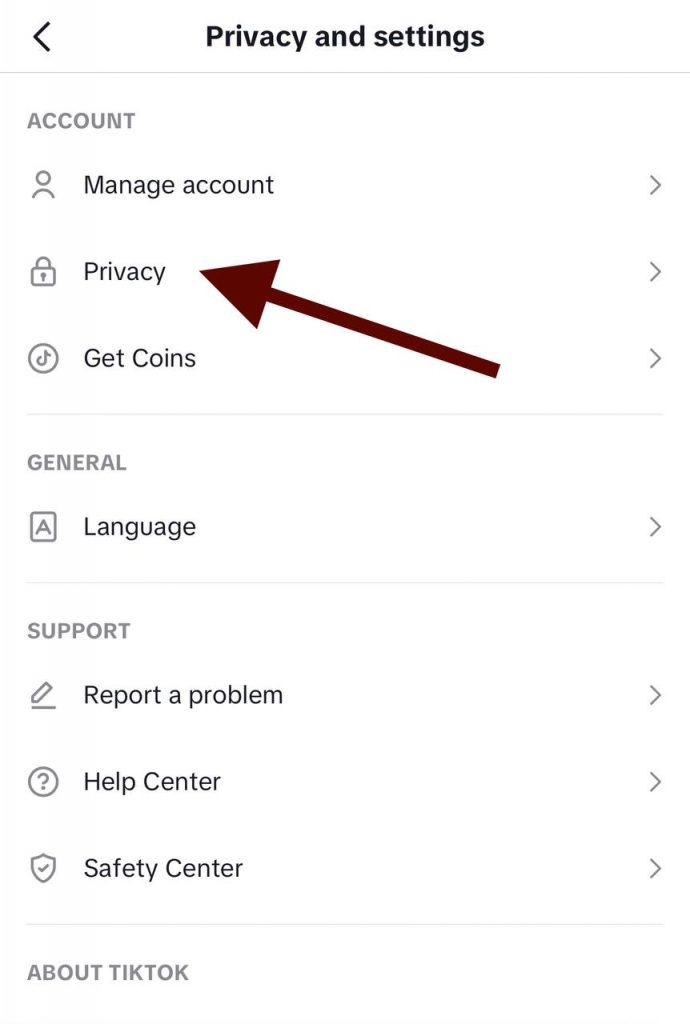
Now, scroll down!
You will find the “Privacy and Safety” category in this stage. This is where you should be!
You can choose between the “Deactivate Account” or “Delete Account” options. Choose the action you want.
Which one is it going to be?
If you’re temporarily taking a break, you should choose deactivation, but if you want to say goodbye to TikTok, you should go with deletion.
Step 4: Confirm the Deletion
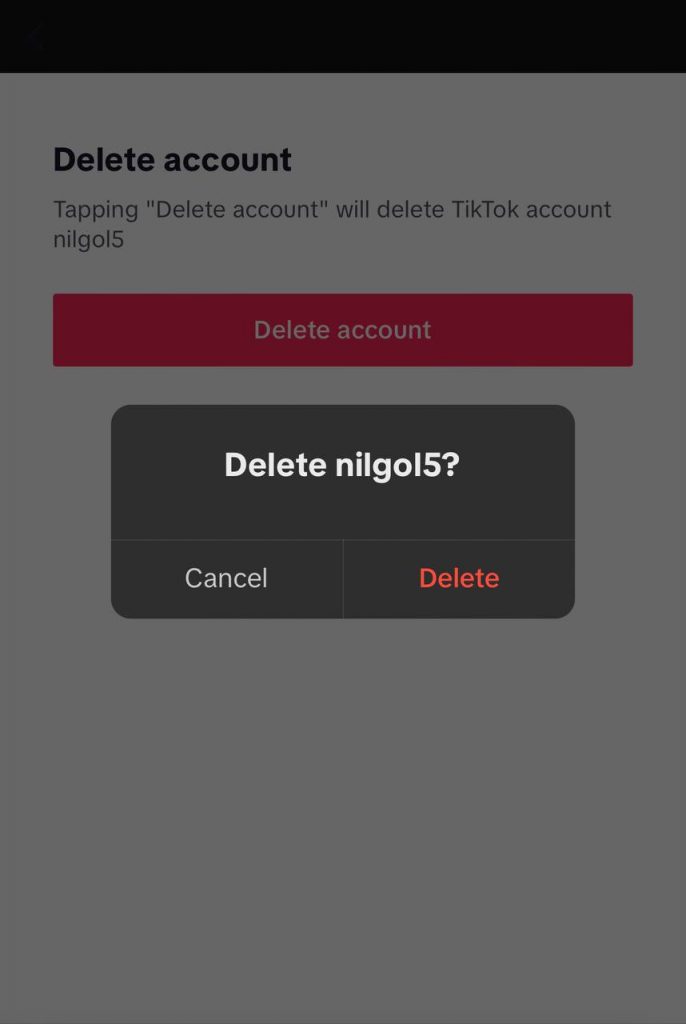
In the last step, TikTok will ask you to confirm your decision and then enter your TikTok password. Make sure you remember it.
The password is required so that the app can make sure that it’s not someone else doing that to your account!
Enter the password and tap “Confirm”.
All done!
Did Someone block you on TikTok?
Here are some methods to find out:
Method 1: Username Search
Search for the username. If their account doesn’t appear in your search results as it did before, it means that you’ve unfortunately been blocked.
However, you should consider other situations, like changes they could have made to their privacy settings or account status.
Method 2: Review DMs and Comments
Review your direct messages and comments with the user.
Do you see them?
If their messages or comments are no longer visible, it could suggest that they’ve blocked you.
Method 3: Ask your friends
Asking friends method is the most solid way, and it also works in this case.
Frequently Asked Questions
Can I find out if someone deleted their account?
You won’t get notified in that case, but there are some strategies like searching their username, checking DMs, and asking friends.
How is deactivating different from deleting a TikTok account?
If you deactivate your TikTok account your profile and content are hidden but can be reactivated later. However, deleting a TikTok removes the account, its content, and all your interactions permanently.
Can I see the content of a TikTok account if it’s deleted?
No. you can’t view a deleted account’s videos, profile, and interactions anymore after they go through deletion.
Can others use a deleted TikTok account’s username?
Yes, others can use a free username. So, if you like your username and you’re not still sure about giving it up, maybe you’d better go with deactivation for a while.
Can I ever recover a deleted TikTok account?
No, deletion is permanent, and once you tap the last confirmation, there’s no going back. This is why we recommend you to think carefully before going through the process.
How long does it take for a TikTok account to get permanently deleted?
It doesn’t have a fixed time, but all your content will be deleted from TikTok servers in a very short time. It shouldn’t take longer than 15 minutes.
Can I mention a deleted TikTok account in my videos or comments?
No, if an account has been deleted, you won’t be able to mention or tag it in your videos or comments.
Conclusion
So, which one’s your case? Did someone block you or they just took off from TikTok?
TikTok is a dynamic platform where connections can evolve, and account statuses might change. One day, you follow someone, and the next day, you find ways to know if they’re blocking you or just inactivating their account!
As we covered, there are clues to find out if someone has deleted their TikTok or just blocked you. The first one is to look them up and ask for confirmation from your friend.
If you can’t find them, but they appear on the search engine, or if another friend of yours could also view their content, well, sorry! You seem to be blocked!
But if you couldn’t find their names on the search engine, or if no one can find them by searching, or if you see their photo as a random TikTok logo instead of their pics, then the case may’ve been a deletion or inactivation.
As you can see, TikTok thinks highly of your privacy, so you can inactivate or delete your account and erase any trace you’ve left in TikTok!
If you found this guide helpful, feel free to share it with your friends and fellow TikTok enthusiasts.
Remember, while the TikTok landscape might evolve, your ability to understand it will stay evergreen with the insights you’ve gained here. Keep your friends close, though, since they can always try and see if you’ve been blocked and assure you!

Emi Daniel
Buy an Established Instagram Account
Skip starting from zero. Browse Instagram/TikTok accounts with audiences across many niches.
See Available AccountsRelated articles
-

Best Influencer Marketing Software in 2026: Top Platforms to Grow Your Brand
Influencer marketing used to feel optional, something you tried after you’d “done” everything else. Now it’s often the first place customers hear about a brand. The problem…
18 min readEmi Daniel
-

The Ultimate Digital and Social Media Marketing Playbook: From Basic to Advanced Tactics
Are you tired of trying different methods and realizing your brand doesn’t get the attention it deserves? If so, you need to come up with the right…
23 min read -

Social Media Competitor Analysis: Tools, Benchmarks, and Strategy Guide
Are you getting fewer likes lately? You’re not alone. On Instagram, the average engagement dropped to about 0.45% in 2025, down 24% from last year. Still, the…
26 min read