
Instagram is one of the best social media platforms that we use to connect with others through messages, sending reels, and reacting to each other’s posts.
However, sometimes, these connections and relationships won’t go as we imagine, and we can’t keep in touch with those people; that’s when we decide to block them on Instagram to avoid further interactions.
Still, a common question is, ” What happens to our messages when we block someone on Instagram?”
As you may know, blocking someone on Instagram is an action you take when you are bothered or want to prevent receiving or seeing their content, so you should know what happens to your messages when you block an account.
In this article, we will explain the basics of blocking and unblocking Instagram users, discuss what happens when you block someone on Instagram, and provide helpful alternatives to blocking Instagram accounts.
Does Blocking Someone on Instagram Delete Direct Messages
The main question we want to answer in this article is whether blocking someone on Instagram deletes messages or not.
Long story short, the answer is no. Most Instagram users think that when you block someone on Instagram, all the messages will be removed from your DM, but that is not true.
When you block an Instagram account with which you have a chat history, all the messages remain in your direct messages, and you can still read the existing messages.
The main change is that you are no longer allowed to send or receive messages from the blocked account until you decide to unblock them, at which point you can start texting each other again.
The interesting point here is that when you block an Instagram user, they might just be able to send messages on the chat screen, but you won’t receive any messages or notifications; even if you unlock them, you will not receive the messages they sent you.
Now that you know that Instagram won’t delete or remove messages when you block someone, it is good to know that you can delete the chat after blocking a person.
How to Block and Unblock Someone on Instagram
Let’s learn how to block and unblock someone on Instagram.
Method one to block an Instagram user:
Step 1- Search for the username of the account you want to block.
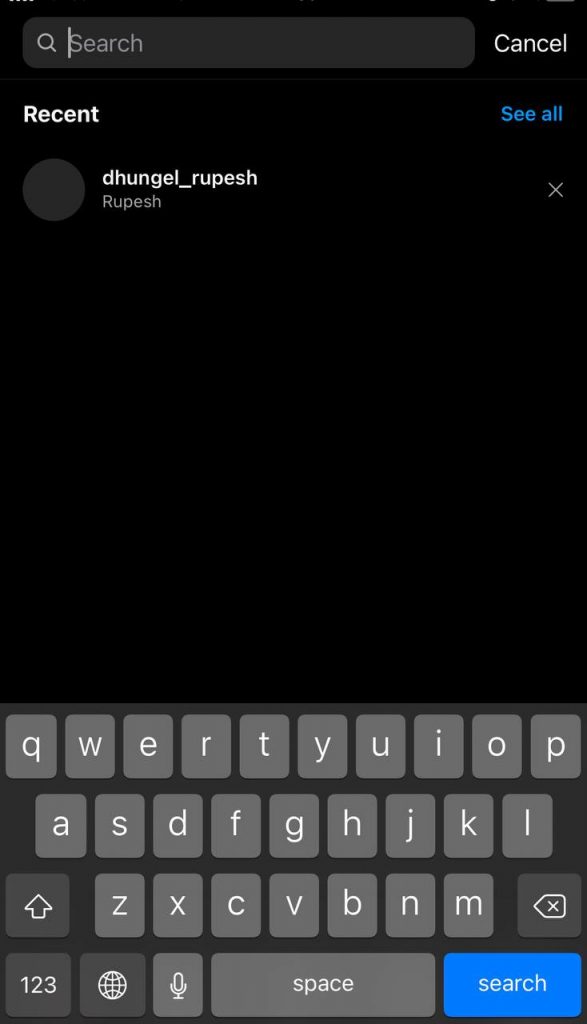
Step 2- Tap on the username to see its profile.
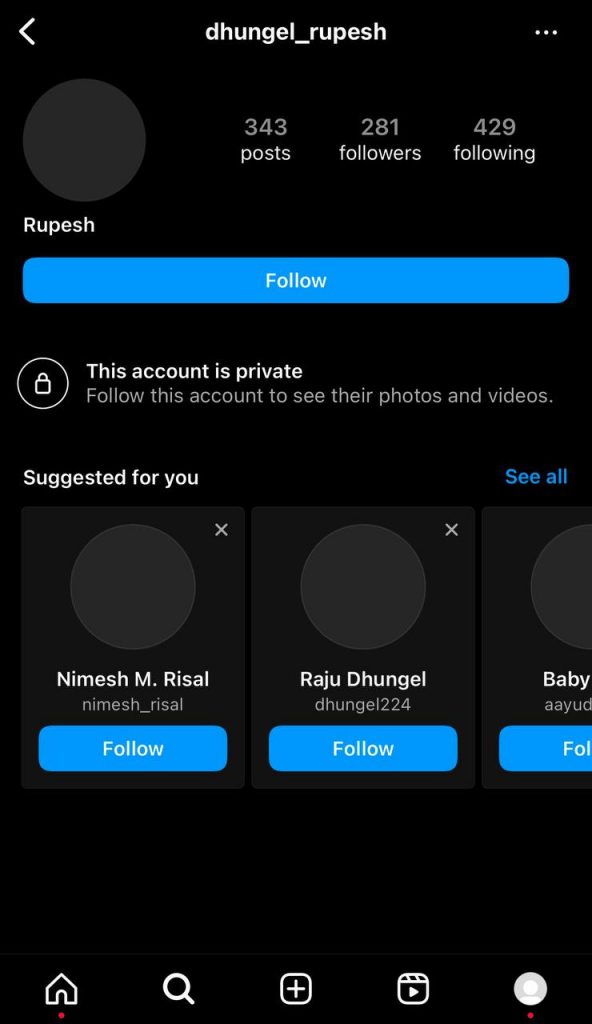
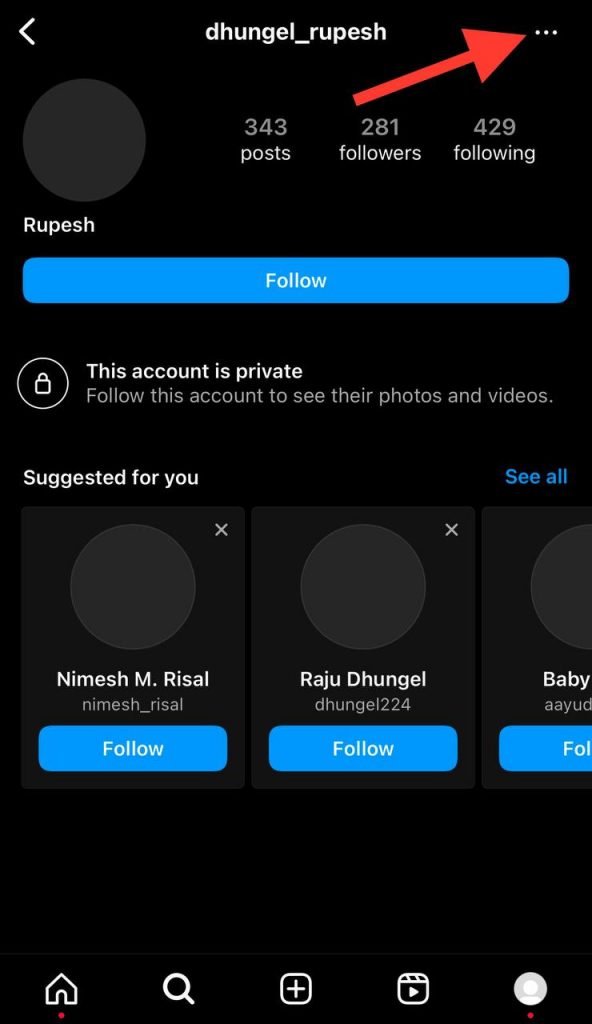
Step 3- Tap on the three dots icon in the top right corner of the screen.
Step 4- Select the “Block” option from the menu to finish the process.
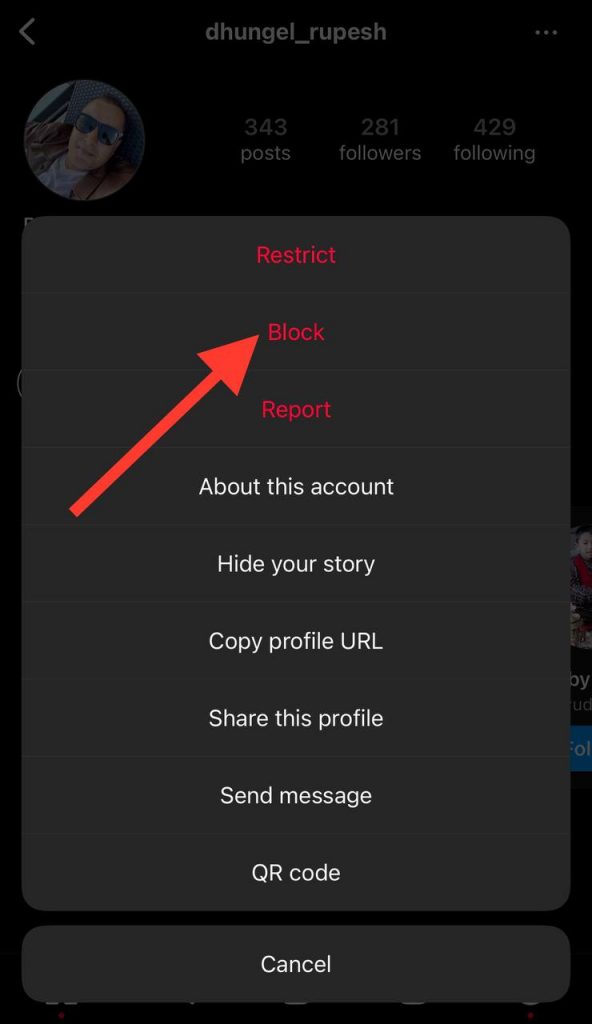
Note that when you want to block a private account, Instagram asks you to confirm it because you can no longer access its content once you block it.
Method two to block an Instagram user:
Step 1- Open Instagram on your device and go to the direct message section.
Step 2- Select the chat with the account you want to block.
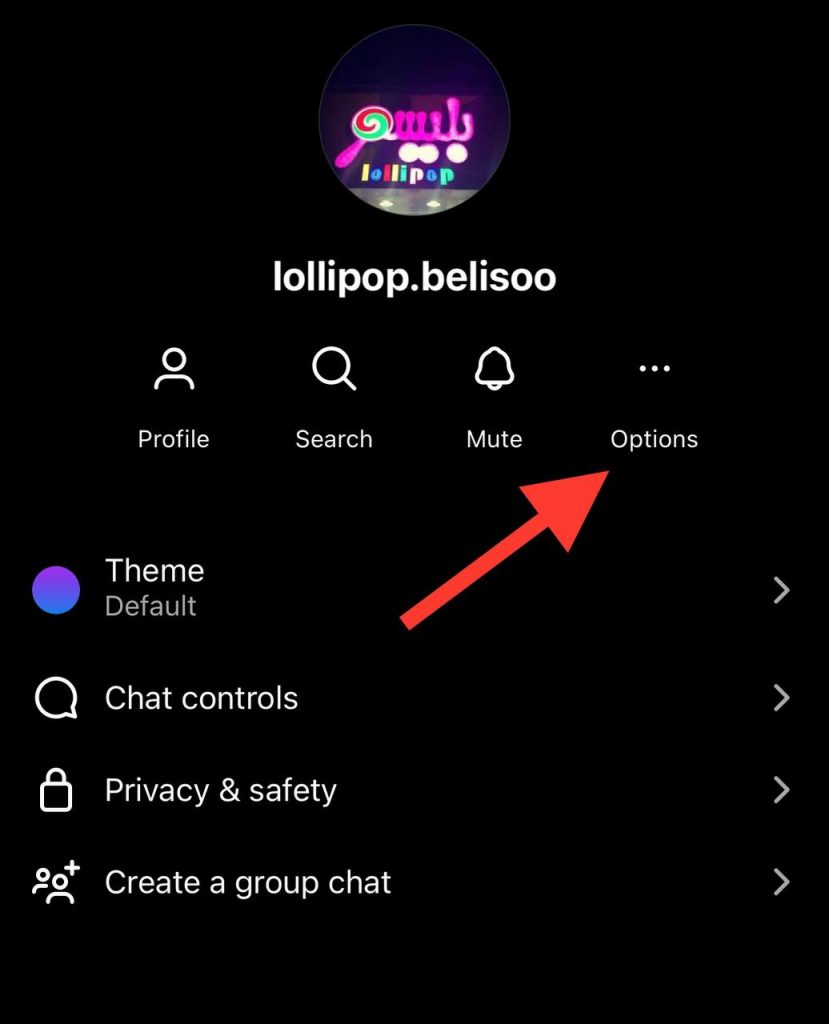
Step 3- Tap on their username and select the “Options” icon.
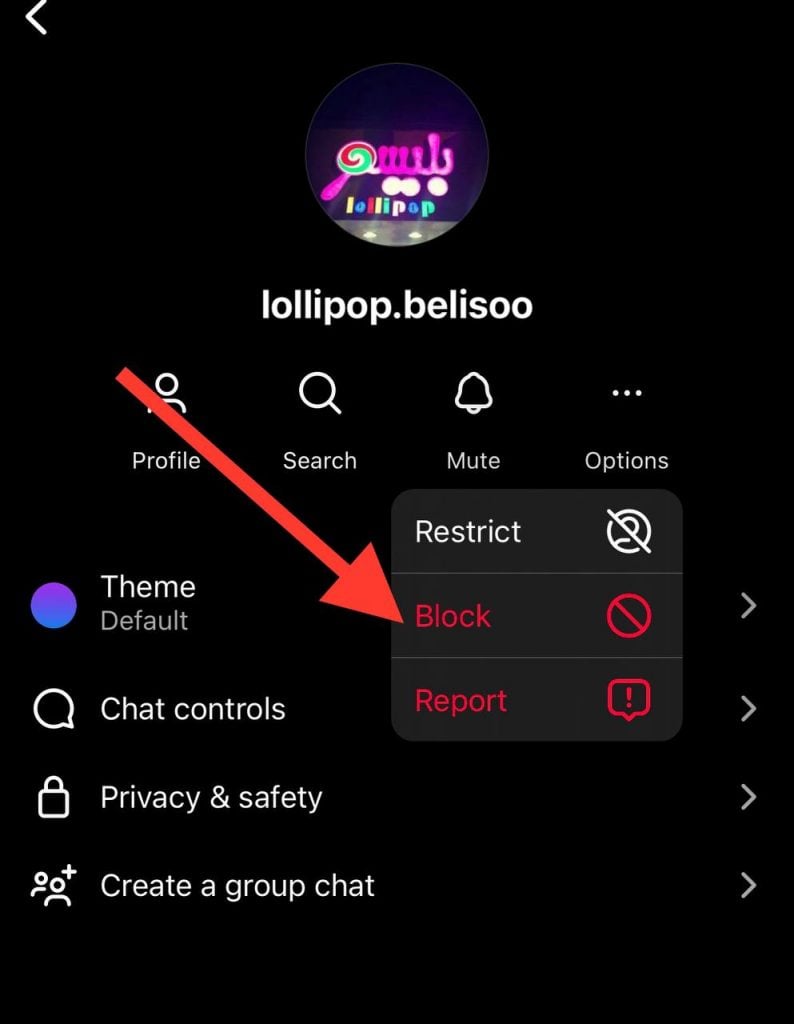
Step 4- Now, choose “Block” to block the account.
Method one to unblock an Instagram user:
Step 1- Open Instagram on your device and go to your profile.
Step 2- Tap on the three-line icon in the top right corner of your profile.
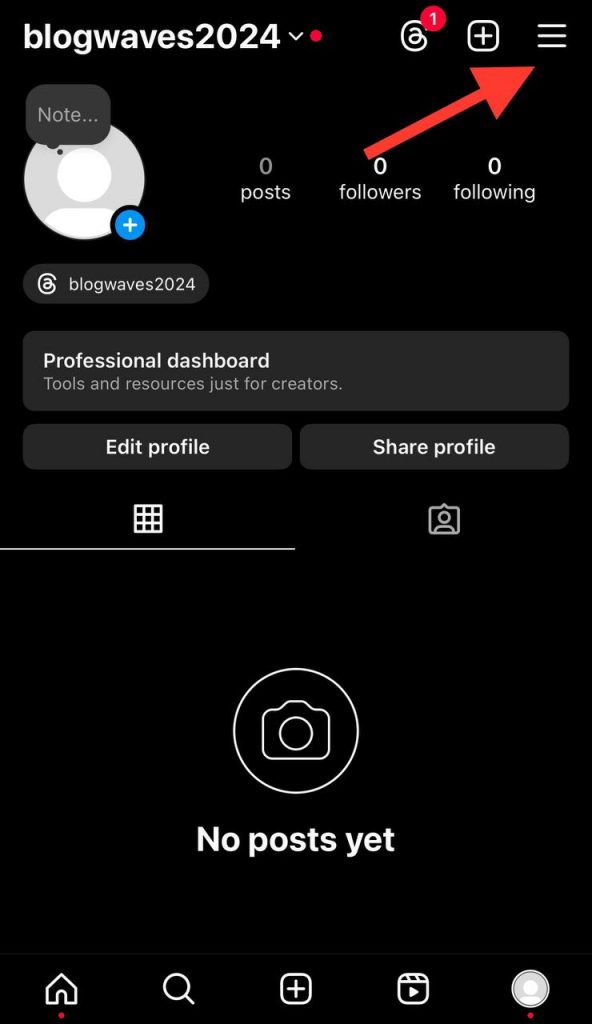
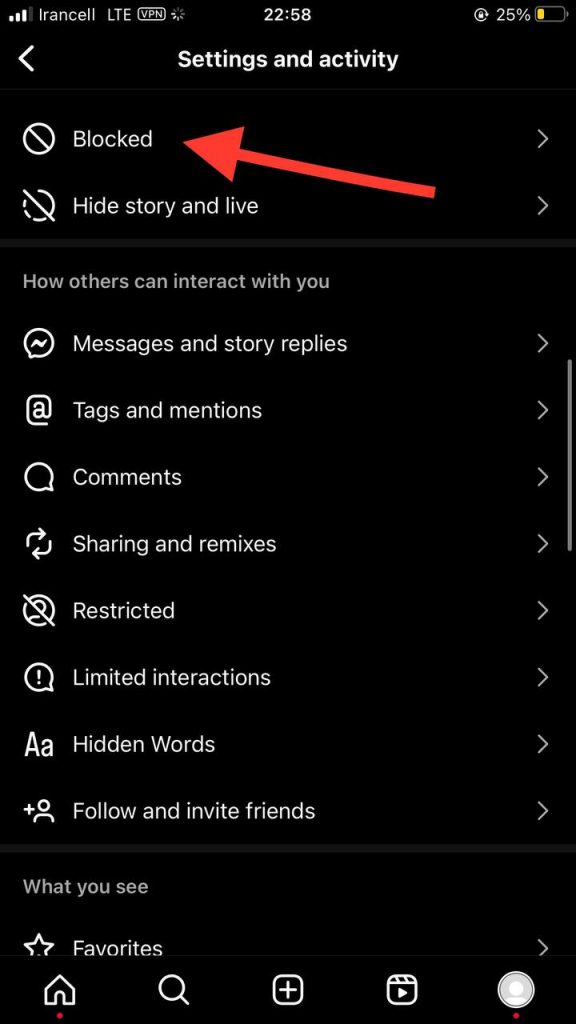
Step 3- Select the “Blocked” option from the menu. Here, you can access all the accounts you have blocked on Instagram.
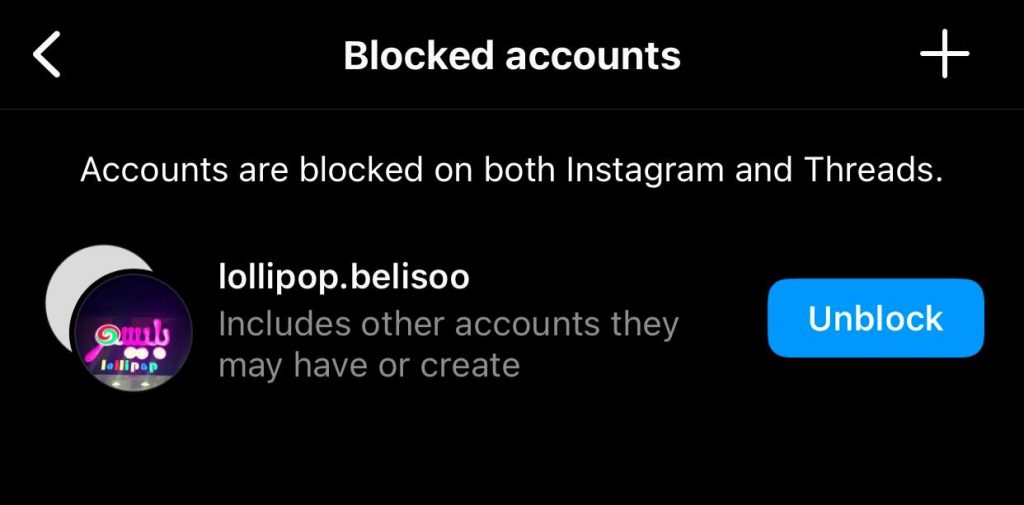
Step 4- Tap “Unblock” in front of the name of each account you want to unblock.
Method two to unblock an Instagram user:
Step 1- Open Instagram and open the direct message section.
Step 2- Tap on the chat you want to unblock the account.
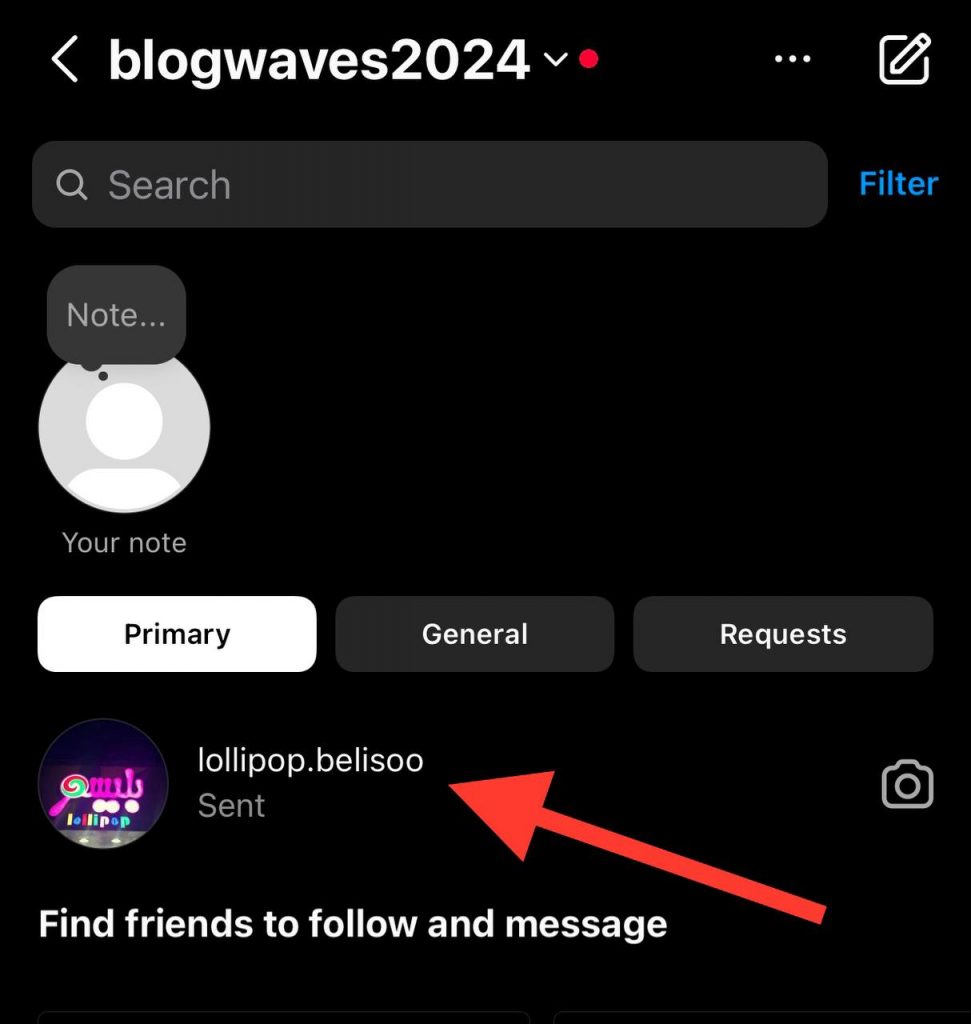
Step 3- Tap on the “Unblock” button to unblock the user and start interacting with the account again.
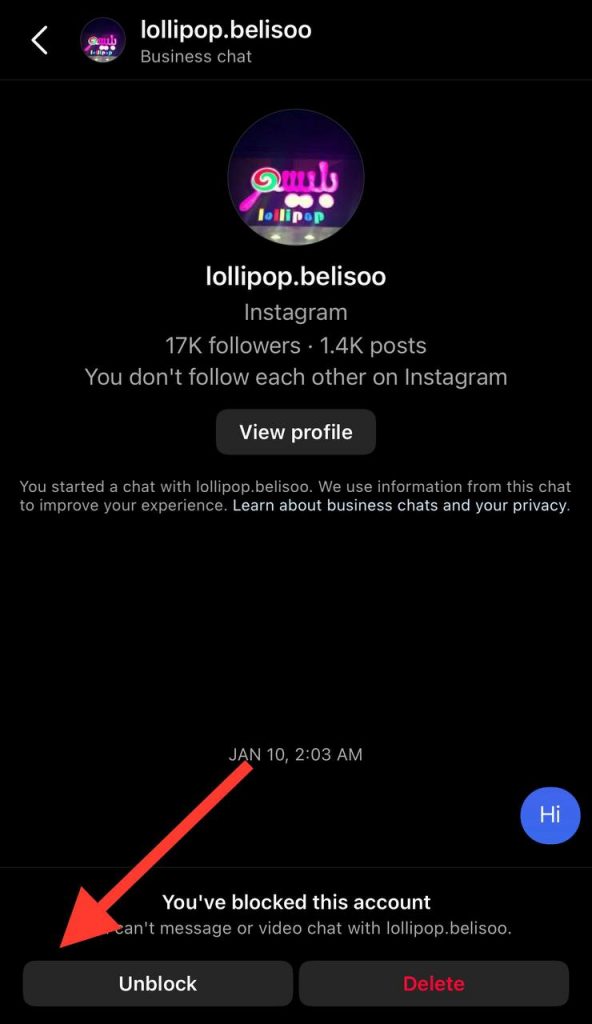
Method three to unblock an Instagram user:
Step 1- Open the Instagram application and tap on the magnifier icon to search for the account you want to unblock.
Step 2- Now that you can see their profile, tap on the blue “Unblock” button to finish the process.
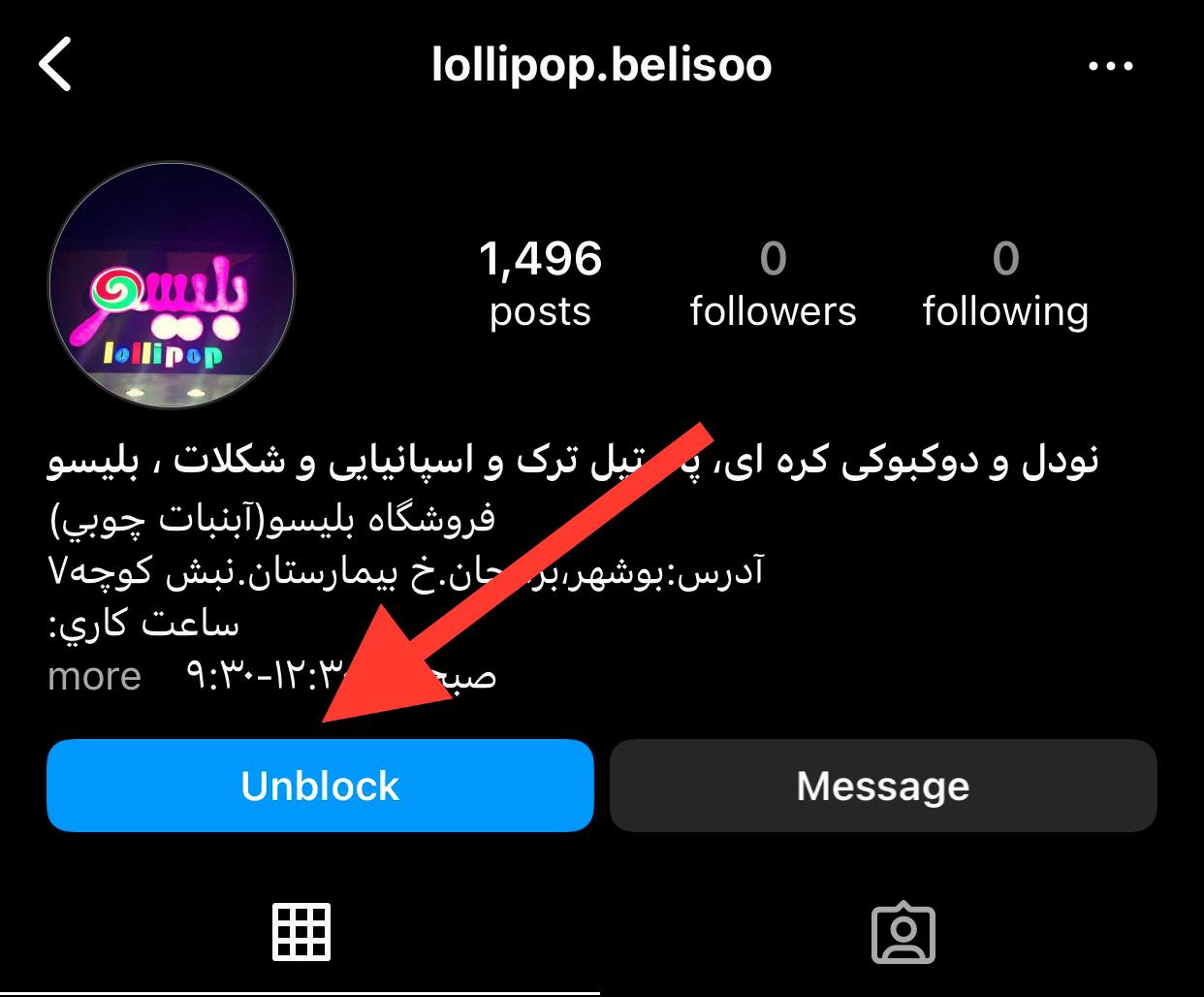
That’s it! As you can see, that is how easily you can block and unblock someone on Instagram in just a few seconds.
What Happens When You Block Someone on Instagram

In previous sections, we explained what happens to your text messages when you block someone on Instagram.
But blocking an Instagram user doesn’t end here; once you block a person, other limits apply; let’s learn them.
Mutual group chats
Sometimes, you want to block a person with whom you share a mutual group chat. In this case, Instagram gives you two options and asks you whether you want to stay in the group chat or leave it.
If you decide to stay in the mutual group chat, you will be able to see messages that the blocked user sends to the group, but you can’t interact with each other.
Likes and comments

Have you ever wondered what happens to the likes and comments on someone’s (or your) post you blocked recently?
You should know that when you block someone on Instagram, the likes and comments will remain on your or their posts, and you can still see them on your content.
However, note that once you block a person on Instagram, the previous interactions will remain, but they can not like or comment on your posts.
Tags and mentions

If you want to block someone you have tagged or mentioned in a post, it is better to note that once you block them, Instagram will remove the tag from your post.
Moreover, you won’t be able to mention each other in a post or share content with each other; even if you try to do this, they won’t get notified because blocking cuts off all the possible ways to interact with someone.
Search and visibility
As you may know, blocking someone on Instagram is an action you take when you don’t want to have any interaction with them, which means you don’t even want them to access your profile.
Therefore, when you block an Instagram account, they can not find it, no matter how hard they try to search for your username. Note that even if they find your account, they will see a profile that says no posts yet.
Post and stories

If you block an account on Instagram, you are no longer able to see and interact with their posts, reels, and stories.
Therefore, you won’t get notified if they share a post or upload a story.
Followers and following list
As mentioned earlier, when you block a user on Instagram, you are no longer following each other, which means your usernames will be removed from your account’s followers and following list.
What Are the Alternatives to Block Instagram Users
The good news is that there are ways that allow you to not receive messages from specific accounts without blocking them, which we will explain in the section below.
Mute conversations
The first thing you can do is mute the conversation to avoid receiving their notifications.
Follow the steps below to mute a direct message:
Step 1- Open Instagram and go to the direct message section by swiping the screen to the left.
Step 2- Select the conversation you want to mute and tap on its username.
Step 3- Now, tap on the “Mute” option and choose only to mute messages or mute calls as well.
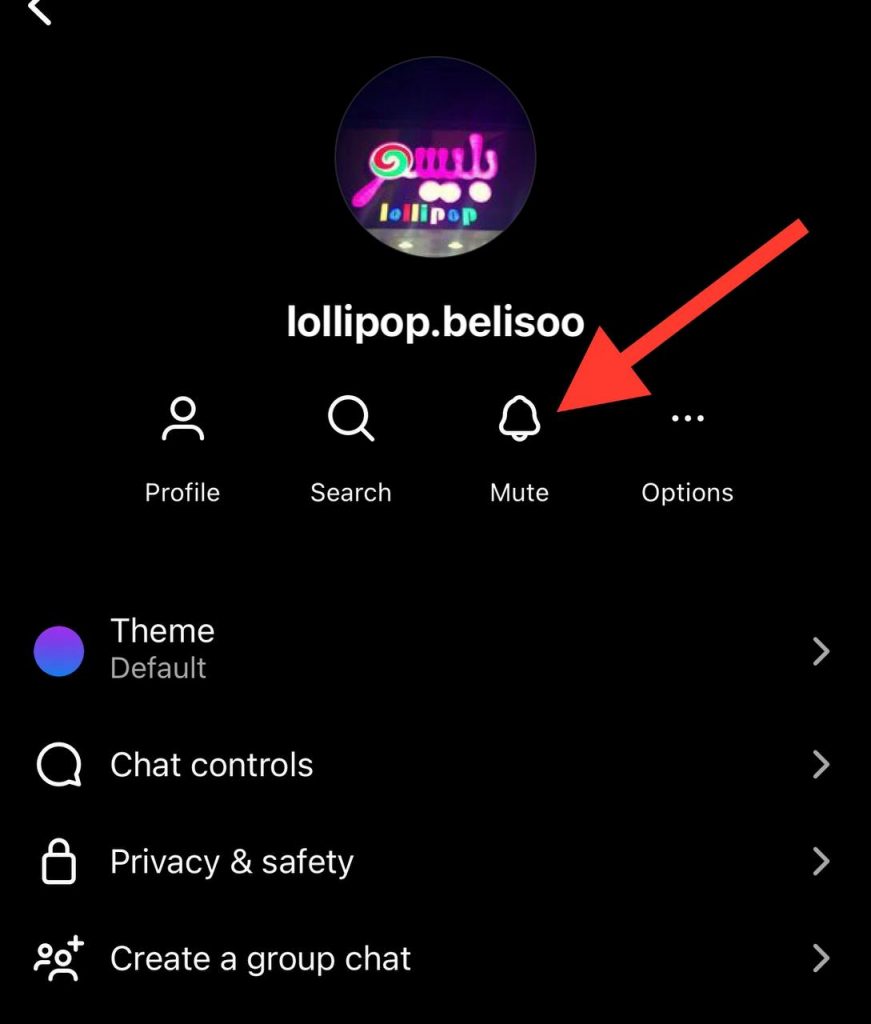
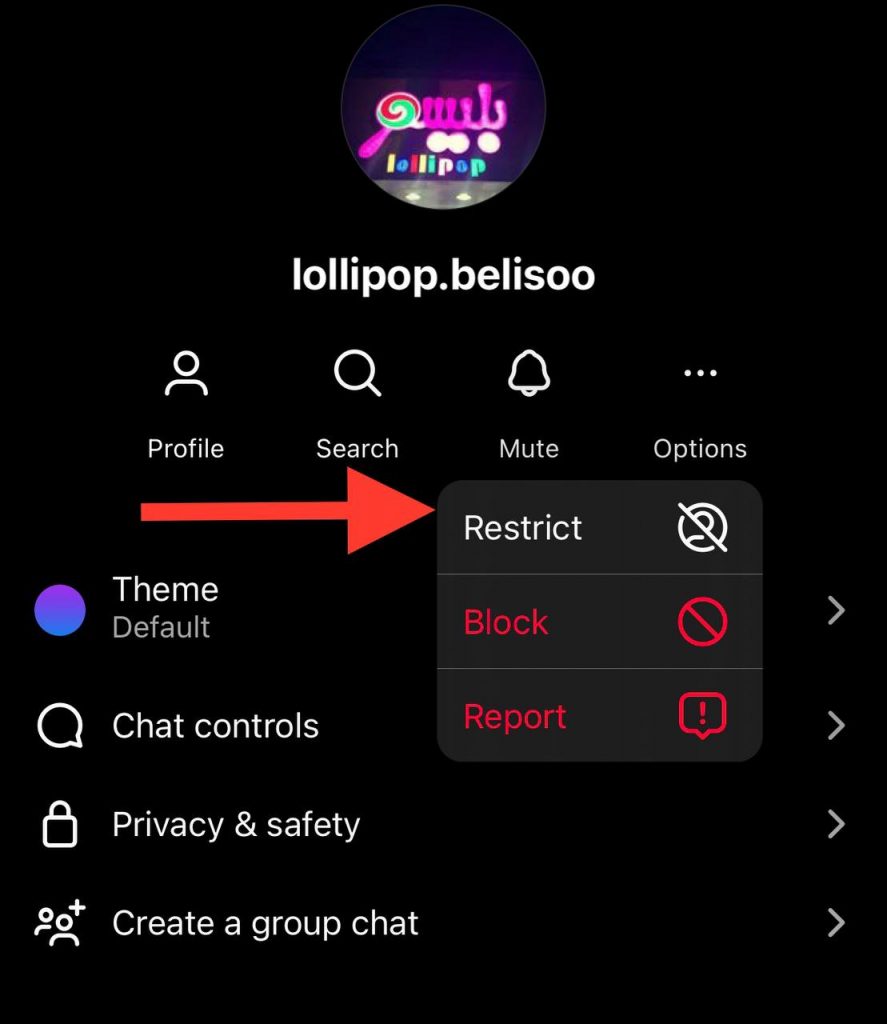
Restrict accounts
When you restrict an Instagram account, you will limit unwanted interactions with the account without having to unfollow or block it.
Follow the steps below to restrict an account:
Step 1- Search for the desired account you want to restrict.
Step 2- Open their profile and tap on the three-line icon in the top right corner of the screen.

Step 3- Choose the “Restrict” option.
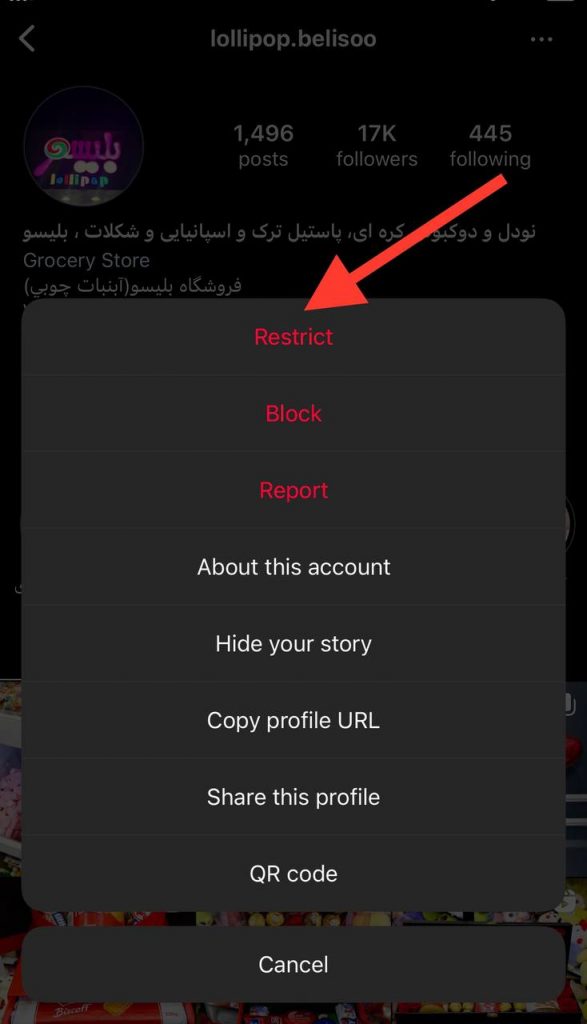
There is another way you can restrict an account from the direct message section:
Step 1- Go to your DMs, and select the chat.
Step 2- Tap on their username.
Step 3- To finish the process, click “Options” and choose the “Restrict” option.
Conclusion
To sum it up, blocking someone on Instagram doesn’t remove or delete the messages, but it affects your possible interactions with those accounts.
As said before, once you block an Instagram account, you can no longer send or receive messages, they can not find your account, and it’s like you don’t have an account on Instagram.
Therefore, if you don’t want to interact with specific accounts, you can simply block them without worrying about removing messages. However, if you don’t want to block them, try the alternatives mentioned in the previous section.
In this article, we discussed all the important information about what happens when you block someone on Instagram and answered some of the most asked questions about this subject. We hope you find this article helpful!
FAQs
1- Can blocked users read previous messages?
Yes, blocked users can still read previous messages in your chat history because blocking them will not remove messages.
2- Does blocking someone on Instagram delete existing direct messages?
No. As mentioned earlier, once you block an Instagram account, the messages remain unchanged, but you can’t interact with their accounts or send and receive messages.
3- Can I still read the messages when I block an Instagram account?
Yes, you can still read the previous messages in your chat history with the blocked account, but only if you haven’t deleted the chat.
4- Can a blocked account send me messages?
No, a blocked account on Instagram cannot send you messages, see your posts, find your account, or share posts.
5- How can I avoid getting notified about receiving messages without blocking the account?
Yes, if you don’t want to block a user and still don’t want to get notified about receiving messages, you can simply mute their accounts.
