

TikTok is now one of the viral social media applications with millions of active users all around the world. People use this platform to share videos of their dance challenges, lip-syncing clips and show off their creativity in making engaging content.
As you know, different people from various spots use this application, which means you will see people of various cultures and identities you may not tolerate, so what should you do when you find yourself in such a situation?
The first thing you need to do is to protect your privacy by ignoring these people, but if you are handling so much pressure and stress caused by someone on this platform, you have the option to easily block them on TikTok.
Buy an Established Instagram Account
Skip starting from zero. Browse Instagram/TikTok accounts with audiences across many niches.
See Available AccountsYes, blocking people on TikTok and similar applications is a common way to control your privacy and have a better experience using these platforms.
Therefore, it doesn’t matter if you want to block a specific person, a spammer, someone stubborn, or just a regular user whose content you don’t like; you can always block them with a few clicks.
The good news is that blocking people on TikTok is a very easy task, and you can do it within a few seconds. In this article, we are going to tell you how you can easily block TikTok users and every other thing you need to know about this action.
Reasons to Block Someone on TikTok

As you may know, there are various reasons why you may want to block someone on TikTok, so it is better to review some of the most common reasons before you learn how to block TikTok users.
1- To avoid negative and unrelated vibes
One of the main reasons to block certain accounts on TikTok is to avoid seeing negative or unrelated content that doesn’t match your mood and energy. Moreover, people are free to add different comments on your or other people’s posts, and seeing those comments may hurt your feelings, so blocking such accounts is a practical way and reasonable reason to filter negative vibes and keep your mood positive.
2- To control your privacy
When you are sharing your moments on social media, it is natural that you don’t want everyone to watch them, so to manage your privacy better, you can block those people to avoid receiving annoying and unwanted messages.
3- To avoid unnecessary attention

As mentioned before, TikTok has users worldwide, which means it may attract unwanted attention from people you don’t know or don’t want to see your content, so blocking them is a great option to control your private space on this platform.
4- To better set up your TikTok feed
The content you see on your TikTok feed is from the accounts you follow, so if certain content is bothering you, you can easily block them to remove their content from your feed and better use this platform.
What Happens When You Block Users on TikTok

Now that you know the reasons why you may want to block someone on TikTok, it’s time to see what happens after you block people on TikTok.
When you block an account on TikTok, they can’t see your profile and stories anymore, and when they try to search for your ID, they won’t be able to find your account.
The blocked accounts can’t add you as a friend or start a chat with you, which means that they can’t see what content you share on your account.
Moreover, the accounts you block on TikTok won’t be able to track your account or activity on this platform.
These are what happens when you block an account on TikTok. In simple words, you cut off all connections between you and the blocked account.
How to Block People on TikTok Using Mobile
TikTok is a user-friendly application, which means you can block people on this application easily. Let’s see how you can block people on TikTok using your mobile:
Step 1- Open the TikTok application on your device.
Step 2- Search for the account you want to block from the search bar.
Step 3- Now that you are on the user’s profile, tap on the “Share” arrow in the top right corner of the screen to access the share menu.
Step 4- Tap “Block” and then you will see a confirmation message that you have to confirm that you want to block the account.
Note that you may see the three dots icon or the arrow share button to find the block option; it doesn’t matter which one you click on; the process is the same.
Finally, keep in mind that the process of blocking TikTok users on mobile devices is the same for both Android and iOS devices.
How to Block People on TikTok Using Desktop
It is good to know that you can block users on TikTok using your desktop. It’s an easy process, like blocking an account on mobile.
Follow the steps below to easily block TikTok accounts using a desktop.
Step 1- Sign in to your TikTok account on your desktop.
Step 2- Search for the account you want to block. You can find the account from the search bar, notifications, or from the “for you” page.
Step 3- Tap on the three dots icon in the top right corner and click “Block.”
Step 4- A confirmation notification will pop up; tap on it to confirm and finish the process.
How to Unblock Users on TikTok
It is expected to regret your decision to block someone and want to unblock them; in order to do so, you need to access your block list on TikTok.
In the section below, you will learn how to access this list.
Step 1- Open TikTok on your device and go to the home page.
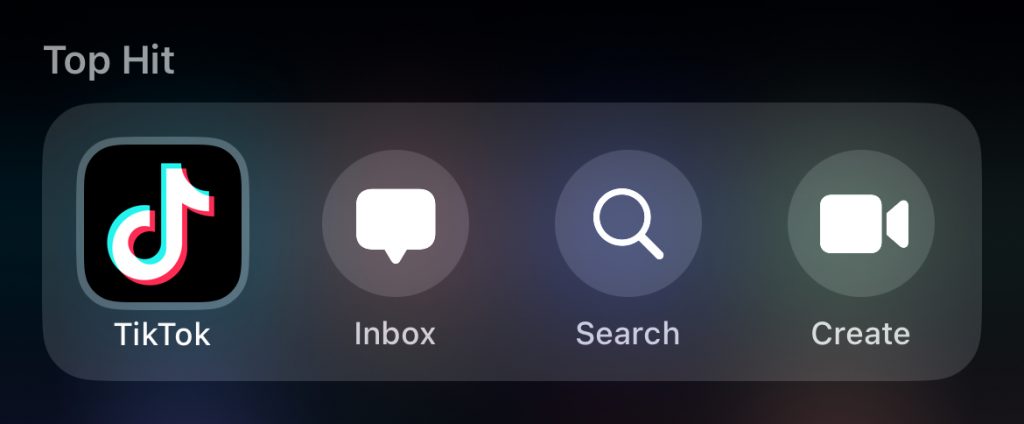
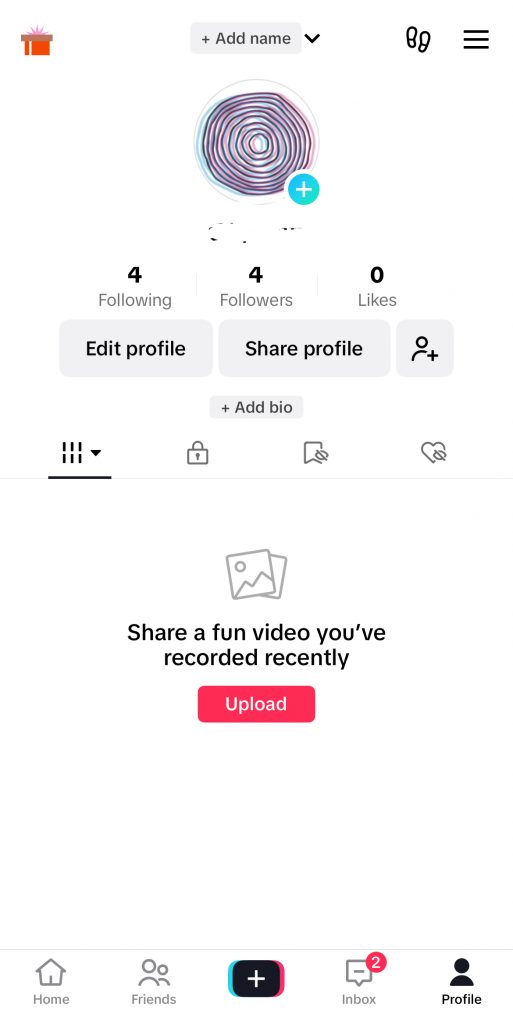
Step 2- Tap on the profile icon in the bottom right corner of the screen.
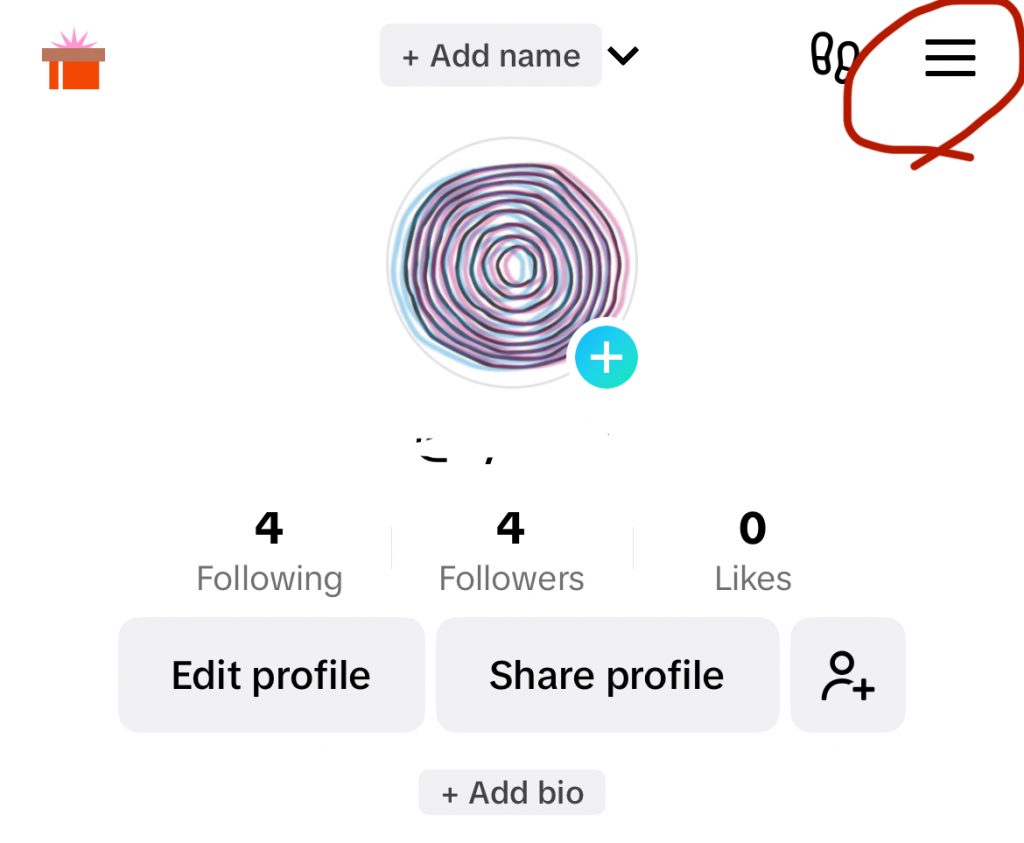
Step 3- Click on the three horizontal (hamburger) icon.
Step 4- Now, select settings and privacy and go to the privacy menu.
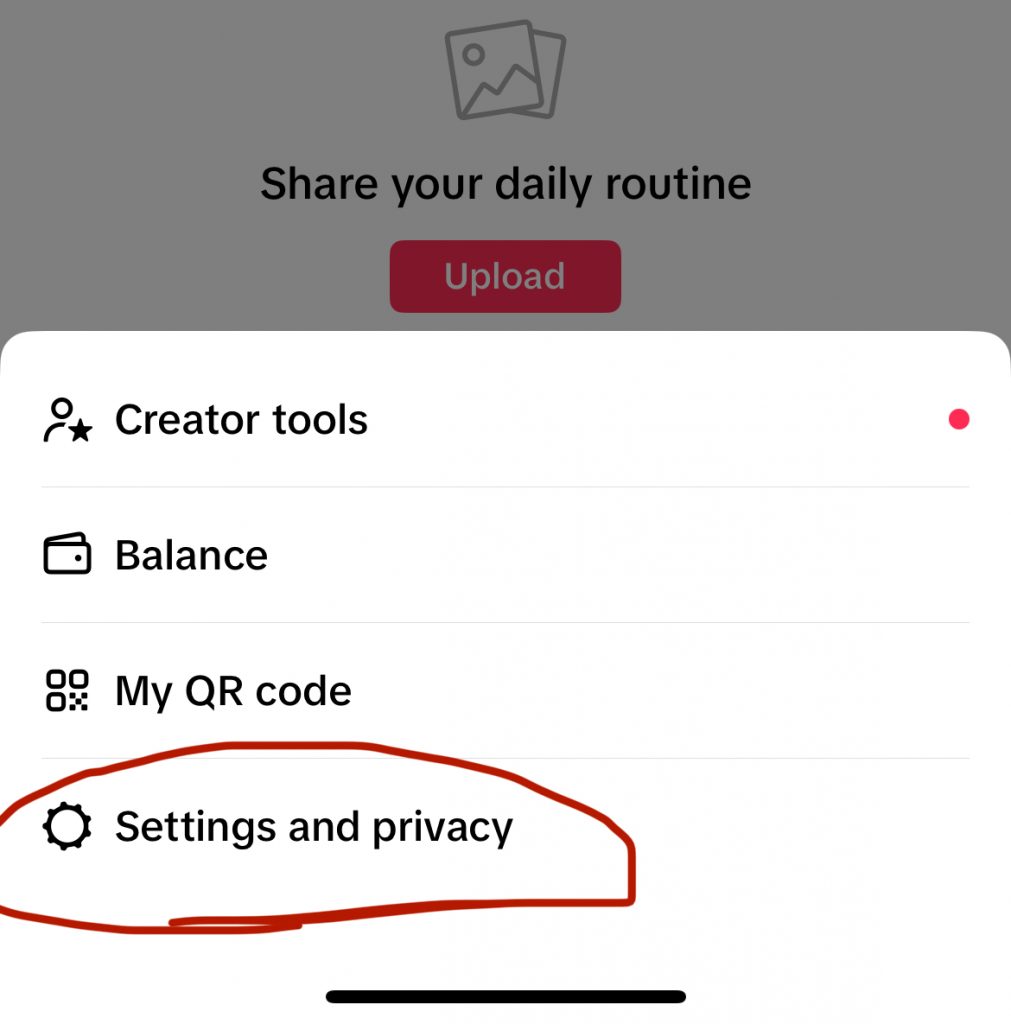
Step 5- Scroll down the menu and tap on blocked accounts.
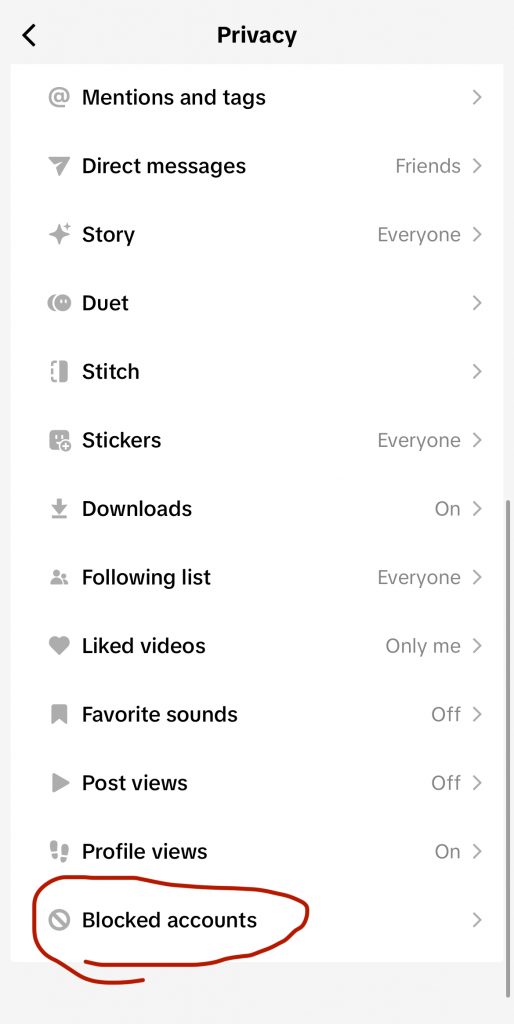
Step 6- Click “Unblock” next to the account you want to unblock.
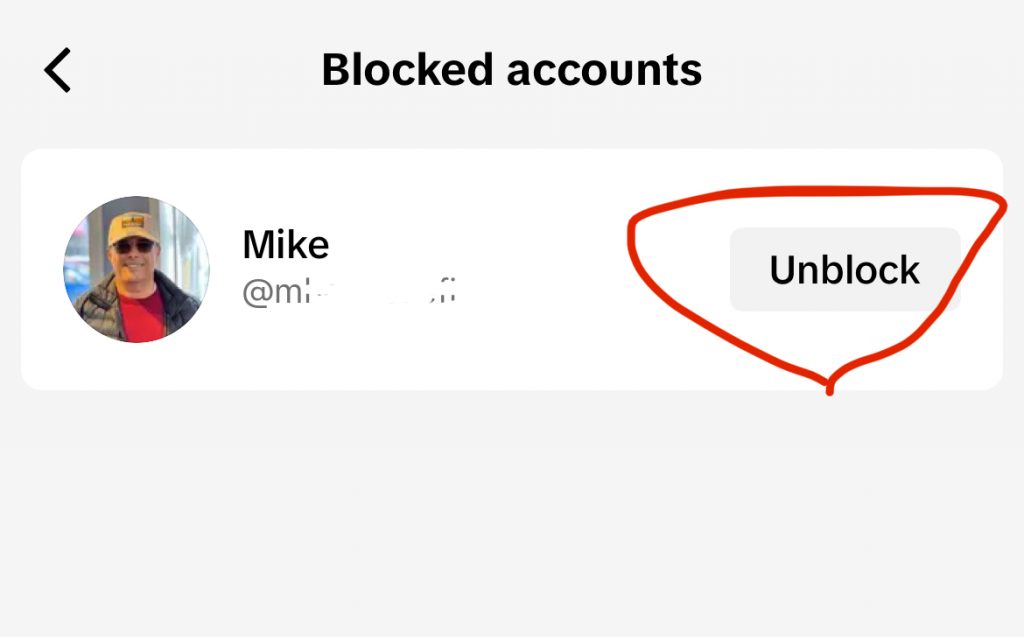
That’s it! This is how you can unblock an account on TikTok with a few clicks.
How to Block TikTok Users in Bulk
Did you know that you can block users on TikTok in bulk? This feature is very handy when you are tired of a group that annoys you by hating you and posting negative comments on your content.
Moreover, you may want to block different spammers and scammers, and it may be difficult to block them one by one, so you can bulk-block them with just a few clicks.
The good news is that you can bulk block up to 100 people on TikTok, which enables you to keep your and your followers safe against scammers and haters who annoy you with their negative or rude comments.
Follow the simple steps below to bulk block users on TikTok:
Step 1- Long press the specific comment from the account you want to block. You can also tap on the pencil icon in the top left corner to access multiple options.
Step 2- Now, you have to tap on the “manage multiple comments” option. Doing so enables you to select multiple comments (up to 100) from scammers or haters.
Step 3- You will see the “block” option, click on it.
Step 4- Confirm the process and TikTok will block all the selected accounts at the same time.
That’s all you have to do to simply block up to 100 annoying accounts on TikTok in just a few minutes.
Why Can’t You Block Someone on TikTok

Have you ever tried to block someone on TikTok and failed? There can be various reasons for this issue; let’s see the most common ones.
One of the most common reasons may be due to network error, so it is better to check your internet connection if you face this issue and try again.
Another reason is that you have reached the TikTok block limits. As said before, TikTok enables you to bulk block up to 100 people. Therefore, if you reach this limit, you can not block anyone else. It is better to try at another time.
Ultimately, it may be because you couldn’t find the block button on the user’s account. We said that to access the block option, you need to tap on the three dots icon, so if you can’t find this button, just long-press the share icon instead and you can easily finish the process of blocking.
FAQs
1- Will people understand when I block them on TikTok?
No, people will not get a notification when you block them on this platform. However, they can guess after a while that you blocked them because they can’t reach your content or account.
2- How do I block someone on TikTok I don’t follow?
It doesn’t matter what account you want to block on TikTok; the only thing you need to do is search for that account, tap on the block option, and confirm the process.
3- How do I block videos on TikTok?
You may not like a video that you see in the “For You” section and decide to block that content so you won’t see similar videos.
In order to block a video on TikTok, long press on that video and tap on the “Not Interested” icon. This leads to seeing less content like that video.
Conclusion
Nowadays, you can find the TikTok application on almost everyone’s mobile phone, because it’s a great app that keeps users entertained for hours by showing them their favorite content.
As said earlier, different people are using TikTok, which means you need to protect your privacy if you don’t want EVERYONE to watch your profile.
One of the best ways that help you better use this application is to block the accounts that annoy you or bother you.
As a person who uses social media platforms such as TikTok, you must know how to block people to ensure you are protecting your privacy.
In this article, we shared all the important information you need to know about how to block users on TikTok, and we hope this article helps you better use this app without getting unwanted attention, comments, messages, etc.

Emi Daniel
Buy an Established Instagram Account
Skip starting from zero. Browse Instagram/TikTok accounts with audiences across many niches.
See Available AccountsRelated articles
-

From 1,000 to 1 Million Followers: How Much TikTok Pays at Every Level
In my research, I have seen TikTok help ordinary people earn from short videos. Some creators now work on TikTok full time. Many started with a phone…
14 min readEmi Daniel
-

TikTok Creator Rewards Program (Formerly Creator Fund): Everything You Need to Know in 2026
Gone are the days when TikTok was just an app for funny videos and quick trends. Today, it is also a serious income stream for creators. Some…
18 min read -
TikTok Creative Center: Complete 2026 Guide to Trends, Ads & Analytics
Mastering TikTok Creative Center is quickly becoming the secret advantage behind top-performing ads, viral videos, and fast-growing brands in 2026. Whether you’re a creator, marketer, or eCommerce…
22 min readLina Stewart