


Have you ever seen a story on Facebook that includes a link and wondered how you can add a link to your Facebook stories?
People add different links to their stories on Facebook for several reasons, but most importantly, to get more attention and reach more audiences, so learning how to add clickable links to Facebook is essential if you want to get the most out of your stories.
You may be surprised that there is no straightforward way to add a link to Facebook stories; however, some tips help you add a link to your story based on the link you want to share.
Buy an Established Instagram Account
Skip starting from zero. Browse Instagram/TikTok accounts with audiences across many niches.
See Available AccountsYou can add links directly through WhatsApp, Instagram, YouTube, and the Facebook application.
As you may know, the Facebook story section is one of the most visible parts after the post section, so you must learn how to add links to your stories to enjoy its various benefits.
In this article, we are going to discuss the advantages of adding links to your stories and go over the different ways you can reach this goal.
Benefits of Adding Links to Facebook Stories

Adding clickable links to your Facebook stories has various benefits for your personal, business, or public account; let’s see the most common and important ones:
One of the main benefits is that clickable links allow users to share more engaging content with their followers, which helps them have better engagement with their audience.
Imagine you have uploaded a new video on YouTube and want more people to watch it, so the best way to reach your goal is to add the video link to your story on Facebook.
Moreover, adding links to FB stories is helpful for business owners because they can add links to their products on their stories to increase their sales, reach more new customers, and build better relationships with their followers.
These are the most important reasons why you should start adding useful and related links to your Facebook stories; don’t forget that Facebook stories are different from regular posts on the timeline because they can have more impact than simple posts, so take them more seriously!
5 Ways to Add Clickable Links to Facebook Stories

Now that you know how clickable links on your Facebook stories help direct your followers to a specific page and have different benefits, it’s time to learn how to add such links to your stories.
1- Use the share link
This method enables you to use a specific link, which you can use to add clickable links to your stories. Note that you must use a browser for this method so it will work the same way on different devices.
Follow the steps below to add links to your Facebook stories using your phone or computer:
Step 1- Open the usual browser you use on your device, such as Chrome or Safari.
Step 2- Enter this URL in the search bar of the browser: https://m.facebook.com/sharer.php?u=addlinkhere
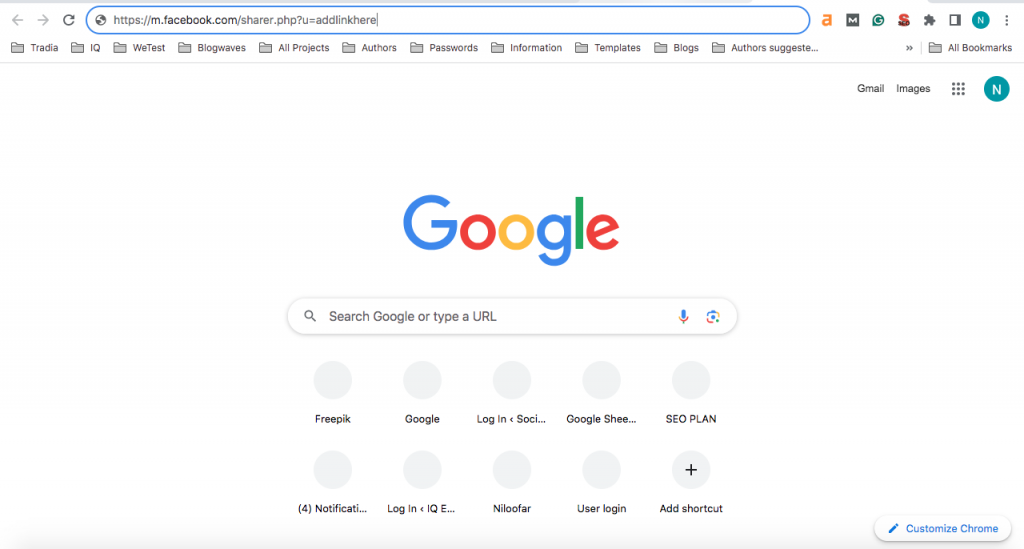
Step 3- Now, you should replace “addlinkhere” with the URL of the content you want to share on your Facebook story.
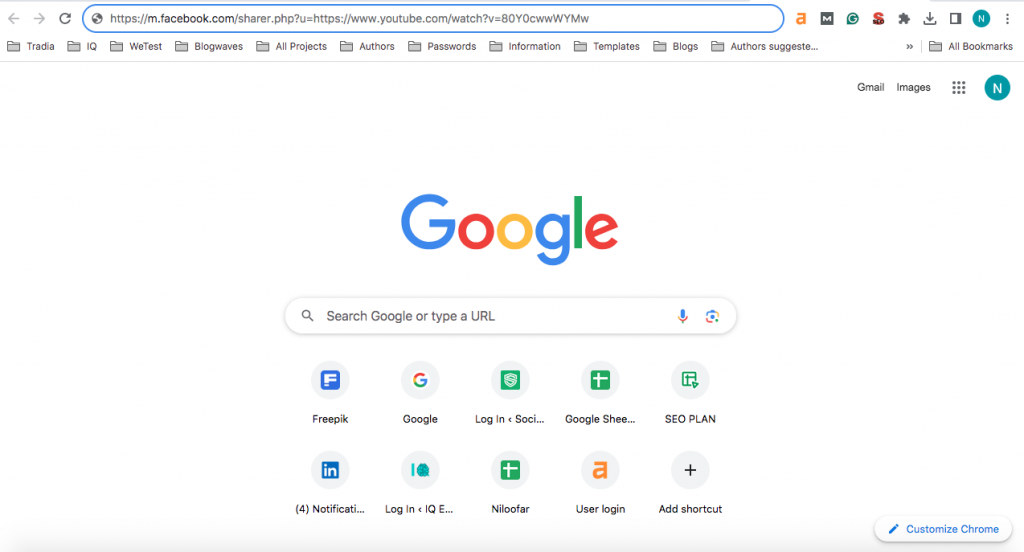
Step 4- Press the “enter” button on your mobile or keyword to open the link, guiding you to the Facebook website.

*Note that if you are not logged in to your account, you will be asked to sign in to your account, which only requires you to add your username and password. Then, you will see a new page titled “Share to Facebook.”
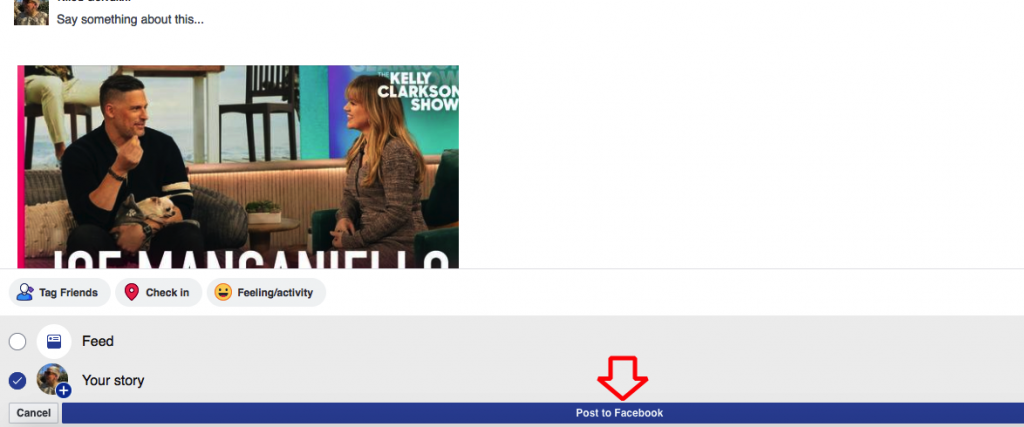
Step 5- Now, you need to tap on the “mark your story” option. The critical thing to consider in this step is that when you choose this option, the news feed will also be selected by default, so if you don’t want to post the link on your feed, you can untick the option.

Step 6- For the final step, you should select “Post to Facebook” to successfully add links to your stories on Facebook.
2- Use WhatsApp
As you may know, the same company owns both Facebook and WhatsApp messengers, so when you want to post a new status on WhatsApp, you will get an option to share it on Facebook as well.
Let’s see how you can add links to your Facebook stories using WhatsApp, step by step:
Step 1- The first thing you need to do is to open the WhatsApp application on your mobile phone and go to the status section.
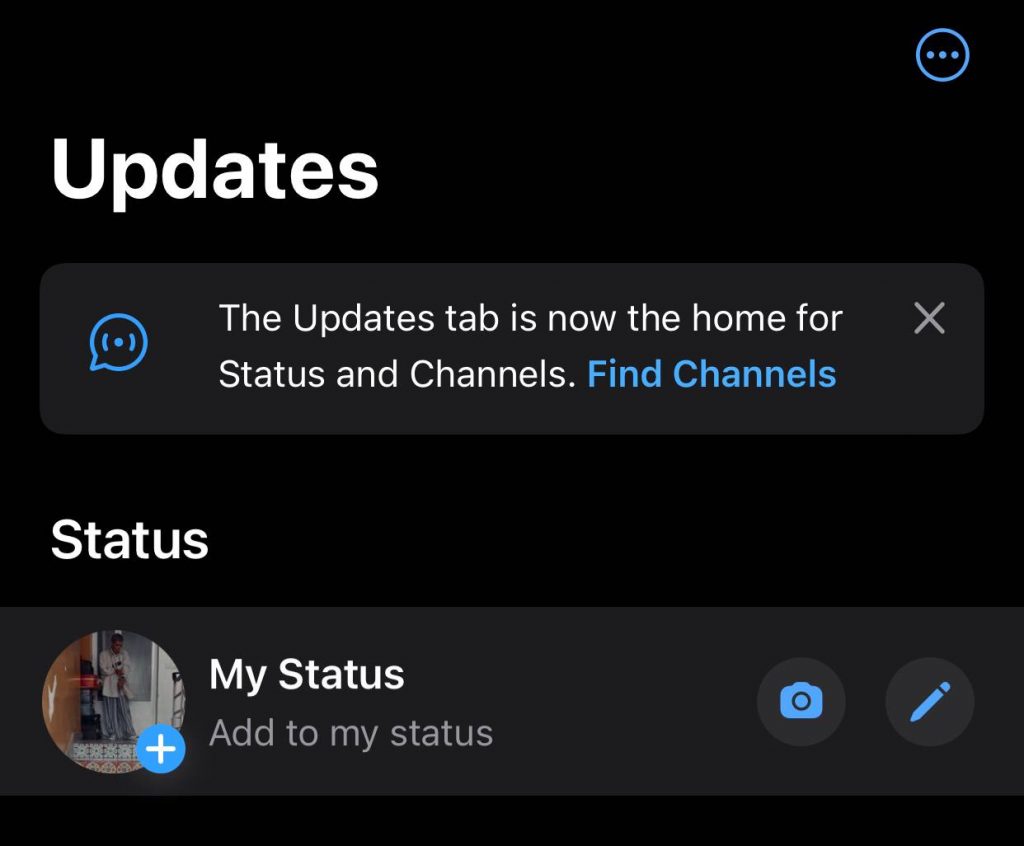
Step 2- Now, you will see the “My Status” option at the top of the screen; tap on the pencil icon to start creating a new text-based status.
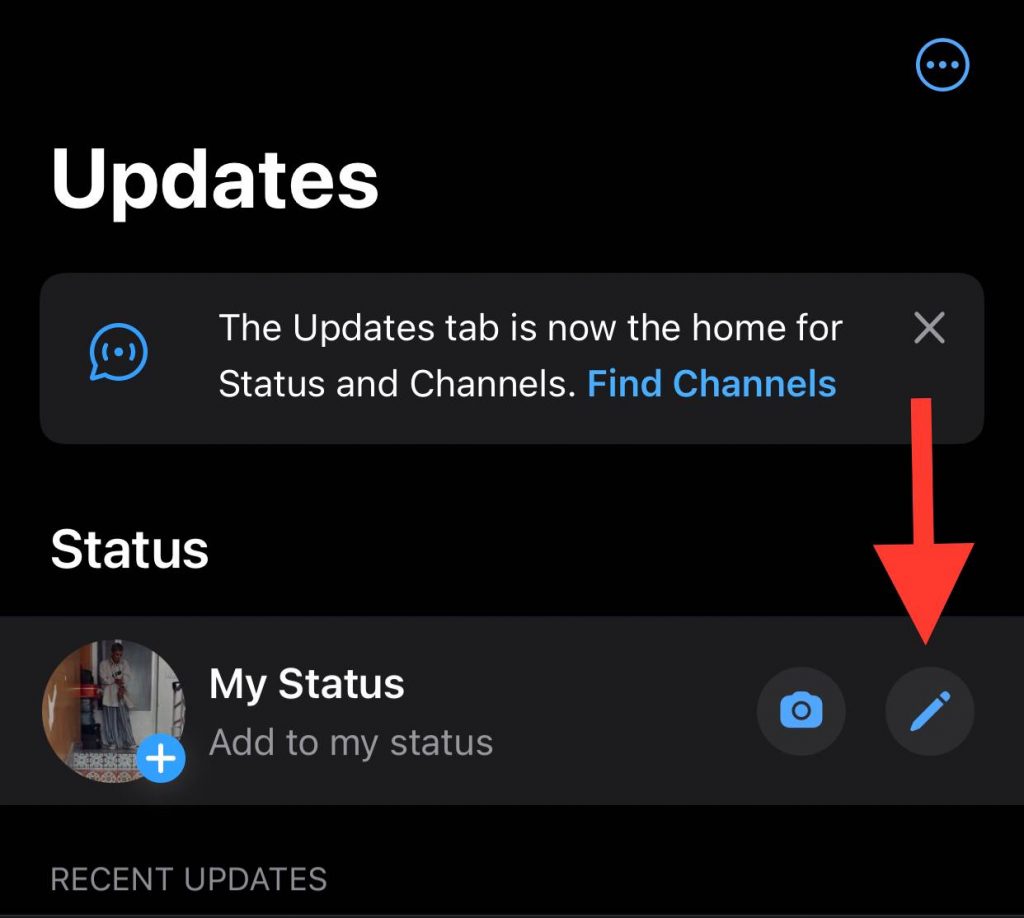
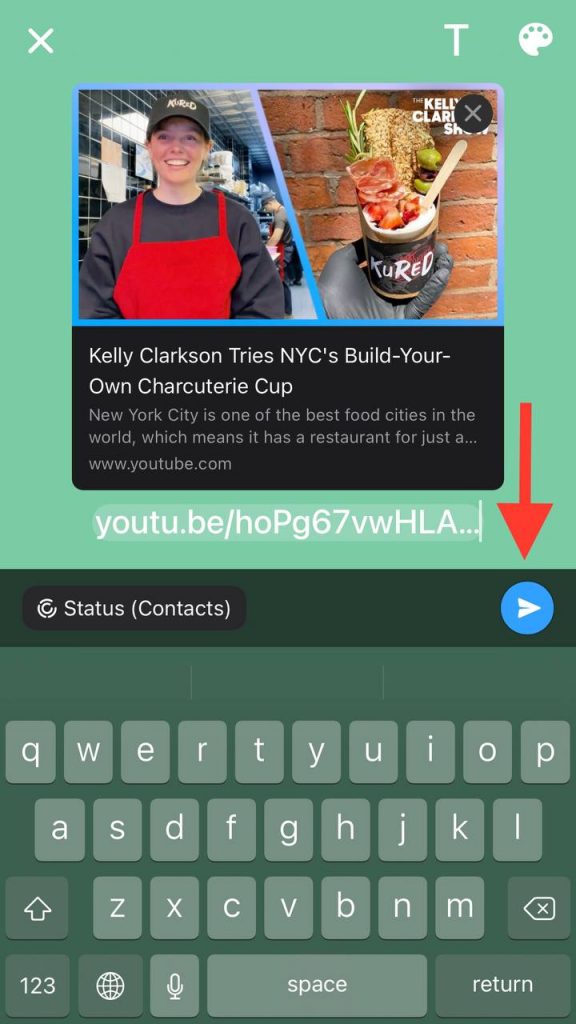
Step 3- Ensure the selected link you want to share on Facebook is clickable, and then paste the link on your Facebook story.

Step 4- Once you have added the link to your WhatsApp status, you should click on the share button to post it.
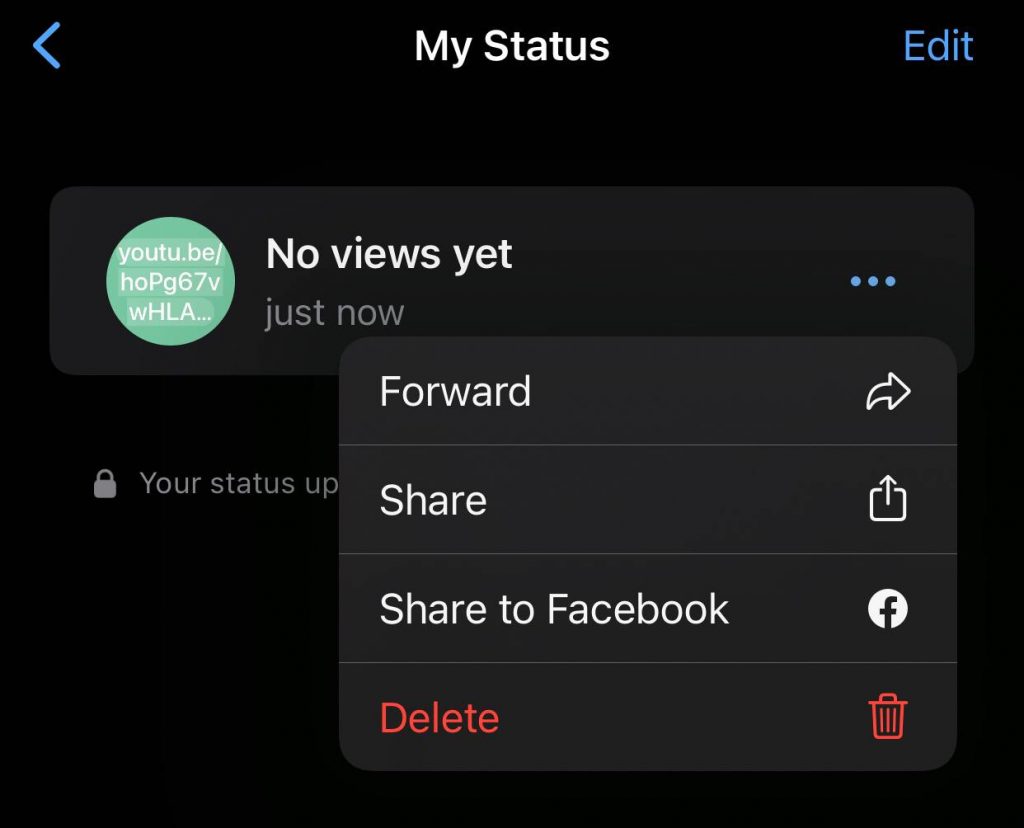
Step 5- After posting the status on WhatsApp, you will see an option called “Share to Facebook Story,” tap on it.
Step 6- Now, WhatsApp will take you to the Facebook application, where you will add the status to your story.
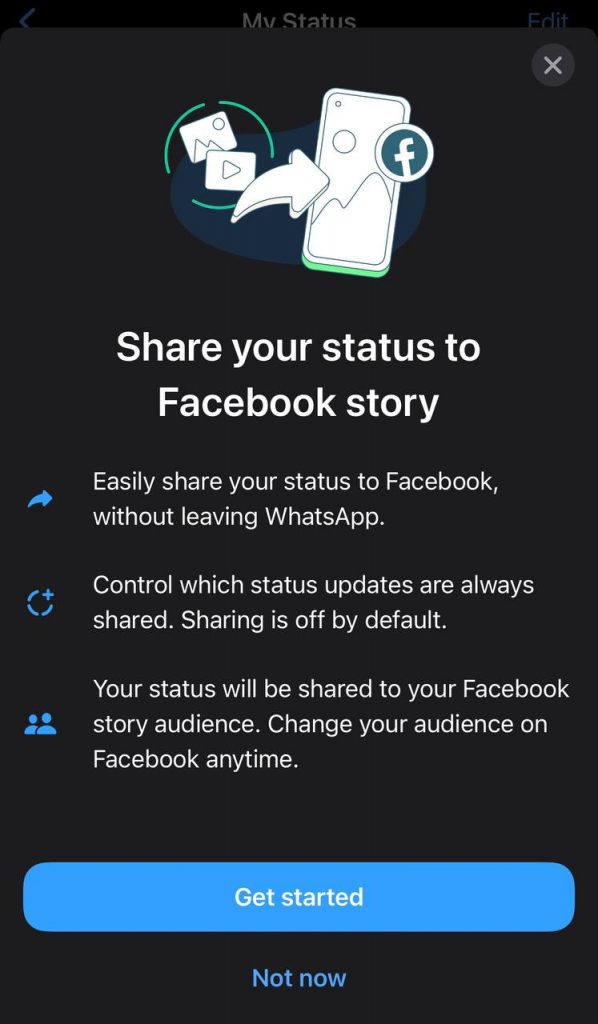
That’s all! As you can see you can use WhatsApp to add clickable links to your Facebook stories easily.
3- Use Instagram
Did you know that Instagram has a feature, which is called “cross-posting?” This feature also allows users to share their Instagram stories on their Facebook accounts.
The interesting point is that this feature enables you to access various story features, such as adding stickers, polls, links, etc.
When you want to use Instagram to add links to your Facebook stories, you must ensure that your accounts on instagram and Facebook are linked together.
To successfully add clickable links to your stories using Instagram, follow the step-by-step guide below:
Step 1- The first thing you need to do is to open the Instagram application on your mobile phone. (The process is the same on both Android and iOS devices).
Step 2- Tap on the “Your Story” icon on the top left of the screen to create a new story.
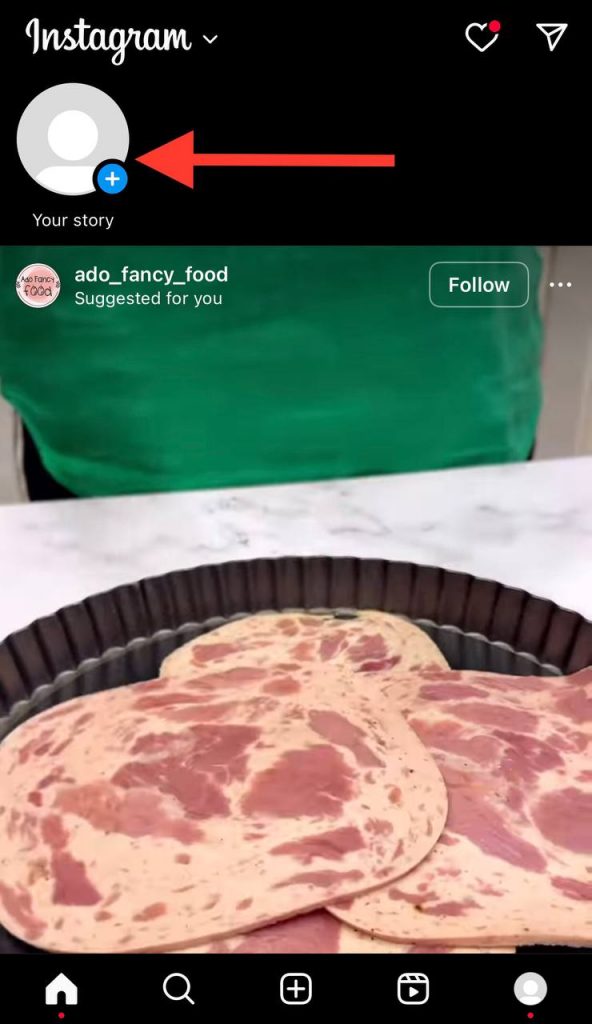
Step 3- Choose a photo from your phone gallery to move to the next step. Note that you can also tap on the Aa Create option to simply add a background for your story.

Step 4- Now, tap on the sticker icon at the top right corner of the screen.

Step 5- Search for the “Link” sticker and select it.
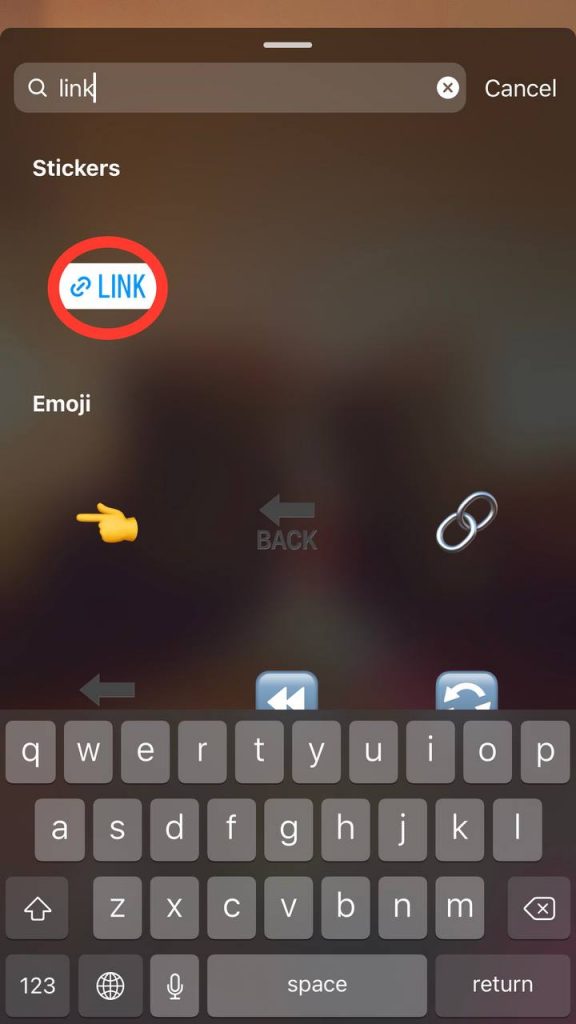
Step 6- After that, paste the URL you want to add to your story, and click “Done” to continue.
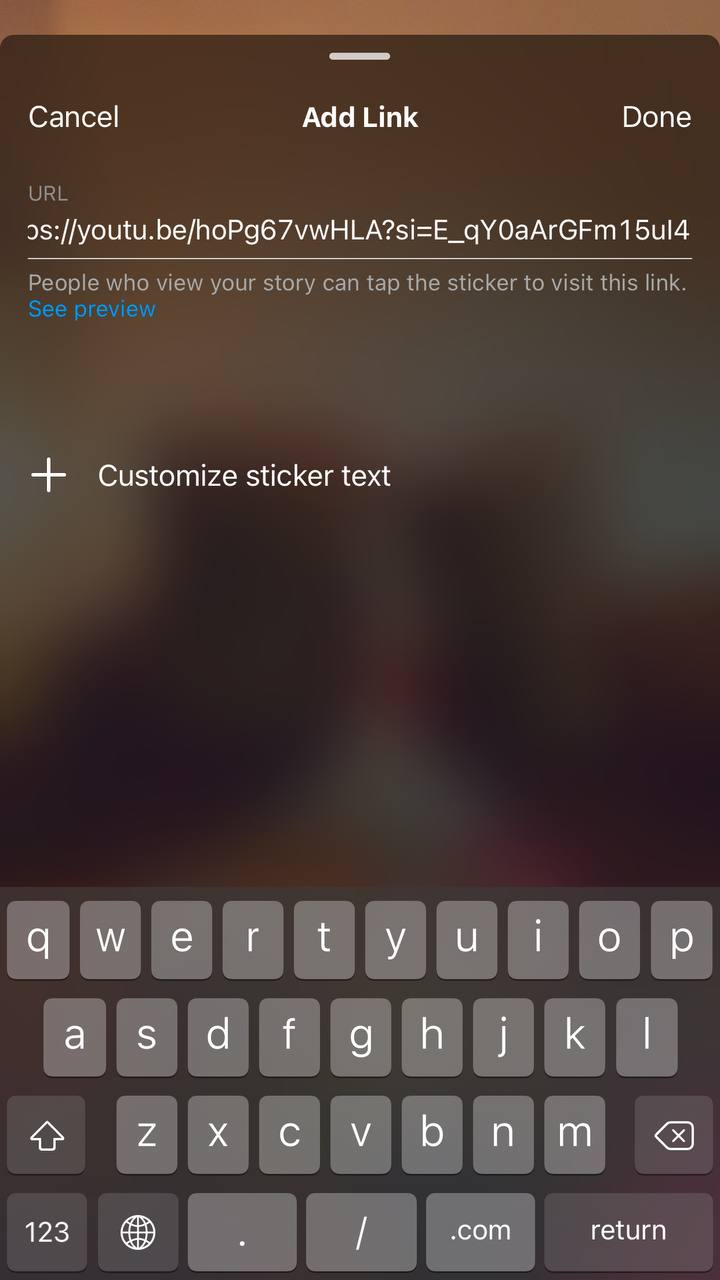
Step 7- For the last part, you should share the story on your Instagram, and it will be added to your Facebook story as well.
Remember that once you make sure the story is uploaded to your Facebook account, you can remove it from your Instagram.
4- Use YouTube
As mentioned earlier, sometimes you want to share a fun or important YouTube video on your Facebook story. The best way to share such a video is to share its link on your Facebook account.
The steps below explain how you can share clickable links from YouTube on your Facebook stories.
Step 1- Open your desired browser on your mobile and search for YouTube; you can also open the YouTube application if you have it on your smartphone.
Step 2- Select the video you want to share on your Facebook, tap on “Share,” and then select the “Facebook” option.
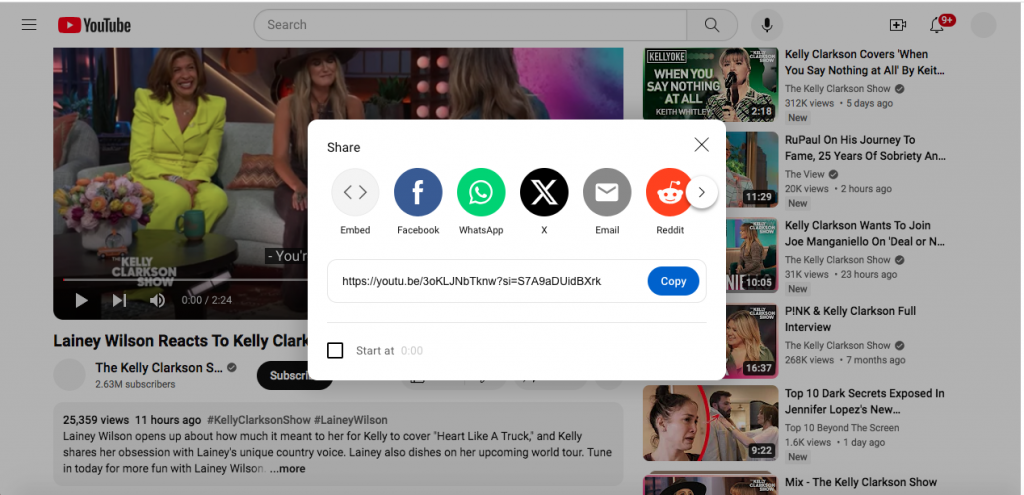
Step 3- When you choose the Facebook option, you will go to the Facebook website in a new tab; the important point is that you must ensure that you are logged in to your account.
Step 4- Now tap on “Your Story” and then “Post” to add the clickable link of that YouTube video to your Facebook story.
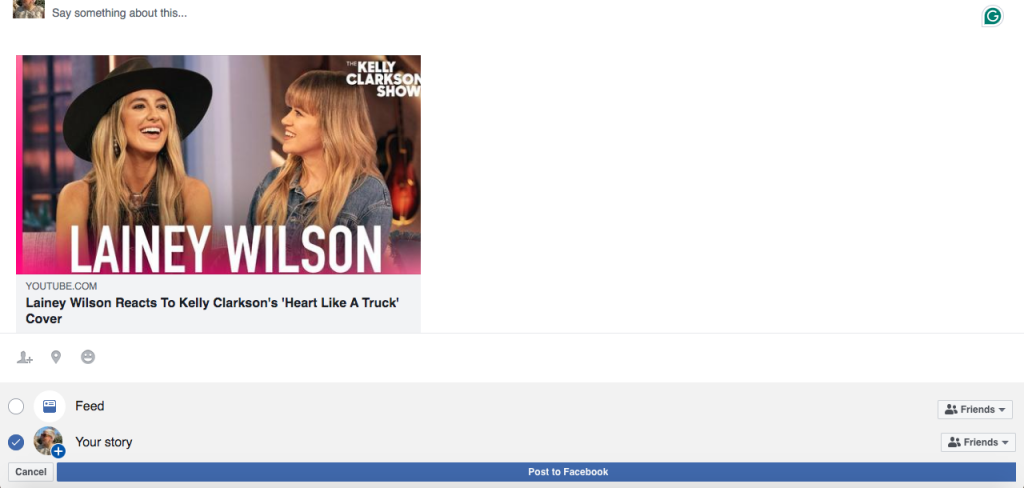
As you can see, you can share any YouTube video with their links on your Facebook stories with just a few clicks.
5- Use the Facebook application
The first thing you need to know about this method is that it is not going to work for everyone, so if you can’t use this method, it is better to try the other four effective ways we mentioned.
Step 1- Open the Facebook application on your mobile phone and create a new post.

Step 2- Copy and paste the link you want to add to your story.
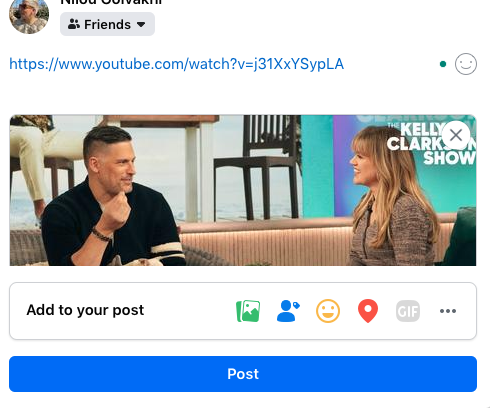
Step 3- After pasting the link, wait for it to load the preview, when it’s done remove the link and upload the post on your page.
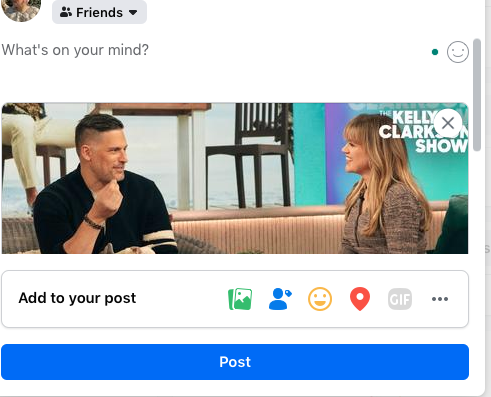
Step 4- Tap on the “Share” option on your post and click on the “Your Story” option. Doing so will add a new story to your account with a clickable link on it.
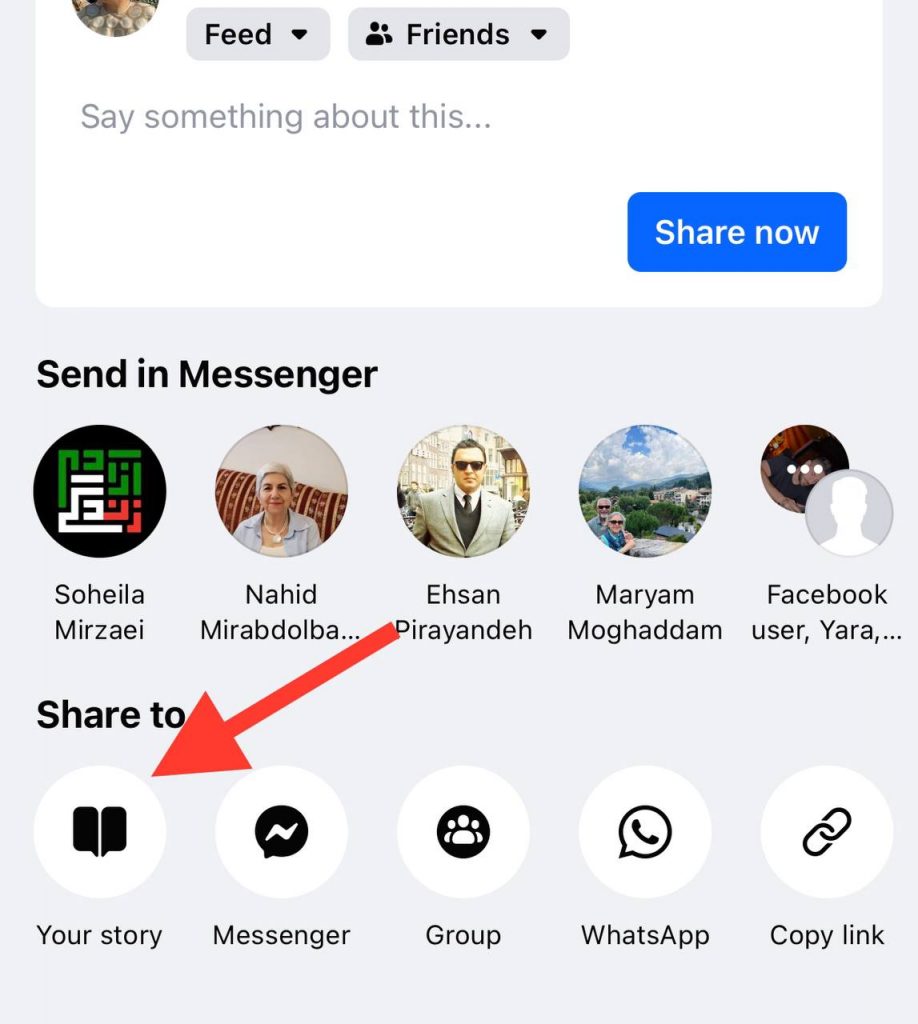
Note that you can delete the main post from your news feed after your story is uploaded. However, don’t forget that this method may not work for all users!
FAQs
1- How to post a link on Facebook without showing the URL?
It is very simple; the only thing you need to do is copy and paste the desired link to your status and wait for it to load. When the content and the text appear, delete the link and start writing your text.
2- Why can’t I add a link to my Facebook story?
As mentioned before, sharing links to Facebook stories has been disabled by Facebook to prevent inappropriate links from being shared on the platform. Therefore, it is better to use the methods we mentioned in this article.
3- How long will the link remain on my Facebook story?
Facebook stories are available on your profile for 24 hours and will disappear afterward, and links will remain on your stories for 24 hours as well. However, you can turn your stories into highlights and keep them on your profile permanently.
Conclusion
We all know that Facebook does not allow users to add links to stories directly, but you still have the chance to add clickable links to your stories and make them more engaging.
In this article, we explained 5 effective ways that help you add useful clickable links that can be a link to your website, a YouTube video, a teaching video, or any other content.
Make sure that you use this helpful feature to show your products to more customers if you have a business page or reach more target audiences if you are an influencer.
We hope this article has been helpful to you and that it helps you share more engaging content with your followers to reach your goals.

Emi Daniel
Buy an Established Instagram Account
Skip starting from zero. Browse Instagram/TikTok accounts with audiences across many niches.
See Available AccountsRelated articles
-

Best Influencer Marketing Software in 2026: Top Platforms to Grow Your Brand
Influencer marketing used to feel optional, something you tried after you’d “done” everything else. Now it’s often the first place customers hear about a brand. The problem…
18 min readEmi Daniel
-

The Ultimate Digital and Social Media Marketing Playbook: From Basic to Advanced Tactics
Are you tired of trying different methods and realizing your brand doesn’t get the attention it deserves? If so, you need to come up with the right…
23 min read -

Social Media Competitor Analysis: Tools, Benchmarks, and Strategy Guide
Are you getting fewer likes lately? You’re not alone. On Instagram, the average engagement dropped to about 0.45% in 2025, down 24% from last year. Still, the…
26 min read