

According to Meta’s official blog, Reels now account for about 50% of time users spend on Instagram. DemandSage reports Reels make up roughly 35% of Instagram usage time in 2025. Industry data also shows that short-form video formats are among the fastest-growing content types globally.
But what do you do if you find the perfect Reel that gives you new ideas for your next marketing plan or has important things you want to see again? This is where Instagram Reels download tools help you.
In this post, you’ll find the most reliable and easy-to-use tools to download Instagram Reels in 2025. That way, you will not miss out on saving a trending clip or making your own viral content.
Buy an Established Instagram Account
Skip starting from zero. Browse Instagram/TikTok accounts with audiences across many niches.
See Available AccountsWhy You Need Instagram Reels Download Tools in 2025
Instagram is always changing now. People feel like there is more need for good Reels download tools than ever. In fact, many creators see them as essential to help grow your Instagram with Reels, which is why these tools are very important in 2025.
Content repurposing is now a main part of a good social media plan. A lot of marketers download Reels to reuse top posts in different places online. This lets people get the most out of their content and helps them reach many groups.
Instagram’s latest rules make it harder to get content the usual way. Now, the platform puts creator rights first. It is tough to reach content, so people need special tools if they want to download things the right way.
For businesses, downloading competitor Reels is a good way to do market research. You can look at the content that gets a lot of attention in your niche. This helps you see the trends and chances to make your own strategy better. You do not have to start from the beginning. Use what works for them to get ahead now.
Also, content creators often need to prepare samples for new clients or collaborations. By using tools to save Reels on Instagram, they can keep their best work organized, even if the original posts are later deleted.
7 Best Free Instagram Reels Downloader Apps
Here are the 7 top-rated apps that make downloading Instagram Reels quick, easy, and completely free.
Indown.io: Watermark-Free Reels Downloader

Indown.io is one of those tools that makes you wonder why Instagram hasn’t built this feature itself! It works across all major browsers including Chrome, Safari, and Firefox, and is compatible with both desktop and mobile devices (Android and iOS).
While it claims to offer watermark-free downloads, this can vary depending on the Reel’s source or Instagram updates. The platform does not require login or account creation, which ensures privacy during usage.
To download, you simply open Instagram, copy the Reel’s URL, and paste it into the Indown.io input field. After clicking the “Download” button, the tool processes the link and lets you save the video. Download quality is typically up to 1080p, depending on the source content, but 4K is not currently supported.
As of September 2025, Indown.io performed well in testing, offering fast downloads without login, and no watermark was present in most cases, though results can vary.
How to Use:
- Open Instagram and find the Reel you want to download.
- Copy the URL of the Reel.
- Go to Indown.io and paste the URL into the input box.
- Click “Download” and wait for the video to process.
- The video will download to your device, typically without watermark, but this may depend on the original source.
Instagram Reels Video Downloader: Fast and Free HD Downloads
Reels Video Downloader is an Android app that claims to provide a straightforward way to download Instagram Reels in HD (up to 1080p). Once installed, you copy the URL of the Reel you want to download, open the app, and paste the link.
You can then choose the quality you prefer, and hit the download button. The video is typically saved directly to your gallery. The app advertises unlimited downloads and no Instagram login requirement, but note that ads are present and some downloaded videos may include watermarks depending on the source.
How to Use:
- Install the app from the Google Play Store.
- Open Instagram and copy the URL of the Reel you wish to download.
- Paste the URL into the app’s input field.
- Choose the video quality (up to 1080p) and press “Download.”
- The downloaded video will be saved in your phone’s gallery.
SaveClip.app: Multi-Content Downloader
SaveClip.app is a web-based tool for downloading Instagram Reels, videos, photos, and IGTV content from public posts. It works on desktop browsers and mobile through browsers like Safari. It is the Swiss Army knife of downloaders: it handles Reels, IGTV, photos, and more. Though, like most multitools, it sometimes trades polish for versatility.
It is considered relatively safe and legit according to automated website-safety checks. However, there is mixed user feedback on whether downloads are always watermark-free and whether the quality always reaches “HD (1080p)” depending on the source.
To use it, copy the URL of the Reel, open SaveClip.app in your browser, paste the link into the input box, select resolution (up to ~1080p if available), then click “Download.” The video will save to your device.
How to Use:
- Open Instagram and find the Reel you want to save.
- Copy the URL of the Reel.
- Visit SaveClip.app via your browser.
- Paste the copied URL into the input field.
- Choose the resolution (up to ~1080p, depending on the original’s quality).
- Click “Download.” The video will be saved to your device.
FastDl: Cross-Platform Compatibility
FastDl (via FastDl.app) is a web-based tool for downloading Instagram videos, photos, Reels, IGTV and carousels from public posts. It works on any modern browser on both desktop (Windows, macOS, Linux) and mobile (Android, iOS) devices.
You copy the URL of the Reel (or photo/video), paste it into FastDl’s download field, choose the quality option, and download. FastDl claims no login required, no watermark, and original quality downloads.
However, while it advertises “original quality,” actual quality depends on what was uploaded at source. Some Reels/videos may not be full HD even if the tool supports HD or higher. Also, “no watermark” is stated by FastDl’s official site.
How to Use:
- Copy the URL of the Instagram Reel/photo/video/carousel you want.
- Open FastDl.app in your device’s browser.
- Paste the link into the input field.
- Select the desired quality option (if available).
- Click “Download” and the file will be saved to your device (Downloads folder or gallery depending on OS/browser).
iGram: High-Quality Downloads
iGram is a web-based downloader for Instagram Reels, videos, photos, carousels, stories, and IGTV. It supports downloading content in HD (720p, 1080p) and claims to support 4K for certain content.
You copy the URL of the Instagram post (Reel, video, etc.), paste it into the iGram website, then choose from available quality options and click “Download.” It works across desktop browsers and mobile ones (Safari, Chrome).
Although iGram advertises “without watermark” and a clean interface, actual results may vary depending on the content and whether Instagram itself has applied compression or limited quality. Some public user reports note ads, and sometimes lower resolutions when 4K was not originally uploaded.
How to Use:
- Copy the URL of the Instagram Reel, video, or post.
- Visit iGram in your browser.
- Paste the URL into the field provided.
- Select the preferred available resolution (720p, 1080p, or 4K if available).
- Click “Download.” The video will be saved to your device.
SSSInstagram: Simple and Secure
SSSInstagram is a free, browser-based Instagram downloader that allows users to save public Reels, videos, photos, Stories, carousels, and IGTV content without needing to log in or install software.
The tool claims to offer high-quality downloads (often up to 1080p) and original resolution where available. However, watermark-free status is not guaranteed for all content, some users report occasional watermarks or limitations depending on Instagram’s source video compression.
SSSInstagram’s site is generally considered safe by site-safety tools (SSL is valid, domain age is fairly old, etc.) but user feedback warns about ads, pop-ups, and redirects that may affect usability and perceived security.
How to Use:
- Copy the Instagram Reel (or post/video/photo) URL from the Instagram app or website.
- Visit SSSInstagram in your browser (desktop or mobile).
- Paste the URL into the input box on the page.
- Click “Download,” then select the quality if options appear (up to ~1080p, depending on source).
- Save the downloaded file to your device.
Story Saver (InSaver): All-in-One Downloader
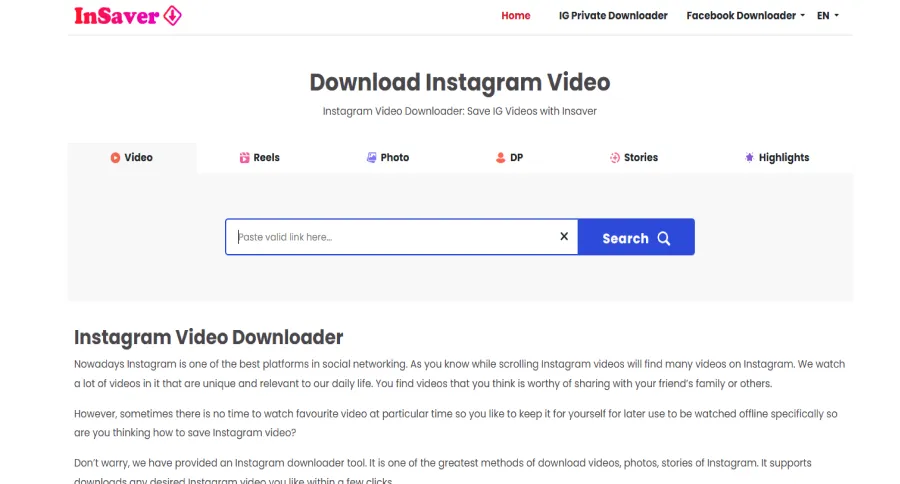
Story Saver (also known as InSaver) is an Android app that lets users download social media content, including Instagram Reels, Stories, posts, photos, and videos, often with claims of no watermark and high-quality saving.
According to the Google Play listing: it supports saving stories with music, videos without watermarks, highlights, etc. It offers batch download support and a built-in media gallery.
However, there are important caveats:
- In the free version, some users report that quality gets reduced (lower resolution) unless you upgrade or meet certain conditions.
- Even though it advertises “no watermark,” results may depend on the original content; some content might still carry watermarks or be compressed. The app contains ads.
How to Use:
- Install Story Saver from the Google Play Store.
- Open Instagram, copy the URL of the Reel, Story, post, etc.
- Open InSaver app; either paste the link or use the share feature to send the content link to InSaver.
- Choose your quality (highest available) and tap “Download.”
- The downloaded video/photo will typically be saved to your device’s gallery.
Instagram Reels Downloader Comparison Table (2025)
| Tool / App | Max Resolution | Watermark-Free | Platforms Supported | Ads? | Login Needed? | Notes |
| Indown.io | Up to 1080p (depends on source) | Usually ✅ (but not always) | Web (Desktop & Mobile) | Minimal | ❌ | Works fast; no login required; 4K not supported. |
| Reels Video Downloader (Android app) | Up to 1080p | Varies (sometimes watermark appears) | Android (App) | ✅ Yes | ❌ | Free, unlimited downloads but contains ads; easy-to-use. |
| SaveClip.app | Up to ~1080p (depends on source) | Mixed reports | Web (Desktop & Mobile browsers) | ✅ Yes (ads/pop-ups) | ❌ | Multi-content support (Reels, IGTV, photos); some redirect ads. |
| FastDl.app | Up to 1080p (depends on source) | ✅ Advertised (no watermark) | Web (Desktop & Mobile browsers) | Minimal | ❌ | Works for Reels, photos, IGTV, carousels; “original quality” claim varies. |
| iGram.world | 720p, 1080p, 4K (if uploaded in 4K) | Advertises ✅ | Web (Desktop & Mobile browsers) | ✅ Yes (ads) | ❌ | Supports all IG formats; quality depends on source. |
| SSSInstagram | Often up to 1080p | Not guaranteed | Web (Desktop & Mobile browsers) | ✅ Ads/pop-ups | ❌ | Works on Reels, Stories, carousels; safe overall but with redirects. |
| Story Saver (InSaver) | Varies (may downgrade in free version) | Claims ✅ | Android app (Play Store) | ✅ Yes | ❌ | Supports batch downloads, Stories, Reels; free version has ads & lower quality. |
5 Browser Extensions That Download Reels Effortlessly
These browser extensions offer a simple way to download Instagram Reels directly from your desktop, and no extra software is needed.
Top Chrome Extensions for Instagram Reels Download
In 2025, Chrome users will have access to the most robust selection of Reels download extensions. These browser-based solutions offer convenience without the need to install dedicated apps.
Reel Grabber leads the pack with its seamless integration directly into Instagram’s interface. The extension adds a subtle download button below each Reel that appears only when you hover over the content. This non-intrusive approach preserves the native browsing experience while adding functionality.
IG Save Pro offers more comprehensive features, including batch downloading capabilities that can simultaneously process up to 20 Reels from any Instagram page. Its right-click contextual menu integration feels natural for experienced Chrome users.
For those concerned about privacy, Phantom Downloader operates entirely within your browser, sending no data to external servers. This security-focused approach comes with a slight performance cost but provides peace of mind for privacy-conscious users.
Installation for all these extensions follows the standard Chrome process:
- Visit the Chrome Web Store
- Search for the extension by name
- Click “Add to Chrome”
- Grant the necessary permissions
- Refresh any open Instagram tabs
Safari and Firefox Solutions for Reels Downloading
Users of alternative browsers aren’t left behind in 2025, with both Safari and Firefox offering capable Reels download extensions with unique advantages.
For Safari users, iGram provides an excellent solution for downloading Instagram Reels. The web-based tool works seamlessly across all browsers, including Safari, allowing you to download high-quality Reels (up to 4K resolution). Simply paste the URL of the Reel into the iGram website, and it will automatically save the video to your device. iGram offers an intuitive interface, and there’s no need for installation or extensions, making it ideal for Safari users looking for simplicity and efficiency.
Firefox users benefit from IG Helper’s open-source approach, which ensures transparent code and regular community updates. The extension’s bookmark-based download system feels intuitive for Firefox users, allowing them to save Reels with a simple keyboard shortcut.
Both browsers offer content script protection that prevents extensions from accessing sensitive information on other websites, making these solutions more compartmentalized and potentially more secure than their Chrome counterparts.
How to Download Instagram Reels Without Any Apps
If you prefer not to install anything, these online tools let you download Instagram Reels instantly with just a link.
Using Online Web Services for Quick Downloads
In 2025, online web services will offer convenient alternatives for occasional downloads or situations where installing apps isn’t practical.
ReelsDownloader.co remains the most reliable web-based solution, supporting high-definition downloads without registration. The service’s streamlined three-step process makes it accessible even to non-technical users:
- Copy the Reel URL from Instagram
- Paste it into ReelsDownloader.co
- Click “Download” and select your preferred quality
SaveFromWeb offers similar functionality with the added benefit of preview capabilities. It allows users to watch Reels before committing to downloads. The service also provides thumbnail extraction as a separate option.
Security remains an important consideration when using web-based services. Stick to established services that don’t require unnecessary permissions or personal information. Always verify that the connection is secure (HTTPS) before uploading or entering Instagram links.
The URL Method: Direct Download from Instagram
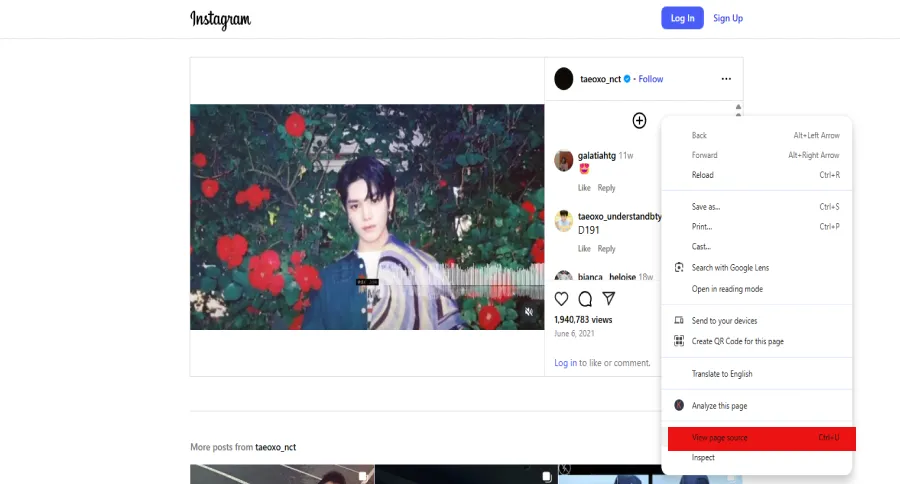
For users comfortable with a slightly more technical approach, the URL method provides a direct way to download Reels without third-party tools.
This technique works by accessing the video source directly from Instagram’s servers:
- Open the Reel in a web browser (not the app)
- Right-click and select “View Page Source” or press Ctrl+U
- Press Ctrl+F and search for “.mp4”
- Look for a URL containing “cdninstagram” followed by a string of characters
- Copy the complete URL (from https:// to .mp4)
- Paste this URL in a new browser tab
- When the video loads, right-click and select “Save video as”
This method typically provides the highest quality version and works reliably when Instagram hasn’t implemented new security measures. However, it requires more technical knowledge and doesn’t include features like automatic organization or batch processing.
Legal and Ethical Considerations When Downloading Reels
Downloading Instagram Reels is easier than ever in 2025, but it’s important to understand the legal and ethical boundaries before using any tool. Instagram’s official platform policies and copyright laws vary by region, and failing to respect them can create risks for both individuals and businesses.
Instagram’s Terms of Service
Instagram’s Terms of Service state that all content uploaded belongs to the original creator. While saving Reels for personal, offline reference may not trigger enforcement, redistributing, republishing, or monetizing downloaded content without permission is against Instagram’s rules. Using third-party download tools can also fall into a “gray area,” since Instagram itself does not provide an official download button for Reels.
Copyright and Intellectual Property
Reels are protected under copyright law. This means:
- You cannot claim someone else’s Reel as your own.
- You must request explicit permission from the creator if you intend to reuse, republish, or remix their content.
- Even when repurposing clips for research, inspiration, or educational purposes, it’s best practice to give credit to the original creator.
Business and Competitor Use
Some marketers download competitor Reels for research. This can be a smart way to study formats, hooks, and editing trends, but it should never involve reposting competitor videos. Instead, use downloads strictly as research material to inspire original creations.
Best Practices for Responsible Downloading
To stay both legal and ethical, follow these guidelines:
- Download for personal use only.
- Always credit the creator when sharing their work for commentary, education, or inspiration.
- Do not monetize downloaded content without written permission.
- Check local laws, as copyright and fair use vary from country to country.
- Avoid private or restricted content, since downloading private posts may also violate privacy laws.
Disclaimer
This article is for informational purposes only and does not provide legal advice. Users are responsible for complying with Instagram’s Terms of Service and applicable copyright laws when using download tools.
Troubleshooting Common Instagram Reels Download Problems
Here are common problems users face and simple fixes to get things working smoothly again.
Fixing Download Failures and Error Messages
Even the best download tools occasionally encounter issues. Here’s how to address the most common problems faced in 2025:
- “Content not available” errors typically indicate that Instagram has implemented new security measures. Updating your download tool to the latest version often resolves the issue, as developers continually adapt to platform changes.
- Connection timeouts usually stem from network issues rather than the tool itself. Switching from mobile data to WiFi (or vice versa) can provide a more stable connection for completing downloads.
- Quality-related errors often occur when requesting a resolution unavailable for a particular Reel. Most modern tools automatically fall back to the highest available quality, but older or simpler applications may fail instead. In these cases, try requesting a lower quality setting.
When persistent errors occur across multiple tools, Instagram might be experiencing server issues. Waiting 30-60 minutes before retrying often resolves these temporary problems.
Dealing with Instagram Updates and Restrictions
Instagram often updates itself to make it safer and to keep creator content secure. Because of this, download features may not work for a short time.
To keep up with these changes, have more than one way to download files. Do not use just one tool. The different apps may get updates at different times. So, using other options helps you keep downloading when things change on the platforms.
Using web tools as backups for apps that you install can help give more safety if something goes wrong. These websites often get updates faster than app stores allow for apps that you download. So, they react quickly to unexpected changes on the platform.
Think about tools that can give you update subscriptions or have busy development groups. This helps you keep your download plan working in the future. These kinds of tools often react fast when Instagram changes how it keeps things safe or adds something new.
Final Thoughts: Choosing the Right Instagram Reels Tool
The tools for downloading Instagram Reels will keep getting better in 2025. You will have options that work for everyone. The tools can help you save a video for fun, or keep track of lots of videos in a big group. There is the right one for your needs. Most people find iGram is good because it’s easy to use and gives you uploads that look great.
If you want a simple and easy way to use something, Indown.io is great. You can get downloads with no watermarks, and you don’t need to sign up. For people who want more options, the SaveClip app lets you save Reels, photos, videos, and IGTV posts. You can use it on all your devices. If speed matters most to you, FastDl is good because it’s quick on mobile and desktop. No account is needed, too.
For anyone who likes an easy Android app, Story Saver gives you a simple way to download Reels, Stories, posts, and photos straight to your gallery. If you want clear, high-quality content with no watermark, SSSInstagram is your choice. This tool lets you download Instagram Reels up to 1080p and keeps things safe. Each tool has something to offer. You can get an app that is easy to use, gives high-quality downloads, or works across different platforms.
FAQs About Downloading Instagram Reels
Which app is best for downloading Instagram Reels?
iGram is one of the best apps for downloading high-quality Instagram Reels. It supports resolutions up to 4K and is very user-friendly, allowing you to save Reels without watermarks directly to your device. It works seamlessly on both Android, iOS, and desktop platforms.
What is the free tool to download Instagram Reels?
Indown.io is a great free tool for downloading Instagram Reels without watermarks and in high quality. It’s web-based, meaning no app installation is required.
How to download Instagram Reels in the highest quality?
For the highest quality downloads, use iGram, which supports up to 4K resolution for Instagram Reels. Simply paste the URL and select your desired resolution.
Are there any limitations on the number of downloads per day?
Indown.io and iGram offer unlimited downloads, making them great options for users who want to download multiple Reels without daily limits. Other tools may have a limit on free downloads, but these apps still provide a generous allowance for casual users.
Can I download Instagram Reels without watermarks?
Yes, Indown.io and StorySave allow you to download Reels without watermarks, ensuring the content remains clean and professional.

Emi Daniel
Buy an Established Instagram Account
Skip starting from zero. Browse Instagram/TikTok accounts with audiences across many niches.
See Available AccountsRelated articles
-

How to Clear Instagram Cache on iPhone, Android & Desktop
Instagram can quietly build up a lot of temporary files while you scroll through Reels, watch Stories, save posts, and upload your own content. You may not…
12 min readEmi Daniel
-

How to See Who Reposted Your Instagram Post (2026 Guide)
Someone reposted your Instagram post, but you have no idea who it was. You check notifications, search through your profile, and still cannot find a clear answer. …
18 min read -

How to Reset Instagram Algorithm in 2026
Instagram can start showing too much of the same type of content. Your Explore page may no longer match your interests, Reels may feel repetitive, or suggested…
12 min read