

Did you know that around 60% of businesses on Instagram use the ‘Story Highlight’ feature to optimize their profiles?
It shows the importance of the feature and how it enhances user engagement and content organization.
However, the main question is: how many Instagram highlights are ideal for optimizing your profile without overwhelming your followers?
Buy an Established Instagram Account
Skip starting from zero. Browse Instagram/TikTok accounts with audiences across many niches.
See Available AccountsWhat is your guess? Around 50? More or less?
Don’t get confused! Here, you will learn how many Instagram highlights are ideal to attract your followers’ attention.
We will discuss helpful tips for optimizing your account using this feature and the best strategies for getting the most out of Instagram story highlights.
What Are Instagram Highlights?
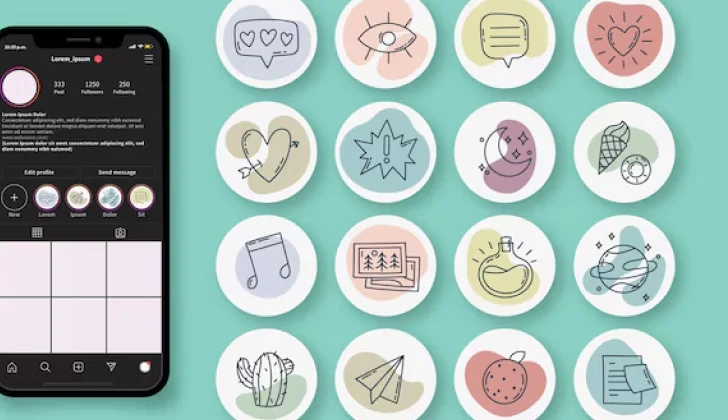
Instagram highlights are collections of your IG stories that you can highlight to show on your profile.
Unlike regular stories that will disappear after 24 hours, highlights show on your profile permanently until you want to remove or delete them.
Instagram highlights appear under your bio and can be organized into various categories, such as “Shipping,” “Products,” “About us,” “Location,” “Prices,” and more.
How to Create Optimized Instagram Story Highlights?
To get the best results out of Instagram highlights, you should know how to create optimized highlights to enhance your profile and keep your followers engaged with your content.
The steps below will help you create optimized IG story highlights for your profile.
Step 1- Choose your desired theme
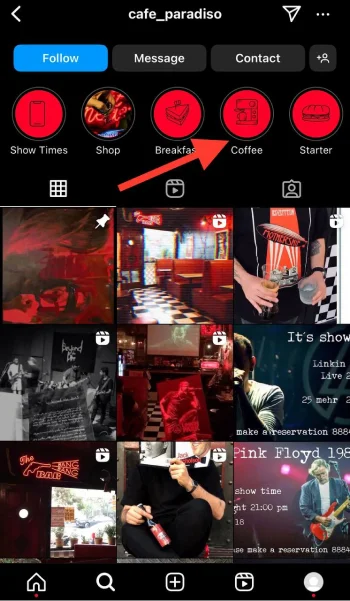
Select a personalized theme for your highlights that best describes your brand and products. You can have a specific color or font that matches your brand voice and your audience’s interest.
Step 2- Create engaging stories
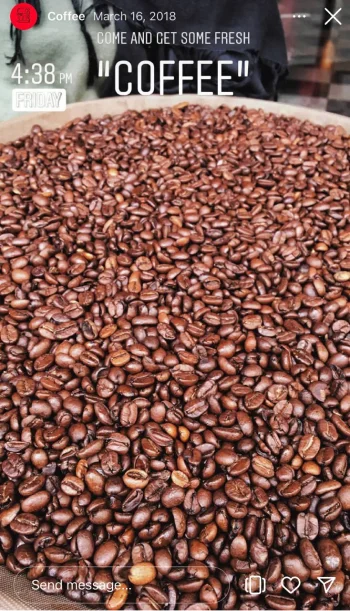
To get the best results, it is better to mainly add engaging stories as your highlights. To do so, try to create engaging stories using high-quality images or videos that capture attention.
Step 3- Choose custom highlight covers

One of the best ways to create optimizing IG story highlights is to choose or design custom images as your highlight covers.
Ensure you write the name of each highlight on the cover, choose the best color that represents your brand’s aesthetic, select a personalized font, and use relevant emojis.
Step 4- Add relevant titles for each highlight
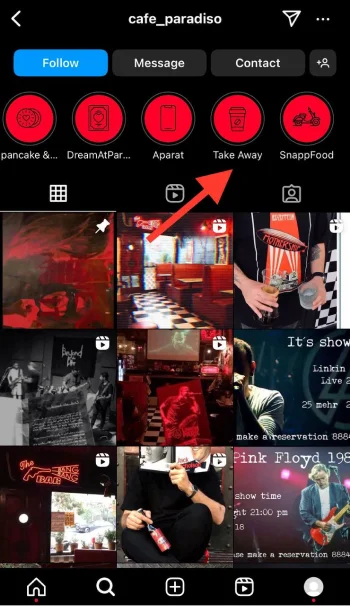
Write the name of each highlight to describe the title best, so your profile visitors and followers can easily find the items they are looking for.
Using relevant keywords in your titles is suggested to get the desired results, which enhances your profile’s SEO.
Step 5- Update your highlights
You are wrong if you think you don’t have to update your Instagram highlights! One way to optimize your profile using IG highlights is to update them regularly.
You can also remove outdated and old content to ensure they are relevant to your current products or services data.
What Is the Ideal Number For Instagram Highlights?

Now that you know how to create optimized highlights for your Instagram profile, it is time to see how many highlights are ideal for your account.
You can add up to 100 stories to each Instagram highlight, and the number of highlights you create is unlimited.
However, I gathered a list of helpful tips for creating the best highlights for your Instagram profile so that you can engage with your followers perfectly.
Recommended range
Experts recommend a range of three to seven highlights. This allows you to show specific content without overwhelming your followers and visitors.
Note that adding too many highlights can confuse your followers, but having a few yet detailed highlights that represent your brand is the best to attract your target audiences and keep them engaged.
Consider your brand’s niche

If you are a business owner, content creator, or influencer, you should use IG highlights to showcase your brand’s voice, products, and services perfectly.
Therefore, while creating story highlights, consider your brand’s (account) niche and your followers’ preferences to create more focused highlights.
Choose quality over quantity

Always focus on adding quality content to your highlights; prioritizing the quality of your content is more important than its quantity.
Remember that each highlight must represent valuable and engaging content, so select the ones that resonate with your followers’ interests and needs.
Avoid chaos
It is also important to avoid clutter while creating Instagram highlights; adding too many highlights looks overwhelming.
Instead, create a well-organized appearance that helps profile visitors and followers easily access your content.
How to Add and Remove Stories to Instagram Highlight
The steps below will help you organize your IG highlights quickly.
Adding stories to Instagram highlights
Step 1- Open Instagram and add the story you want to highlight.

Step 2- Once the story is uploaded, tap on the “Highlight” icon.
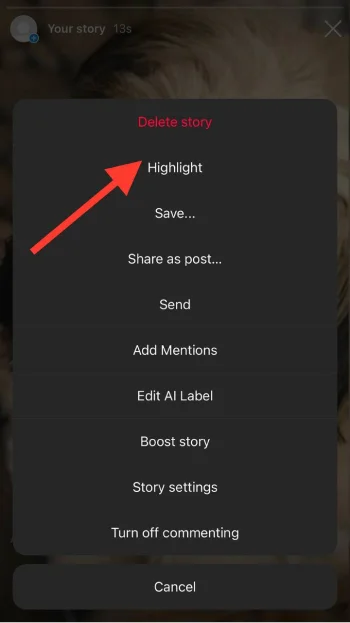
Step 3- Now, you can create a new highlight or add the story to an existing one.
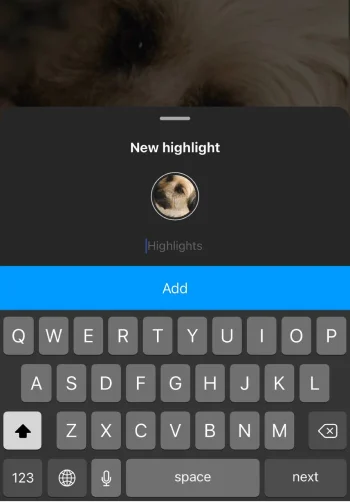
Step 4- Choose the highlight, and it will be added. If you want to create a new highlight, tap “New,” add a title, and tap “Add” to finish the process. After that, you can change the cover or highlight.
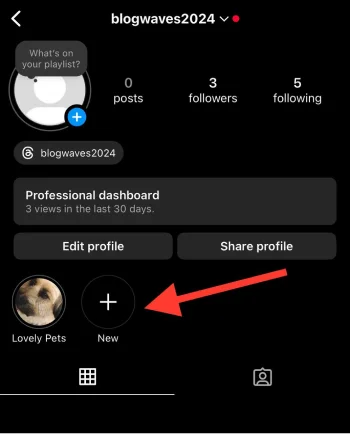
Removing stories to Instagram highlights
Step 1- Open Instagram and go to your profile.
Step 2- Choose the highlight from which you want to remove a story.
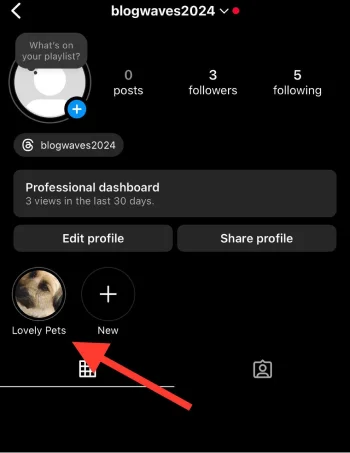
Step 3- Tap “More” and select “Remove from highlight” to finish the process.
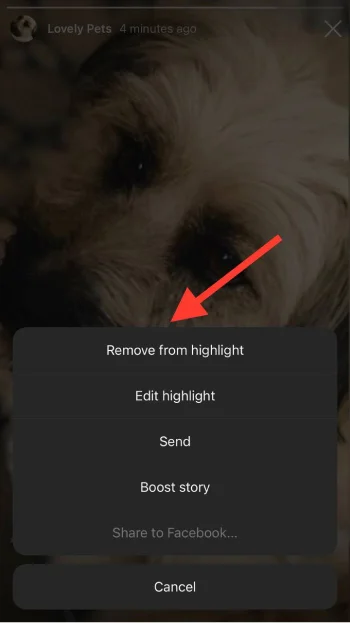
Note that once you add a story to a highlight, it will be shown as the first highlight on your profile, and once you remove the recent story from that highlight, it will be shown in the order it used to be.
How to Optimize Your Instagram Story Highlights

Optimizing Instagram highlights with the right number of them leads to more engagement and sales. So, let’s see how to optimize your IG story highlights.
Choose relevant themes
Select related themes for your highlight’s cover images aligned with your brand (account) identity.
Ensure that selected themes value your followers’ interests and they find it easy to connect with them.
Analyze highlight performance

Use Instagram highlights insights to track and analyze the performance of each highlight to create more engaging highlights.
It is better to pay attention to the views, interactions, replies, profile activities, navigation, reach, and more.
Promote Instagram highlights

You can use posts and stories to promote your highlights and refer your followers (especially new ones) to explore each highlight.
Note that you can also share your highlights on other social media platforms. For example, If you link your Instagram account to Facebook, you can share highlights on Facebook and ask your followers to check them.
Use interactive elements in highlights
To optimize your IG story highlights perfectly, you can add interactive elements, such as quizzes and polls, before saving them to highlights to encourage your followers to interact with your content.
These helpful methods allow you to optimize your Instagram highlights to attract more target followers.
Reasons to Optimize Your Instagram Highlights

Now that you know how to optimize your Instagram story highlights, it is time to discuss the common reasons why you should create and add optimized highlights to your IG account.
Better user experience
Optimizing Instagram highlights allows users to quickly find the content they are looking for, which improves their overall experience on your profile.
More engagement

Having engaging and visually appealing highlights on your profile captures the attention of your followers and profile visitors and encourages them to engage with your account more.
If you include a call to action in your optimized highlights, they help your audiences learn about your products and services, which also increases engagement.
Enhanced visibility

One way to optimize Instagram highlights is to use relevant keywords in highlight titles. This helps people to find your account more easily, which means enhanced visibility on the platform and higher chances of attracting new followers.
Increased trust
If you include user-generated content in your highlights, it can build trust among your followers and increase your business’s credibility.
Creative Instagram Story Highlight Ideas

FAQs
Create a highlight of frequently asked questions about your products, services, brand, or industry to help clarify customers’ common concerns.
Behind the scenes

People are always interested in seeing what’s going on behind the scenes of product preparation, daily operations, manufacturing, and more.
You can also introduce your team members and their roles in your stories and add them to the BTS highlight.
Challenges and milestones
Let your followers and customers participate in your brand’s milestones and challenges. This will make them feel closer to you.
You can create stories of reaching your goals, celebrating anniversaries, and how you deal with challenges.
Customer reviews

One of the most important things that make your followers and profile visitors to your potential customers is the ‘customer reviews’ highlight.
Share screenshots or screen records of messages with satisfied customers with your products, services, customer support, and more.
Fun facts about your business (brand)
Share interesting facts and related information to your niche and business. This can educate your audiences and keep them engaged.
Educational content and tips

Create highlights that include simple guides on how to use your products or services. For example, you can create highlights about styling tips and trends if you sell clothes.
Brand history
Every brand, business, content creator, and influencer starts their journey at some point.
You can share stories about your journey’s early days and how you overcame challenges and cherished small successes.
Conclusion
Instagram highlights are an excellent opportunity to optimize your Instagram account while engaging with your followers.
Using this feature and organizing your highlights, you can share valuable content, show your brand’s voice, optimize your profile, and provide a visually appealing presence on the platform that aligns with your audience’s preferences.
However, it is better to stay focused on adding high-quality stories to your highlights and prioritize quality over quantity to avoid chaos and overwhelming.
Add the most common content as your highlights and add up to 100 stories to each to allow your followers and profile visitors to feel connected to your account.
I hope this article helps you create optimized highlights with the ideal number to perfectly showcase your brand’s identity and keep your followers coming back for more!
FAQs
Can I edit my Instagram highlights after creating them?
Yes, you can edit your IG highlights anytime. You can update or change the title, add or remove stories, and change the cover image.
What type of content should I add to my Highlights?
It is better to share high-quality content that best represents your brand’s niche and aligns with your follower’s preferences, such as behind-the-scenes footage, product details, FAQs, and more.
How can I make my highlight covers visually appealing?
Create custom covers with personalized text font, icons, and colors matching your brand aesthetic.
How often should I update my highlights?
It is better to review them every few weeks to make necessary changes and ensure your content is relevant and updated.

Emi Daniel
Buy an Established Instagram Account
Skip starting from zero. Browse Instagram/TikTok accounts with audiences across many niches.
See Available AccountsRelated articles
-
Instagram Hashtags That Actually Work in 2025: Strategy, Research & Reels
Instagram posts with hashtags see 70% higher engagement rates and 12.6% more reach than those without. Yet most Instagram users struggle with hashtag strategy in its complex…
25 min readEmi Daniel
-
Top 30 Black Instagram Models to Follow in 2025
Black models are among the most followed in the industry on Instagram. A great example is “Naomi Campbell,” who has over 15 million followers. The main reason…
22 min read -
Good Times to Post on IG: Maximize Engagement and Reach in 2025
Your Instagram posts are getting lost in the noise. Since 2020, engagement rates have dropped by 30% across the platform. This means timing your posts has never…
27 min read