


The Instagram live feature allows users to share their live moments with their friends and followers. You can join these live videos to see what’s going on with your friends or those you follow.
Once you join someone’s live video, they can see your username appearing on the screen, which notifies them you are watching their video.
However, you may wonder if there is a way to view Instagram Lives anonymously because you don’t want others to notice if you join their live session on Instagram.
Buy an Established Instagram Account
Skip starting from zero. Browse Instagram/TikTok accounts with audiences across many niches.
See Available AccountsThe strict answer to this question is that you cannot hide your username once you join a live video, but there are various methods you can use to view live Instagram videos without them knowing.
In this comprehensive article, we will share all the information you need to know about how to watch Instagram live anonymously. We will also cover reasons you may not want others to notice you joined their live sessions, how to start and join a live video on Instagram, and more.
How to Start a Live Video on Instagram?
Some of you may not be aware of how to start a live session, so before we explain how to join an Instagram live anonymously, let’s see how to start one.
To do so, follow the steps below:
Step 1- Open Instagram on your device.
Step 2- Tap on the + icon in the middle of the home page. Note that you can access this section by swiping the screen to the left.
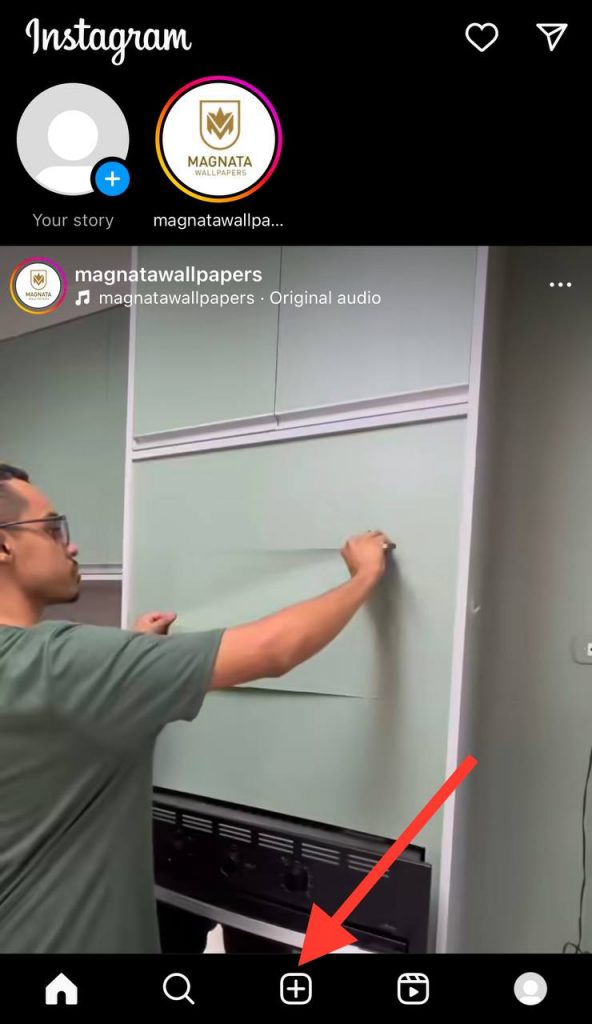
Step 3- You should now see a new post page; swipe right on the menu bar at the bottom to access the ‘Live’ section.

Step 4- Once the camera screen is open, tap on the four lines on the left side to add a title.
Step 5- Tap on the circle button to start your live video.
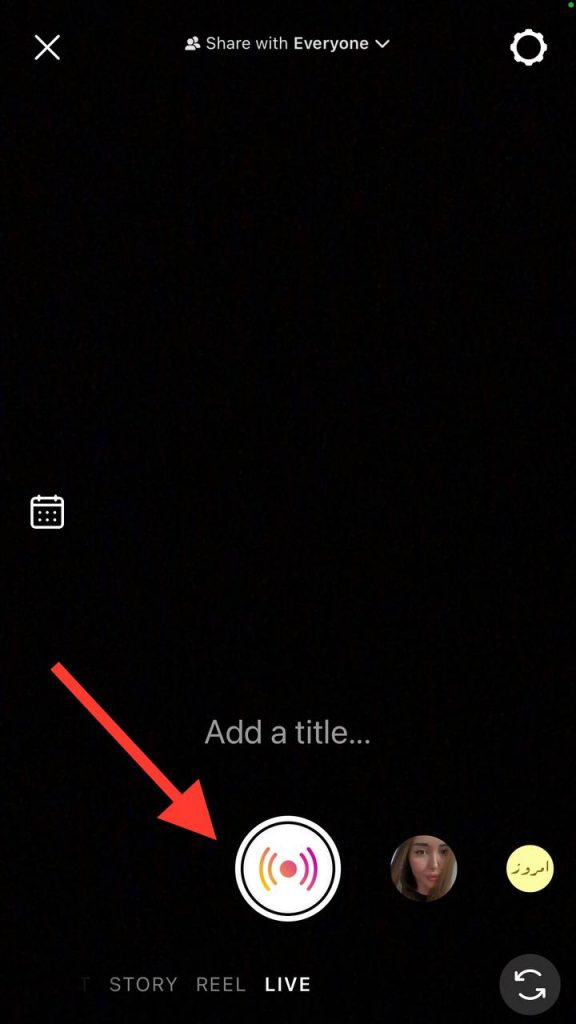
Once you finish these steps, your followers will be notified that you are going live so they can join your session.
To end a live video, tap on the ‘X’ icon in the top right corner; select ‘End Now,’ and your live video will be finished.
Keep in mind that after you finish the video, Instagram will show you how many people viewed your stream, and you will have the option to share, save, or delete the video.
Another important thing to consider is to put your phone on ‘Do Not Disturb’ mode before starting your video to avoid any distractions; doing so will also prevent your live video from being cut off due to receiving phone calls or messages.
How to Join Instagram Live?
Now that you know how to start a live video on Instagram, it is time to learn how to join and watch a live stream.
In fact, joining a live video is as simple as reviewing an Instagram story.
Follow the steps below to easily join any Instagram live:
Step 1- Open the Instagram application on your iOS or Android device.
Step 2- If someone is going live, their profile will appear in the story section surrounded by a red circle, indicating that they are live.
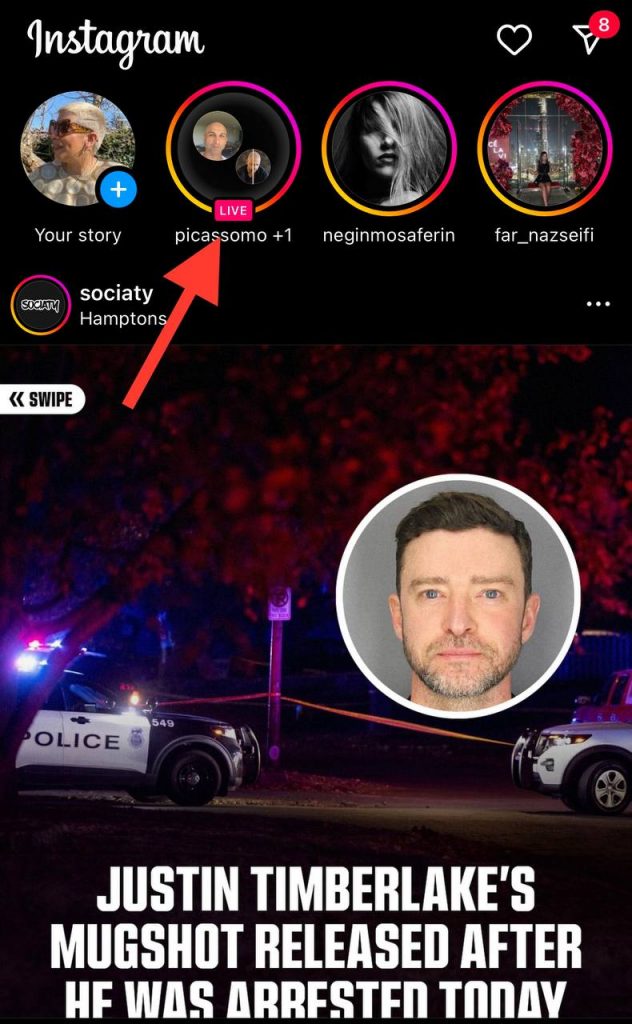
Step 3- Once you tap on their profile picture, you will join their live session, and they will be notified about your presence.
Note that when you join a live video on Instagram, the account owner and all the people watching the live can see your username, which means they will understand you are watching the video too. That is why some users prefer to view Instagram Live anonymously!
Is It Possible to Join Instagram Live Anonymously?

Before we go any further, let’s see if it is possible to join an Instagram live without them knowing.
The first thing you need to know is that there is no official way to join and watch Instagram live videos without being seen because Instagram will show all the usernames to the host so they can see who is watching their sessions.
However, as said before, there are different ways you can try to watch these live videos while you are hiding your identity.
Reasons People Want to Watch Instagram Live Without Them Knowing

There are various reasons people may want to watch Instagram live videos anonymously, but the main reason is to hide their identity because they don’t want the host to see their username.
Another reason is that sometimes you are not in a good relationship with someone; yet you are curious to see what is going on in their lives, so you decide to join their Instagram live video but anonymously.
As you can see, the most common reasons that people prefer to watch Instagram lives without them knowing are private reasons or just out of curiosity.
Thus, if you are among those users who want to join Instagram Live anonymously, you should check out the methods we will explain in the following section.
Different Methods to Watch Instagram Live Anonymously

The methods mentioned in this section are for those users who don’t want others to know you watched their live videos.
Method 1- Use a new or fake account
The first thing you can do is to create a new account or use a fake one to watch the live stream anonymously.
To do so, you can simply create a new account with wrong/fake information just to search for the specific user you want to join their video.
However, you should keep in mind that this method is only helpful if the other person has a public account on Instagram; otherwise, you must send a request to them, and they have to accept it so you can join their video. This may take longer than expected, and you will miss the live stream.
To get the best result out of this method, it is better to know when the other person usually goes live on Instagram, so you can follow their public account or send a friend request to their private account and join their video the second they start a live session.
The advantage of this method is that you can easily watch any live video without revealing your true identity.
Method 2- Watch the saved video as an IGTV

As mentioned before, Instagram allows users to save their live videos after they finish their stream.
Therefore, one of the best ways to watch Instagram Lives without them knowing is to view IGTV videos.
However, this method is only helpful if the creator saves the video once it is done; otherwise, you can never watch or access the video again.
Method 3- Make changes to your Instagram profile
It may sound surprising, but it is true! Making small changes to your account helps you change your Instagram identity in some ways, which is a good way to watch Instagram live videos anonymously.
As you know, when someone starts a live video, and hundreds or thousands of people join their stream, there are many notifications and messages on the screen, which makes it hard for the host to realize and know everyone who joins the session.
Thus, making small changes to your Instagram profile, such as changing your profile picture or changing a word in your ID, can help you join any live stream while protecting your real username and using your actual account.
If you don’t know where to start to make small changes to your Instagram identity, follow the steps below:
Step 1- Open Instagram on your device and go to your profile by tapping your profile icon in the bottom left of the screen.
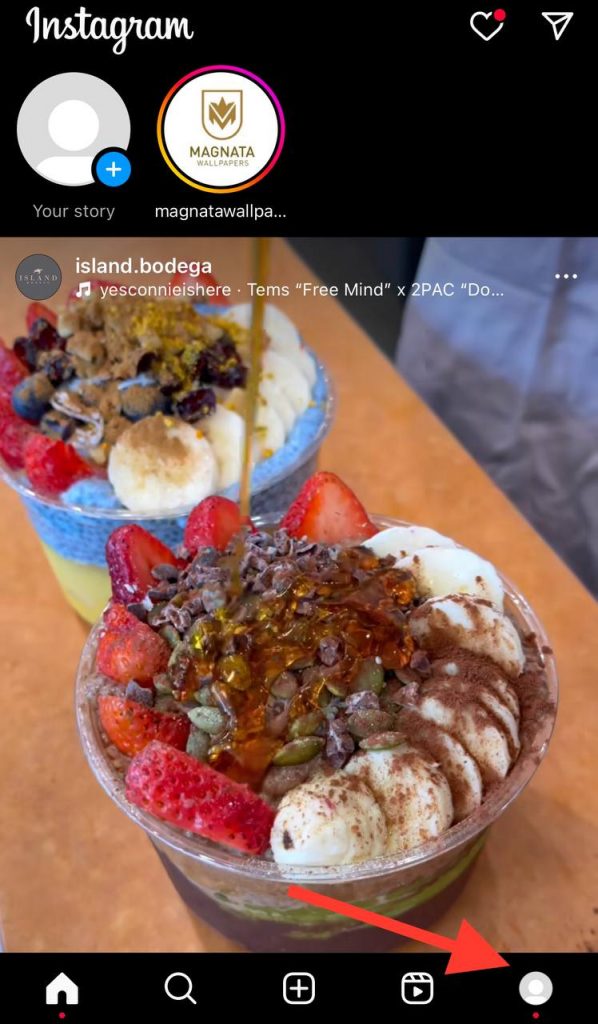
Step 2- Once you are on the profile page, select the ‘Edit Profile’ option from the menu.
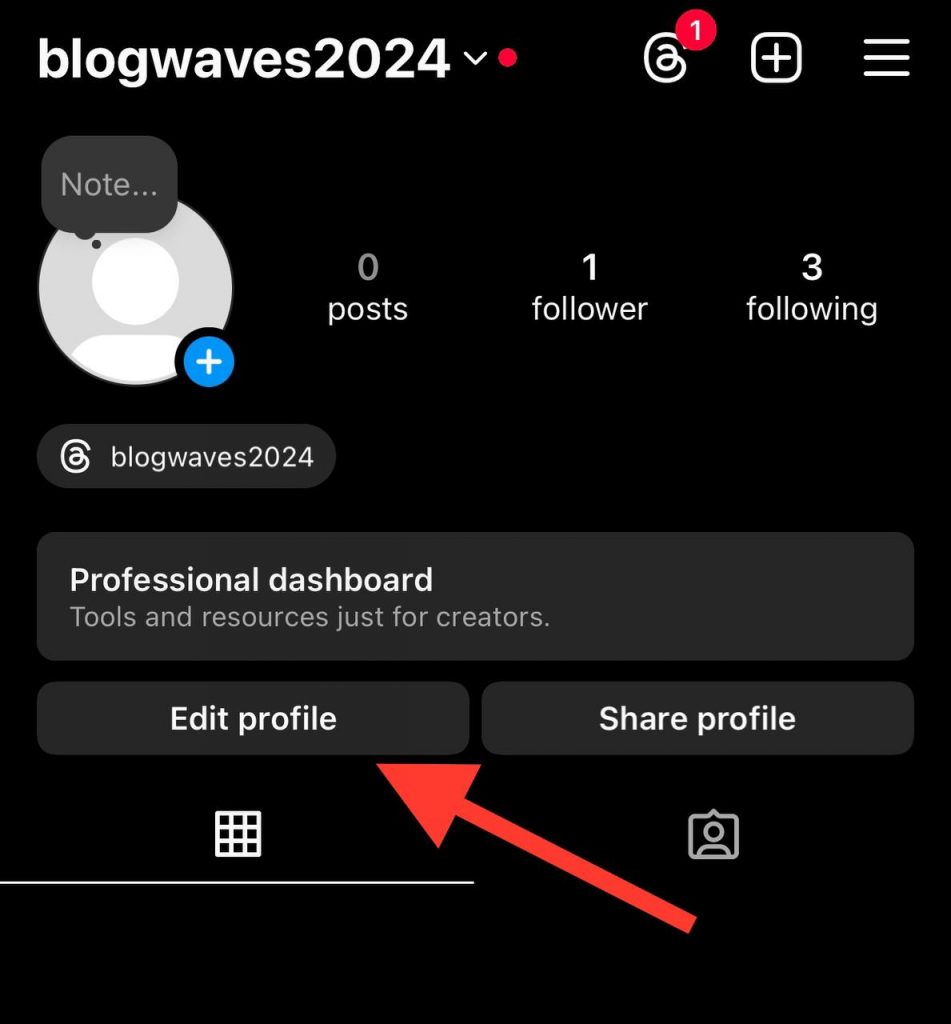
Step 3- Here, you can change your profile picture, username, display name, etc.
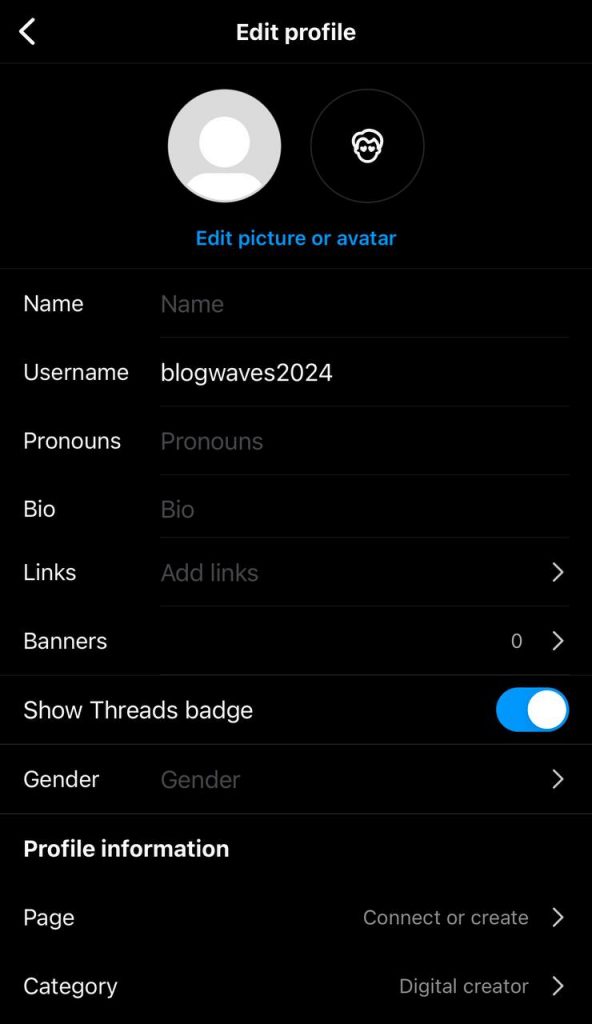
Once you have made all the changes, click the tick icon in the top right corner to finish the process so that no one will recognize you the next time you join their live streams.
Method 4- Use website tools (Not recommended)
As you may know, some website tools offer different secondary ways to enable you to use every feature on Instagram without others knowing about it.
However, you should avoid using these tools as much as possible because they mainly ask to share personal information, which is unreasonable and unsafe.
If you insist on using these website tools, it is good to know how they work. These tools ask you to share the desired username of the account you want to watch their live videos secretly, and then it creates a random username for you, which allows you to watch the live video directly from the website.
Another reason we don’t recommend this method is because these website tools want you to complete or follow certain tasks, such as watching useless or inappropriate ads that suddenly redirect you to spammy websites, which may hack your account, and so on.
Therefore, it is better to try other methods rather than this one to better use Instagram and protect your personal information.
Method 5- Use another Instagram account
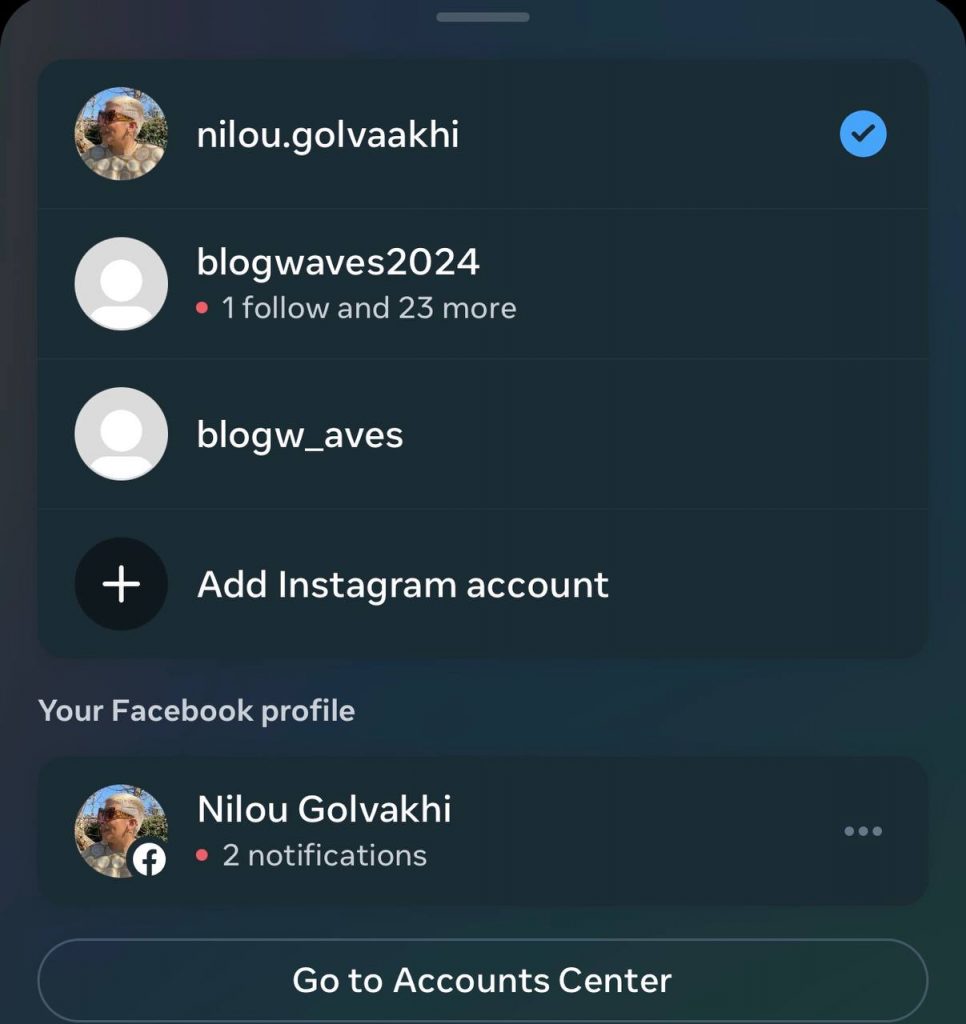
Another method you can try is to use someone else’s account to join any live video that you don’t want the owner to notice your presence.
The important point about this strategy is that you need a close friend and someone you can rely on to ask them to use their account.
It is better that the person you want to use their account and the person you want to join their live video don’t know each other to better control your identity and privacy; however, you will have better chances to use this method if the other person has a public account.
Conclusion
The Instagram live feature is a great way for creators to share their moments with their followers and friends to build better relationships with them, and is a perfect way for users to check up on their friends or see what their favorite celebrity or influencer is doing.
However, not everyone likes to watch these videos directly for several reasons, which we covered earlier.
Although Instagram has not officially announced a way to watch live videos anonymously, you can try the effective methods we mentioned in this article to join and view any live video on the platform.
We hope this comprehensive article helps you better use Instagram and watch live streams while protecting your identity and privacy.
FAQs
Does Instagram tell you who is watching your live video?
Instagram allows you to see who is watching your stories and live videos. After your live video ends, it will show you a list of those who joined and watched your video.
Can I see who views my Instagram live replay?
No, once you finish your live video, you will be able to see the exact number of accounts that joined it, but you can not see who rewatched it or how many times they have watched it.
When you watch someone live, can they see your name?
Yes, when you join a live video, the host and everyone in the live session can see your account and username, which means everyone in the live will notice you were in the video session.
Can Instagram Live be private?
Yes, when you are about to start a live video on Instagram, you will see an option on the left side of the screen called the ‘audience option.’
When you click on this option, you will have two more options: public and private. When you choose public, all your followers can see you are live, but private means you will have more privacy and control over your videos.
Can I control who sees my Instagram live videos?
Yes, Instagram allows you to customize who can join and watch your live streams. You can visit the settings section on Instagram and hide people you don’t want to watch your stories and live videos to control who can see your live content.

Emi Daniel
Buy an Established Instagram Account
Skip starting from zero. Browse Instagram/TikTok accounts with audiences across many niches.
See Available AccountsRelated articles
-

How to Go Live on Instagram: A Step-by-Step Guide
Going live can feel more stressful than posting a Reel. You cannot remove a pause, rewrite a sentence, or start over after an awkward moment. But that…
17 min readEmi Daniel
-

Instagram Instants Feature: What It Is, How It Works, and How to Turn It Off
The first time I opened Instagram Instants, I almost backed out. I had taken a normal photo. Nothing worth editing. Nothing worth posting. Nothing that needed an…
11 min read -

How to Clear Instagram Cache on iPhone, Android & Desktop
Instagram can quietly build up a lot of temporary files while you scroll through Reels, watch Stories, save posts, and upload your own content. You may not…
12 min read