


As you may know, the story format on online applications was first introduced to the world by Snapchat, and this feature was added to Facebook in 2017. The interesting point is that today, more than one billion stories are shared on different social media platforms such as Facebook, Instagram, Snapchat, WhatsApp, etc.
But did you know that you can see your old stories on Facebook? We all know that working with Facebook is easy, but it’s not always as simple as it appears, which means maybe you can’t find how to easily access your old stories.
Before we go any further, you need to know that Facebook stories are different from Facebook posts that you share on your timeline, which means that they will be shown on your account for a limited time.
Buy an Established Instagram Account
Skip starting from zero. Browse Instagram/TikTok accounts with audiences across many niches.
See Available AccountsThus, if you are looking for a way to view your old Facebook stories, you are in the right place.
In this post, we are going to discuss how you can access your old Facebook stories, no matter whether you’ve created them on your mobile or desktop, how you can view others’ old stories, and you will learn how long FB stories last.
How Long Do Stories Last on Facebook?

It might be surprising to hear, but Facebook stories last for only 24 hours and then will disappear just like Instagram or any other social media platform.
Therefore, no matter what type of content you share on Facebook, which can be photos or videos, they are only available for 24 hours.
However, you can still save and archive your Facebook stories that you shared with your followers, but the important point is that they will be only visible to you and others can no longer see them.
You will learn how to archive your stories on Facebook in the next sections.
How to See Other’s Old Stories on Facebook?

Now that you know you are able to see your old Facebook stories, it might not surprise you to know that you can see other’s old stories too.
Imagine you just found the account of an old friend on Facebook and want to review your old memories, the good news is that you are in luck because you can easily check their old stories on Facebook.
Facebook offers its users an option to save their stories temporarily or permanently, and using this option people can save their special moments for future enjoyment.
Let’s see step by step how you can see the old stories of your friends on Facebook:
- The first thing you should do is to visit the profile of your friend. Doing so is very simple, you need to search for their name in the search bar and Facebook will find their account.

- If your friend has decided to save their stories as highlights, you will find them by a star emoji, which is located in the bottom left corner of their profile. Therefore, you have to look for their story highlights to be able to check their previous stories.
- The last step is as easy as a piece of cake! To see a story highlight, you have to choose and click the specific highlight you want to see and they will appear on your screen, which means you can review your old memories.
How to View Old Stories on Facebook

As said earlier, Facebook stories will disappear after only 24 hours; however, you can watch your stories after they disappear from your profile.
In this section, you are going to learn how to see old stories on Facebook on your mobile and desktop.
Seeing Old Facebook Stories On Mobile Devices
Many people use Facebook on their mobile devices because it’s more user-friendly, and you may be among them, so let’s see how you can see old stories while you are using FB on your phone.
Before that, you need to keep in mind that this process is the same on both Android and iOS devices.
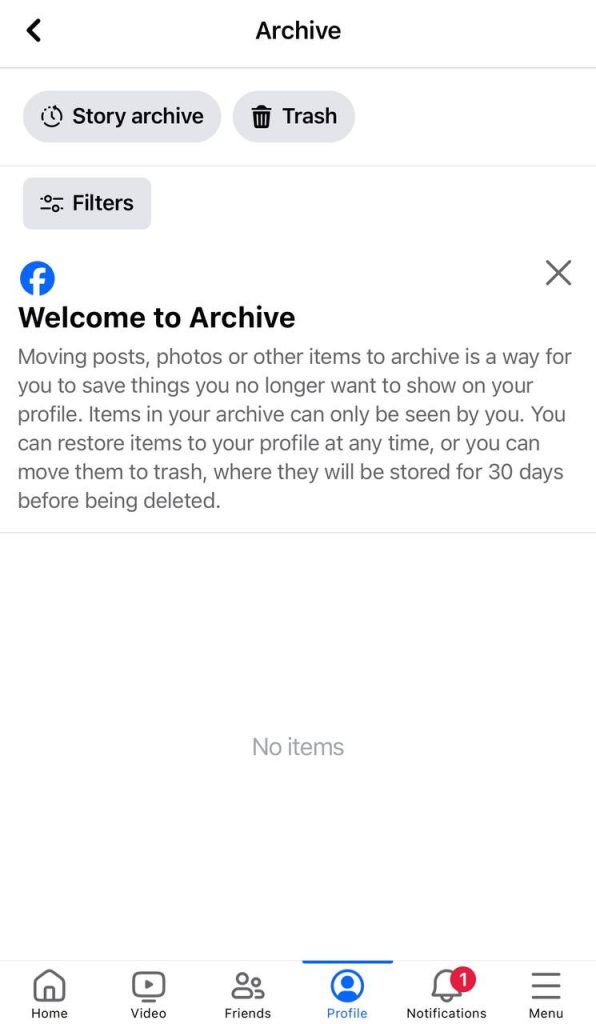
Step 1- The first step is to open the application on your device and click on the three horizontal lines on the down right of the screen. Now, you will see an option called “view your profile,” tap on it.

Step 2- Once you are on your profile, click on the three dots icon on the top right to access the menu, then tap on “Archive.”

Step 3- Now, click on the “More” option to see a few more options that appear in the menu, tap on “Story archive” to see previous stories.
Seeing Old Facebook Stories On Desktop
As you know, you can use Facebook on your desktop, especially when you want to use it for more professional purposes, such as business or marketing.
Follow the steps below to review your old stories on your desktop:
Step 1- Open Facebook and log in to your account, then click on your profile picture icon to go to your profile. There is a menu bar under your profile picture, choose “Story archives” from that menu.
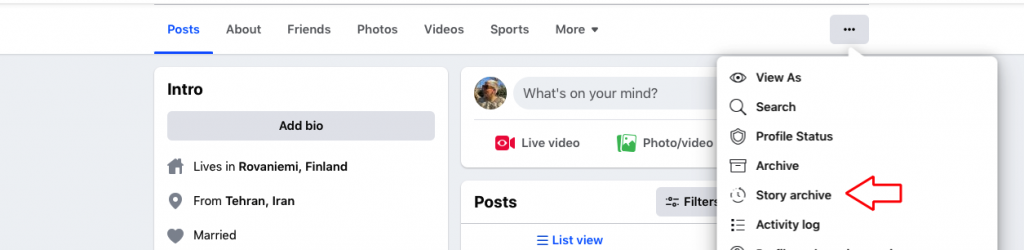
Step 2- When you click on the story archive option, all your old stories will disappear, and you will see them sequentially.
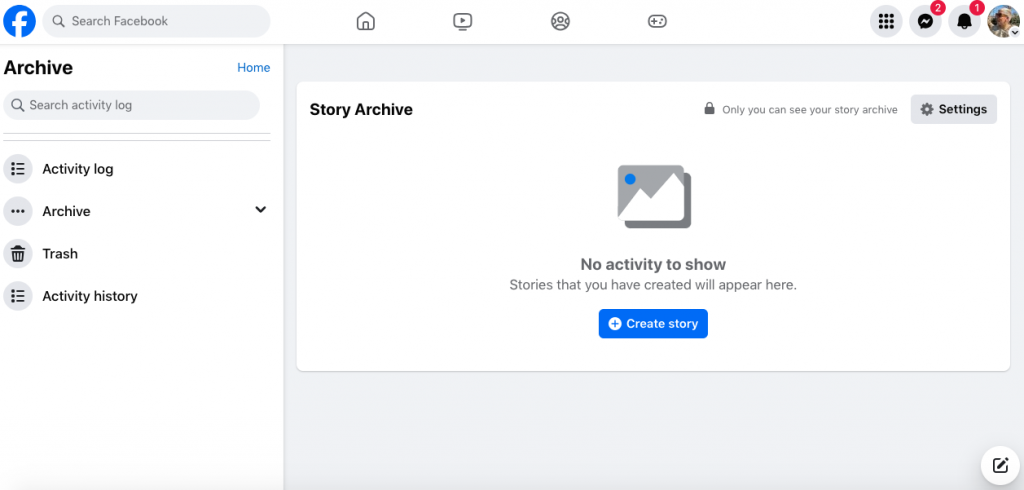
That’s it! As you can see, you are able to review your old Facebook stories with only a few clicks and enjoy your moments in the past.
FAQs
1- Why did my Facebook story disappear?
There are different reasons that may cause this issue. For example, your story may have been removed by Facebook because it was against the website’s community guidelines, it also can be because of your friends that have blocked your story from appearing in their timeline.
2- Is it possible to see Facebook stories after 48 hours?
As said before, Facebook stories will disappear after 24 hours, which means they won’t be visible anymore. In simple words, once the story is gone, it’s gone forever. If you want to see your previous stories after 24 or 48 hours, you must keep the story archive option enabled to save your stories to your account.
3-How to see who viewed your story on Facebook after 24 hours?
In order to see who viewed your stories after 24 hours you need to go to your profile and click on the “Archive” tab which is next to photos.
Then, select the story you want to see and tap on the “eye icon” at the bottom left of the screen to see how many people have seen your story.
Conclusion
We all know that Facebook is a great platform that allows you to interact with your friends and followers all over the world. One of the best ways to keep engaged with your audience is to share your special or daily moments with them through the story feature.
Reviewing your old stories can bring up a lot of memories in different places and with different people and you can review various aspects of your life one more time.
However, to perfectly use this feature you must ensure that you have the “Story archive” option enabled, so you have the chance to always go back and see your old stories.
Now that you know how to see your old stories on Facebook, it is a great time to take a look at what happened in your life a year ago today!

Emi Daniel
Buy an Established Instagram Account
Skip starting from zero. Browse Instagram/TikTok accounts with audiences across many niches.
See Available AccountsRelated articles
-

Best Influencer Marketing Software in 2026: Top Platforms to Grow Your Brand
Influencer marketing used to feel optional, something you tried after you’d “done” everything else. Now it’s often the first place customers hear about a brand. The problem…
18 min readEmi Daniel
-

The Ultimate Digital and Social Media Marketing Playbook: From Basic to Advanced Tactics
Are you tired of trying different methods and realizing your brand doesn’t get the attention it deserves? If so, you need to come up with the right…
23 min read -

Social Media Competitor Analysis: Tools, Benchmarks, and Strategy Guide
Are you getting fewer likes lately? You’re not alone. On Instagram, the average engagement dropped to about 0.45% in 2025, down 24% from last year. Still, the…
26 min read