


These days, everyone in any age group is an Instagram user, and many people spend most of their time during the day scrolling through Instagram stories and posts and seeing different and attractive photos and videos.
The Instagram app gives subsequent updates, unveiling new features allowing users a better experience using this platform.
It can be said that Instagram is no longer just an application for sharing photos and videos; with the help of various features of this platform, users do not need to leave Instagram for many tasks, which is an undeniable advantage.
Buy an Established Instagram Account
Skip starting from zero. Browse Instagram/TikTok accounts with audiences across many niches.
See Available AccountsThe posts shared on the Instagram app become trending quickly and attract much attention worldwide. The Reels feature, one of Instagram’s most attractive and practical features, helps users’ videos go viral.
In this article, we will discuss how to add music to Instagram Reels, and more! So keep reading.
What Is The Instagram Reel Feature?
With the help of this feature, users can record short 15-second videos and share them on their profile so that their followers can visit them.
Users can see their reel videos at the bottom of their home page; Instagram reels can quickly enter the explore section of Instagram and get many views only if your profile is public.
You can make reel videos with different topics such as entertainment, dance, challenge, education, or any other subject and share them as reels to get more followers and attract attention.
In addition, you can add music and interesting effects to your reels, which will make your video more exciting and get more engagement.
Also, remember that if you click on the reels icon (it’s like a video symbol) on your home page, next to the profile icon, you can enter a section that is like explore but only displays Instagram reels videos.
How To Add Music To Instagram Reels?
As mentioned earlier, you can add music to your reels to make them more interesting. In this section, we explain step by step how you can easily add music to your reel videos.
Step 1- Open the Instagram application.
Step 2- Tap on the Instagram reels icon next to the profile icon at the bottom left of your home page. This will lead you to the reels section.

Step 3- Then tap on the “camera” icon in the top right corner of the screen.
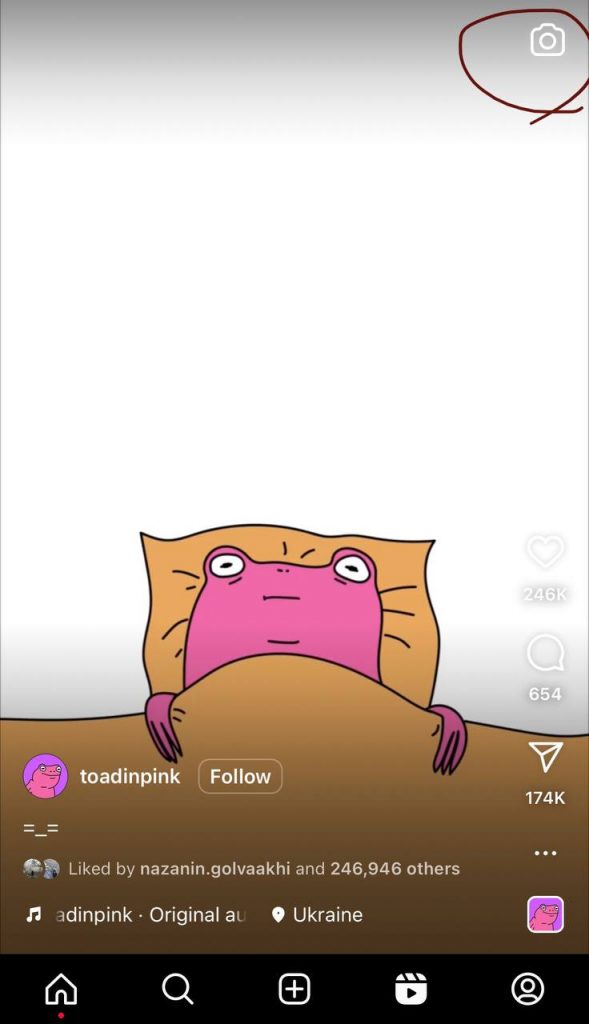
Step 4- Choose the “music” icon from the left options on the left side.
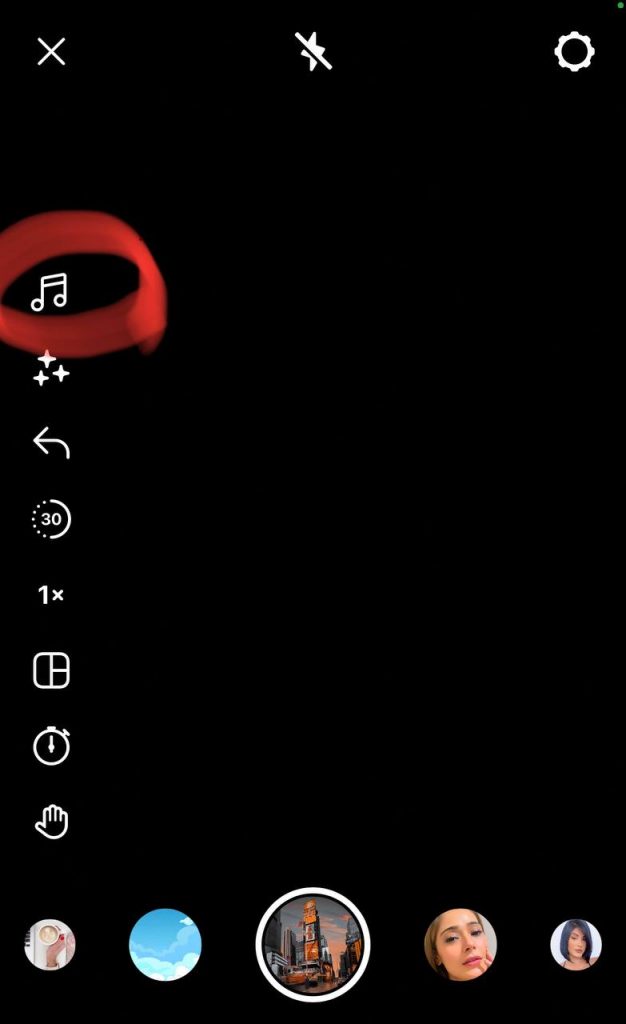
Step 5- Now, you need to select the music you want to add to your reel. Again, you can choose a song from the suggestion list or use the “search bar” to find the music or artist you want.

Note, if you have already saved any particular music for your reels, you can tap on the “saved” option to access and use them.
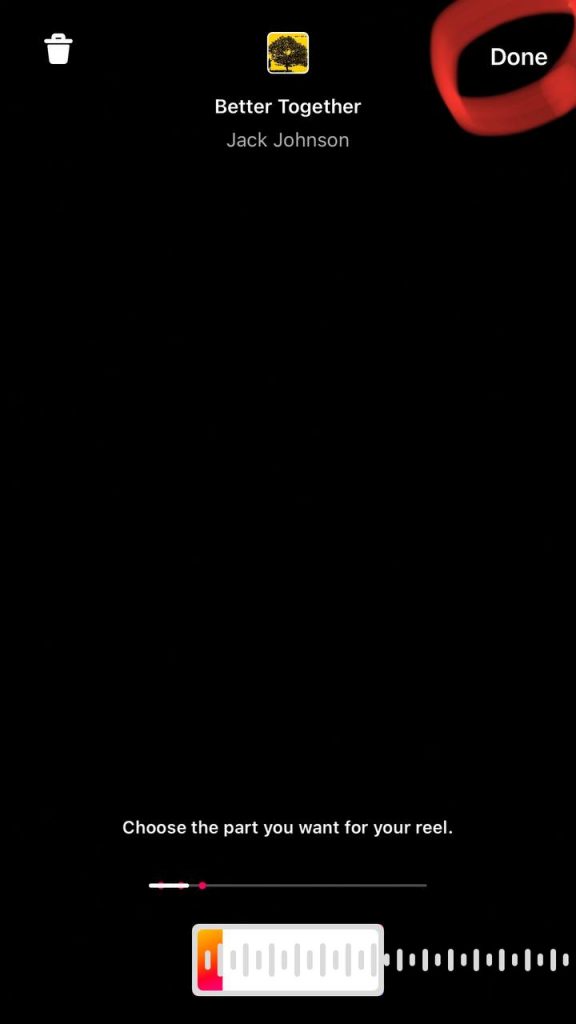
Step 6-After selecting the song, tap “Done” at the top right of the screen to finish the process. Now, you can easily share your reel to your profile.
How To Save Other Reels’ Music?
As it was said, one of the reasons that make the reels trendy is the music that is added to them, sometimes you may see the reels and like their music and want to use it on your videos, or even you might be looking for a song that has become trendy through the Instagram reels.
In this section, we explain how you can easily save any song you hear on the reels.
Step 1- Choose the reel you like its music, and tap on the video
Step 2- Tap on the “audio file” at the bottom of the screen
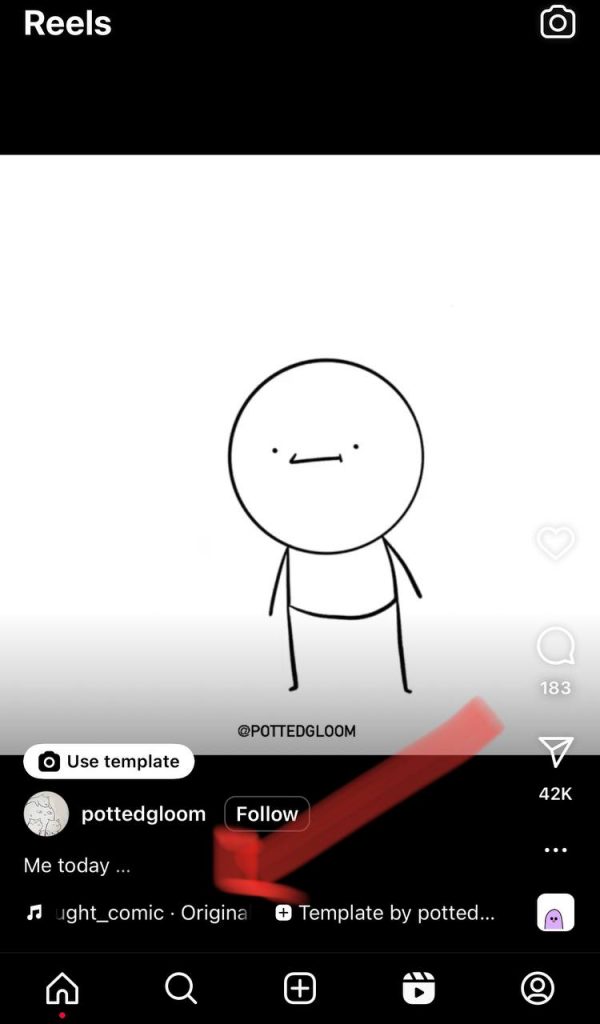
Step 3- Now, you can see the audio file, tap on the “save” icon in the top right corner.
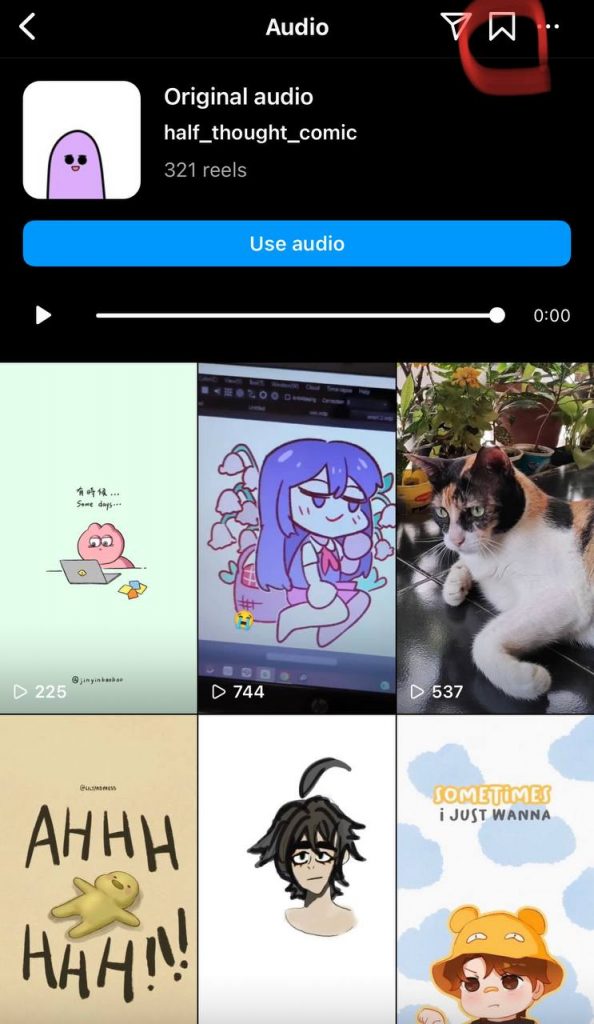
Remember, you can tap the “share” icon next to the save option to send the audio file to your friends through DMs.
Benefits Of Adding Music To Instagram Reels
Creating reels has many advantages for your Instagram account; adding music to reels adds to these advantages, which we will discuss further.
-
Increase engagement:
Adding exciting and trending music to your reels will attract a lot of attention and make more people see your video and react to it, which means that the number of likes, comments, saves, and sharing of your reels will increase. That is, the engagement rate of your post and account will grow.
-
Help your account grow with no ads:
As mentioned, adding music will increase the engagement of your reels and account as well, which means that many people will watch your videos and share them with others.
Based on this, according to Instagram algorithms, your reels are considered important and popular and will be shown to more people, so your account will grow without advertising and spending money.
-
Make your video goes viral:
Many factors help your Instagram video to go viral, but adding trending music is one of the critical factors that will make your reel videos go viral faster
The vital thing you should pay attention to is to try to add trendy music to your reels because this type of music attracts more attention, and Instagram algorithms will show it to more people. And in this way, your reel will go viral.
-
Attract engaged followers:
When your reel video is interesting, it attracts more attention, and more people will visit your account; it makes them like your content and want to see more of it, so they follow your account.
This will increase the number of your followers, and such people will react to your posts, like and save your reels, leave comments, and share with others. So adding music to your reels has many benefits.
Where To Find Trending Music For Instagram Reels?
-
The Explore page
The Instagram Explore page is a section where viral videos and posts that have been viewed a lot are shown there.
As mentioned, videos with trending music have a higher chance of going viral and entering Explore, so scroll through the Explore page to find and use trending music.
-
Instagram Reel’s music catalog
When you want to make your reels, you can find and use the trending music from the Instagram music catalog, in which you will see the suggested trendy music.
In addition, as mentioned earlier, you can use the search bar on that page to find the music or artist you want.
-
Find the arrow icon
When you scroll the reels page, pay attention to the part that shows the name of the song or audio; if the song in the reels is a trend, an icon in the form of an arrow pointing up will be shown next to the name of the song, and you can find trending music quickly.
-
Search among TikTok videos
It is interesting to know that some trending songs become famous on TikTok; in fact, TikTok is the main reason for trending those kinds of music.
Therefore, TikTok is an excellent source for finding interesting and trending music. So if you don’t even use TikTok, use it to find popular songs so that you can add them to your Instagram reel.
-
Check out the Reels page
Finally, in order to easily access the top and popular Reels music to use in your videos, you can check the Instagram Reels page, which only shows Reels to find the best piece easily.
Conclusion
As we know, Instagram is one of the most popular social media platforms, with over one billion monthly active users.
Many Instagram users spend much time scrolling to see exciting content and have fun or learn something. So, if you are a content creator on Instagram, it is better to use different methods to create more interesting content for followers to get more engagement is better.
Instagram reels are an attractive feature, but if you want to get better results from them, it is better to make them more attractive. As mentioned in this article, adding music to Instagram reels adds to its appeal and has many advantages.
In this article, we have comprehensively explained all the information you need to know about how to add music to Instagram Reels, save Reels music, find popular and trending music, and the benefits of adding songs to Reels.
Try to add music to your reels using the description of this article and make it more attractive.
We hope this article will help you to make your reels more interesting and increase followers and engagement.

Emi Daniel
Buy an Established Instagram Account
Skip starting from zero. Browse Instagram/TikTok accounts with audiences across many niches.
See Available AccountsRelated articles
-
300 Instagram Notes Ideas to Attract Attention
Are you looking for a new and creative way to communicate with your followers and grab their attention? You don’t have to search anymore, as Instagram Notes…
27 min readEmi Daniel
-

How to Unhide Tagged Photos/Videos on Instagram
Have you ever been tagged in an ugly photo and worried everyone can see it? Or have you hidden a tagged content and later, you wondered how…
10 min read -

How To See Most Recent Followers On Instagram
Instagram is a unique online platform on social media and almost 2 billion people use it daily for different reasons, from sharing special moments to promoting a…
6 min read