


Have you ever used an Instagram Carousel template?
As you know, Instagram features come in a variety of shapes and sizes. You may create videos, reels, tales, or single photos.
On the other hand, IG Carousels has the most engagement for each individual impression on Instagram. Remember that more than 70% of brand posts are single-image posts. So this is a great opportunity to increase your engagement rates and outperform your competitors.
Buy an Established Instagram Account
Skip starting from zero. Browse Instagram/TikTok accounts with audiences across many niches.
See Available AccountsOne of the issues users have is that they think matching carousel images is time-sucking! The solution is using Instagram carousel templates to make the process of sharing a carousel post easier.
In this post, we’re going to give you some tips when using customizable templates for IG carousel posts.
What Are Instagram Carousel Posts?
An Instagram post with up to 10 images or videos is called a carousel. Desktop users can click through Instagram carousels by clicking the arrow button on the right-hand side of a message, whereas mobile Instagram users have to swipe left to view all the images.
You can include a caption, image alt-text, geotag, and account and product tags on each photo in your carousel in the same way that you would on any other Instagram post. Your carousel post may be liked, commented on, and shared.
A tiny square icon appears in the post’s upper right corner when an IG carousel is published. The icon is replaced by a counter that shows the number of frames when someone scrolls to the second picture. Also, tiny dots appear at the bottom of a post to indicate progress through the carousel.
Benefits of Using Carousel Posts on Instagram
Of course, one of the advantages of using an Instagram carouse template is achieving a high engagement rate, which is really important in social media marketing. Followers usually spend more time looking at carousels than on regular posts in general because they are interactive.
When you post a carousel, you’re actually saying that you have something important to say. This will create a sense of curiosity, and as a result, the visitors will be encouraged to see all the images. That’s why a carousel post with multiple images performs better than a single post.
Carousels are great for:
- Showing close-ups of your product from different angles
- Sharing how-to and step-by-step posts about guides
- Showing the differences before-and-after transformations
Sizes and Specs of Instagram Carousel Posts
Here is the list of characteristics of a carousel post:
- Aspect ratio: square (1:1), vertical (4:5), landscape (1.91:1)
- Landscape size: 1080 * 566 pixels
- Portrait size: 1080 * 1350 pixels
- Square size: 1080 * 1080 pixels
- The video length: 3 to 60 seconds
- The best video formats: .MP4 and .MOV
- Video aspect ratios: square (1:1), vertical (4:5), landscape (1.91:1)
- Max video size: up to 4GB
How to Create Instagram Carousel Posts?
Start with a concept when creating an Instagram carousel. Instead of a conventional picture post, collage post, video, or Instagram story, figure out why multiple pictures or videos in your Instagram posts make sense together.
Sketch a storyboard to get an idea of how many frames you’ll need once you know what content you want to use. Then, you can choose between a leaping transition from one picture to the next or a continuous, panoramic effect for your carousel.
Here you can learn how to create an Instagram carousel post:
- Put all the photos in the photo library.
- Open the IG app.
- Click the “+” sign on the navigation bar.
- Tap the “SELECT MULTIPLE” icon.
- Choose the photos/vids you like to add to the IG carousel (up to 10 images.)
Note: Remember to pay attention to the order you select the items.
- Tap the arrow (→) button in the top right corner of your screen.
- Apply the filters you like to edit the effects of the photos.
- You can tap “EDIT” to change the Brightness, Contrast, and Structure.
- Add the caption, geotag, mentions, and hashtags.
- Tap “Share” to post the pictures.
Top Tools to Find and Customize an Instagram Carousel Template
There are a few different tools that you can use to find and edit an Instagram carousel template. Some of the most popular ones include:
Freepik
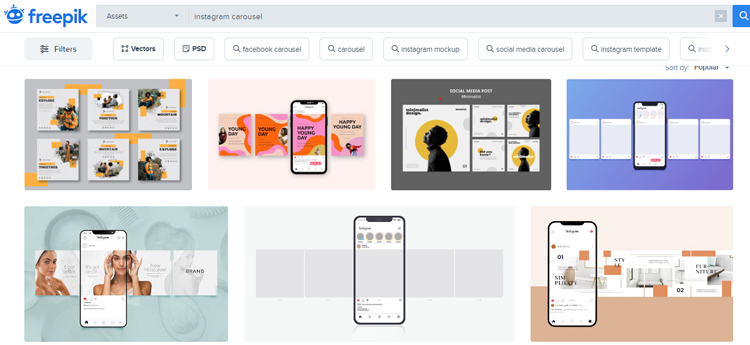
Freepik is a website that offers free stock photos, illustrations, and vector pictures. It’s actually among the largest platforms of free graphic resources that have everything you want, including IG templates.
You can easily search for carousel images or carousel templates on this platform to see countless free templates for Instagram posts.
You can easily trim each of them to use in your social media marketing strategies.
Canva

Canva is a well-known brand in the realm of graphics, especially when it comes to creating graphics for social media platforms.
It offers features for:
- Curved text
- Photo effects
- Image enhancer
- Photo for frames
- Photo texts
- Online video recorder and trimmer
- Convert videos formats
- Social media templates
It’s extremely easy to work with this online platform, and that’s why social media managers offer this tool to their employees. You just need to search for your favorite Instagram carousels and change them according to your interests. You can be sure about the engagement rates and product sales results.
Picmaker
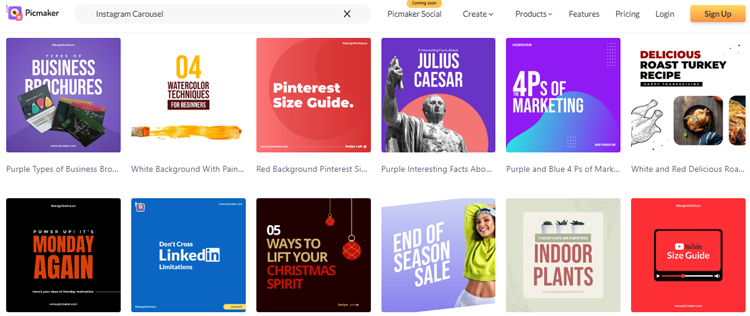
Picmaker is also a great name in this field. It has many useful graphic features like:
- Background remover
- Free social media templates
- 100 million stock photographs
- Brand kits
- Stickerify tools
It also offers great customizable templates to create carousels. Start customizing your Instagram carousel by choosing from their extensive collection of templates. It’s really simple, and it only takes a few minutes.
Venngage
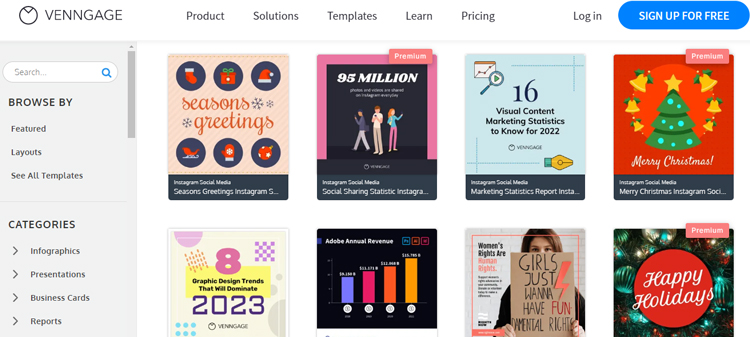
With templates from Venngage, you can make it simple and easy to create Instagram carousels.
In today’s marketer’s toolbox, Venngage is a valuable tool. With a few clicks, you can collaborate with your team and apply your brand in real time.
Marketers can use Venngage to update their Instagram strategy and branding or begin with a clean template, including various Instagram carousel template designs. Using their simple-to-update templates and a drag-and-drop editor, you can subsequently build your own Instagram carousel.
Tips for Creating IG Carousels Using Templates
Now that you know what Instagram carousels are and how to use templates for them, it’s good to know some advice when using them.
Don’t Forget the Brand Storytelling Approach
Instagram carousels are a great way to tell your brand’s personal story without interfering with a carefully curated feed.
You may now add practically any image to your update, no matter how grainy, as long as it matches your Instagram style.
For example, a photograph from your first company meeting or a picture of your early work might be included.
Alternatively, you might use this method to share pictures from a company volunteer activity or recruit members of your team.
These are all fantastic techniques to humanize your brand on Instagram, and they’re all great ways to establish a closer relationship with your audience. You can tell every story in one slide in your carousels. This is the best means of pursuing the storytelling approach and increasing product sales without being too promotional.
Provide Educating Content
Why not take advantage of the format to produce digestible material that provides your audience with actual benefits? Use carousel posts to enhance visibility with your audience.
You may convey essential product information and context with your community by producing tailored content – up to 10 slides.
If you’re providing how-to instruction, specific product advice, or a custom routine, it might be useful.
Actually, this is perfect for teaching something cool about your products or even something about your industry.
Take Advantage of Customer Reviews
Customer reviews strongly influence a brand’s success, and using multiple slides on Instagram is an effective way to share them if you’re getting positive ones.
On Instagram, sharing good feedback with your followers is an excellent strategy to raise your profile, pique attention to your goods or services, and build brand trust.
Carousel posts may help build trust and increase sales, and Instagram is a wonderful platform to share your customer reviews.
Empower User-Generated Content
UGC is one of the most reliable types of material you can post on your Instagram account, in addition to customer reviews.
You may maximize brand loyalty, build a feeling of community on your channel, and increase product sales via a successful UGC plan. What’s even better than one piece of UGC? So, there’s a lot of UGC out there. What’s even better than one piece of UGC? So, there’s a lot of UGC out there.
Although also enticing members of their community to join the UGC train for the chance to be highlighted, this gives them valuable styling background for a wider audience.
Create a sense of Curiosity to Make People Swipe
You want to keep people scrolling after you’ve grabbed their attention with the first slide.
As with any marketing effort, the best way to encourage someone to do something is to prompt or ask them.
A simple call-to-action to swipe should suffice. Just include it in your caption. For example, influencers often include the following:
For anybody who hadn’t noticed before, this basic phrase makes it clear that the page is a carousel. Anyone who wasn’t compelled to swipe before reading it may also find it intriguing.
Make Sure that All Slides Have the Same Style
While you strive to construct each picture into a self-contained piece, make sure you don’t produce ten independent pieces instead of one cohesive slideshow.
For example, use the same fonts and colors throughout your visuals (brand guidelines should make this simple). Also, using the same filters and presets is necessary.
Final Thoughts
An Instagram carousel template can play a significant role in your marketing strategy. They will simplify the process and make your content more beautiful. As a result, you can be sure about achieving a higher engagement rate by using templates for your Instagram carousels. Last but not least, you can run A/B tests to determine your carousel post’s performance and optimize them accordingly.

Emi Daniel
Buy an Established Instagram Account
Skip starting from zero. Browse Instagram/TikTok accounts with audiences across many niches.
See Available AccountsRelated articles
-

How to Go Live on Instagram: A Step-by-Step Guide
Going live can feel more stressful than posting a Reel. You cannot remove a pause, rewrite a sentence, or start over after an awkward moment. But that…
17 min readEmi Daniel
-

Instagram Instants Feature: What It Is, How It Works, and How to Turn It Off
The first time I opened Instagram Instants, I almost backed out. I had taken a normal photo. Nothing worth editing. Nothing worth posting. Nothing that needed an…
11 min read -

How to Clear Instagram Cache on iPhone, Android & Desktop
Instagram can quietly build up a lot of temporary files while you scroll through Reels, watch Stories, save posts, and upload your own content. You may not…
12 min read