

Do you use an Instagram feed template in your marketing strategy?
Instagram marketing has become fiercely competitive and requires so many details to consider.
One of the most important things you have to pay special attention to is visualization and the style of your Instagram account.
Remember that visitors should be impressed when visiting your page and be encouraged to follow your account.
Having a specific theme makes it possible to create a good visualization for your account. If you want to know how to create and use an Instagram feed template, read the following article.
Why is an Instagram feed template important?
First, let’s look at why you need to use an Instagram feed template.
When you determine the template of the 9-grid feed of your Instagram account, you’ll give it consistency in posting and also in style.
In other words, when you have a pre-maid template, you know what you have to post and how you have to create it.
For example, when you have a feed template based on weekly topics, you know you have to create a post about the trend of the week.
Also, when you create a unique style for your feed, you already know the design and color of your post. This will reduce the time you have to spend on your post and also impress your audience because they remember your style.
Last but not least, your Instagram home page will become more beautiful, encouraging visitors to follow your account.
Best Instagram feed templates
There is no limitation in feed templates, but there are some famous and common templates. Here are some of the most common Instagram feed templates:
Tiles
The “Tiles” template is really common, especially among influencers. In this template, you have to alternate between two different things in your posts. In other words, you have to create a chess-like 9-grid feed.
Here are some different types of the Tiles template:
- Quotes and photos
- Tips and photos
- White and black
Here is an example of a tiles template.

Columns
Columns are also a common Instagram feed template. You can create a simple column template by putting one type of post in the middle column of your 9-grid feed and filling the rest of the columns with a different type of post.
This is very pleasing in terms of visual effects and impresses many Instagram users. This template will encourage them to scroll down to see all the lines, which is good because they’ll spend more time on your page. It’s actually addictive, and users sometimes can’t stop scrolling.
Of course, it’s your choice to select the content of each column, but putting quotes in the middle and photos on two sides is a common template. Some accounts also choose a combination of Tips, Ads, and Personal topics.
Here is an example of an Instagram feed template with column themes.

Topic alternation
Another common method for creating an Instagram feed template is to alternate between topics. This is strongly related to your account’s niche because if you’re focused on a single topic, you might find it difficult to change the topic frequently.
Lifestyle and fashion accounts usually use this theme because they can talk about many things, giving them the luxury of changing the topic regularly, resulting in a feed template.
For example, they can choose a combination of tips, ads, and personal topics to fill the 9-grid feed of their account.
Here is an example of how a topic alternation template works.

Puzzle
A puzzle feed template will make your posts seem linked together, creating a larger image. That’s exactly why it’s called Puzzle.
Actually, it’s one of the most difficult feed templates to create. It’s really time-sucking, and you have to be patient to fill the 9-grid with suitable images and videos so that a large puzzle is created and simultaneously, each one is meaningful. Using tools to create and schedule this Instagram feed template is recommended.
Here is an example of this template:

Color-based
One of the most important factors in the Instagram feed that is effective in creating a feed style and template is definitely color.
Several common Instagram feed templates can be created by playing with colors. Here are some sought-after feed templates with colors:
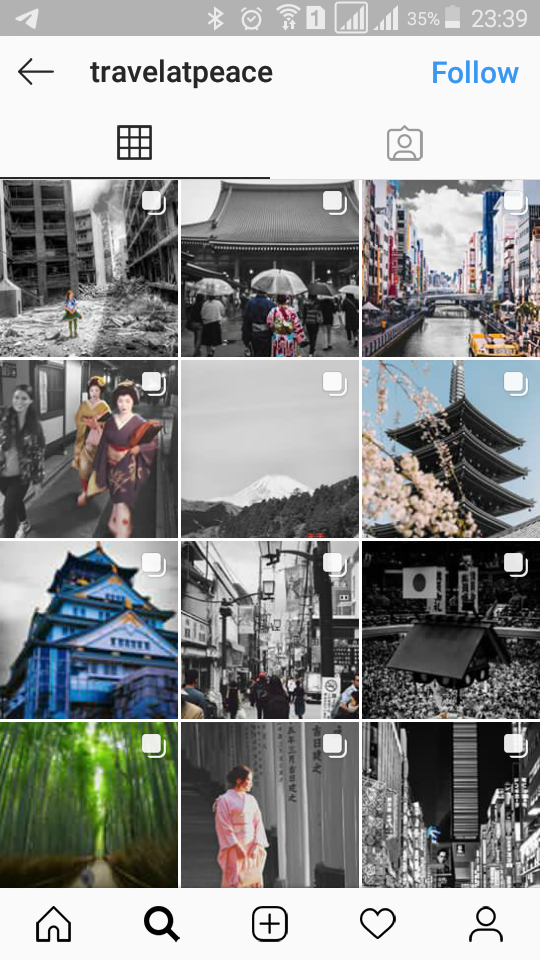
- Color splash
One of the best templates on Instagram is “Color Splash.” In this feed template, you have to turn all parts of the post black and white unless there is a special item you want to focus on.
In fact, you’ll highlight this item and emphasize it. You have to use editing tools to create this feed template.
Here is an example of this IG feed template:
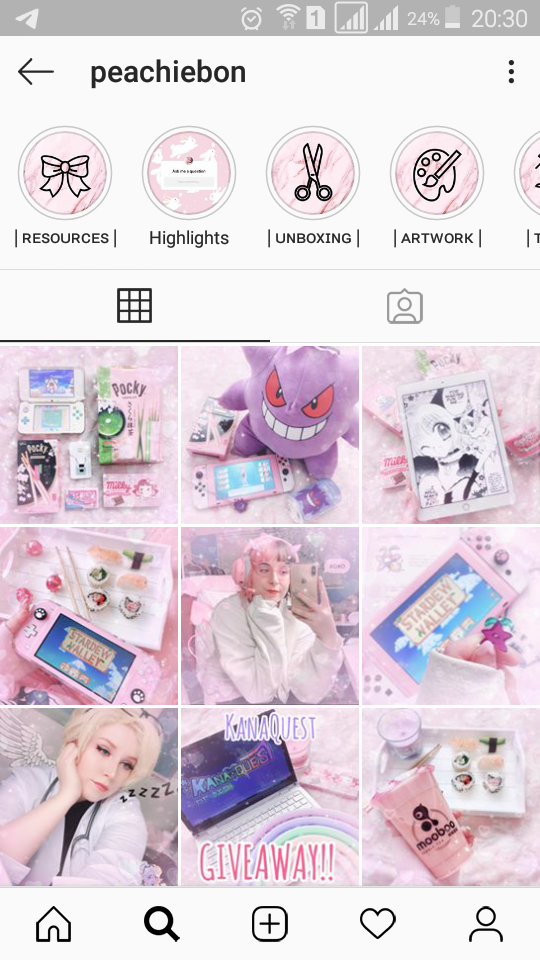
- Single color
In this template, you have to make your 9-grid feed seem like a single picture with a single color.
Of course, it’s not possible to avoid using other colors, but the use of one color has to be intense. Here is an example:
- Black and white
Using black and white colors is really common among many IG accounts. This is a heavy style and is suitable for some niches like art, architecture, and cars.
Here is an example:

Best tools to create an Instagram feed template
Now the question is how to create an Instagram feed template and use it in your marketing campaigns.
Fortunately, there are a handful of tools that make this process really simple. Here are some of the best tools to create Instagram feed themes:
Canva
If you’re looking for a tool to make the process of creating Instagram templates fast, simple, and professional, Canva is the best one.
With this online editing tool, you can create countless Instagram themes apart from content for other social media platforms.
Canva provides you with various colors, fonts, and stickers, which are extremely easy to use. So Canva is best for unprofessional marketers with no graphics or design experience.
Canva has numerous eye-catching templates for IG feed posts and Stories. You can use the templates if you don’t have time, or you can edit them and add items to represent your brand.
A surprising fact about this tool is that you can do almost everything with the free version, and there are only some minor limitations.

Source: Canva.com
VSCO
VSCO is one of the rarest editing tools and is great for those who want to appear unique. This is a really advanced design tool, making it suitable for professional graphic designers.
Creating Instagram feed templates and themes is also one of its capabilities. You easily use its presets to make your 9-grid feed more beautiful.
Just like many other editing tools, VSCO also allows you to choose your style from some pre-maid templates. Then it gives you the chance to edit the template to add your personal preference.
VSCO has the ability to display your images in a grid format, just like the Instagram feed. So you can see what your feed will look like.
Preview
Preview is also a great Instagram tool for planning unlimited posts and stories on the platform for free.
It allows you to upload as many pics and vids as you wish and then rearrange the order of them. It lets you see how your Instagram feed will appear before you post your content on Instagram. So it’s great to create Instagram feed templates.
Using a great scheduling feature, you can also post your content at the best time without worrying about your social presence.
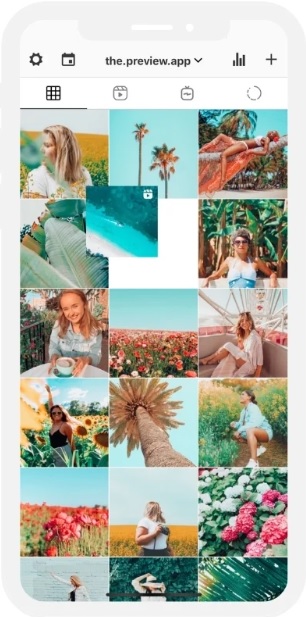
Source: thepreviewapp.com
Adobe Illustrator
Adobe is a well-known name in the realm of tools, especially graphic designing tools. It also has a great feature that is useful in creating Instagram feed themes, which is called Illustrator.
Illustrator has many capabilities, like vectors and logos, but this tool also has some great features for creating Instagram filters and themes.
You can put your pics in an Instagram-like grid to see the result and understand the style of your Instagram feed after uploading the posts.
Final thoughts
If you want to make your Instagram page unique, you’d better design a unique style for yourself. Having a feed template is a great way to show your brand’s style and culture and make your visitors remember your IG account. Try to be consistent in your style and also in the frequency of your posts. This way, you’ll stand out among countless competitors after a while.
