


Have you ever thought of the importance of Your Instagram story background?
Instagram Stories lets users instantly record and tell a deeper, more transparent story than what you represent with several pics.
Stories last 24 hours before disappearing, much like the cake you bought, although you can highlight some of them to appear on your profile.
Buy an Established Instagram Account
Skip starting from zero. Browse Instagram/TikTok accounts with audiences across many niches.
See Available AccountsInstagram Stories has become a powerful tool for marketing. As a result, more than 85% of businesses use it to boost sales.
Despite what it seems, effective usage of Instagram Stories might be a bit tricky. Remember that many competitors are using it, so you can’t expect a miracle by sharing some mediocre stories.
Stories should be attractive enough to make followers react to your Call-To-Action, for instance, Swipe Up.
There are many factors you have to pay attention to when it comes to creating and posting a story. One important thing about every story is its background, as it greatly influences visitors’ judgment.
Nothing is better than vivid colors, attention-grabbing patterns, and entertaining designs in an Instagram Story background to draw your fans in.
Many users might consider it trivial. If you’re one of these Instagram users, you need to read the following article to change your mind.
How to change Instagram Story background color
The most important factor in your stories is their colors.
Here is a step-by-step guide on how to change the Instagram story background color.
Step 1
Find “Create” at the top of your Instagram home page, or simply swipe your Instagram page to the right.
Step 2
Tap “Story” from the options available there.
Step 3
Click on the “Create” option with upper/lower case A. You’ll be taken to another page where you can create a story.

Step 4
On the new page, click on the colorful circle in the bottom right corner to alter the color of the background of your story.
To change the color that appears, you have to tap the icon again. The icon’s background color will change each time you tap it.
Give your Instagram Story the splash of color it needs by choosing from a variety of colors Instagram provides you with. There are color ranges from plain black, gray, and gradients to rainbows.

Top Instagram Story background ideas
Now, it’s good to become familiar with the most popular Instagram Story background ideas. Here are some of the best background ideas for your Instagram stories:
White Instagram Story background
White is the most prevalent color used as a background everywhere, and Instagram Story is no exception.
Using white backgrounds is really good for some situations. For example, a white background is a fantastic choice in headshot photography, straightforward portraits, stock images, and product photography.
Certain products perfectly match white Instagram backgrounds. For instance, cleaners, child-related products, healthcare products, and also food-related stories are suitable for white backgrounds.
Here is an example of white Instagram Story background:

Black Instagram Story background
Dark background for Instagram stories is one of the perfect things to make your stories stand out from the competitors.
To boost your black Instagram Story style, use it with light-colored text or with black-and-white images.
This way, you’ll show a contrast, making your stories become eye-catching so that visitors remember them.
Of course, you have to pay attention to your brand and the content of your stories to match the black background.
For example, if you’re selling women’s or kids’ products, it wouldn’t be a wise course of action to use black color as your Instagram background.
Here are some examples of black Instagram background:

Pink Instagram Story background
This color has also gained great popularity among Instagram users, particularly girls, women, and teenagers.
A pink background has always been considered a girly color, so it’s obviously popular among female users of the platform.
This Instagram background color has great potential to attract the attention of many users. Countless other colors can be combined with pink to create an excellent background for your stories.
Here are some examples of using pink as the background color for Instagram stories:

Aesthetic Instagram Story background
Aesthetic backgrounds for Instagram stories are also popular among users, particularly among those who are crazy about those #AestheticVibes.
This contemporary and fashionable Instagram background is perfect for fashion, art, and women-related accounts.
As they offer a fascinating, high-quality background to your stories, they are ideal for overlaying with your own pictures or films.
Avoid indulging in using these backgrounds, especially if you’re unsure about the match between these backgrounds and your products or services.
Here are some sample templates of aesthetic backgrounds for Instagram Story from Canva:

Fun Instagram Story background
Remember that in the realm of social media, you can’t act officially!
Try to have a sense of humor and combine it with fun Instagram Story backgrounds to humanize your relationship with your audience.
You can use many things like stickers and texts to make your stories look funny. This is when you can use some third-party tools to create and customize your stories because you might find little-ready templates for this kind of background.
Try to be as much creative as possible to make the most of your story and grab the attention f every visitor.
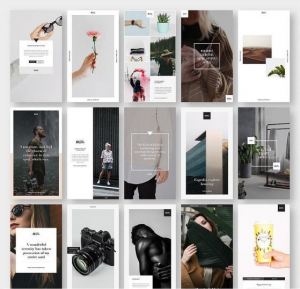
Minimalist Instagram Story background
In its essence, being a minimalist on Instagram means highlighting the items we love most and getting rid of other things.
Minimalist Instagram backgrounds are appropriate for a variety of story types because of their monochromatic color scheme and simple design.
Use them for your promotional films, BTS videos, tutorials, brief stories, and more! Almost every niche can take advantage of this type of story background. Healthcare businesses, artists, and fashion accounts usually use minimalist Instagram backgrounds.
Here are some examples of minimalist backgrounds on Instagram Story:
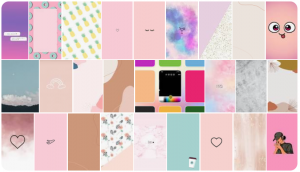
Cute Instagram Story backgrounds
A cute Instagram Story background immediately grabs your viewer’s attention thanks to its quirky and vibrant motifs and shapes.
They work well as text overlays, such as your favorite quote or stickers, or as backgrounds for your social media profile pictures.
Just like what you see in the samples below, a cute background on Instagram stories includes any shape, sticker, animation, or other elements that make your stories CUTE. Being colorful is essential to this background, which should match your business style.
This type of background is mainly suitable for girls, women, teenagers, and those who sell products related to these personality groups.
How to find or create Instagram Story background templates
Fortunately, there are many websites and apps from which you can download free Instagram templates or create and customize one.
Here is a list of top sources for finding Instagram story background templates:
Canva
If you don’t consider yourself an expert in graphics, the best Instagram Stories template builder for you may be Canva.
Using pre-made Instagram background templates, you don’t need to think about anything but add your pics and texts.
Free accounts provide tons of functionality, including free stock photos, a vast selection of fonts, and many inventive layouts. Today, Canva even offers a free tool specifically for creating Instagram Story backgrounds and changing backgrounds on Instagram Story.
Social Ked
You may design your own template during the upload stage of Sked Social, in addition to working with a team on social media scheduling and scheduling Instagram posts.
Colors, text, frames, filters, and stickers can all be changed here. You can try it for your business with a 7-day free version.
Hype Type
This is also an excellent platform for making social media postings easily and doing things a little differently.
You can use Hype Type to animate text and include music in your Instagram stories. Having a distinctive soundtrack for your Stories is quite interesting from the standpoint of templates. It also offers excellent features for the backgrounds of your stories.
Adobe Spark
You’re probably already familiar with Adobe Suite if you’re a graphic expert. Adobe Spart is a user-friend app that makes the process of creating Instagram Story layouts simple.
The best part is that it is entirely free to use and provides millions of free images, fonts, and effects to create stunning visuals for your Instagram Story background.
Conclusion
Many users work with Instagram Stories, but only a few use it to its full potential. You must learn about all its capabilities and features to make the most of it. The background color of your Instagram stories plays a significant role in showing your brand style, so you shouldn’t ignore it when posting. Try to create a consistent style and theme for your brand and use it in all your stories. This way, niche audiences on Instagram will remember your brand, helping you in brand awareness and boosting sales.

Emi Daniel
Buy an Established Instagram Account
Skip starting from zero. Browse Instagram/TikTok accounts with audiences across many niches.
See Available AccountsRelated articles
-

How to Go Live on Instagram: A Step-by-Step Guide
Going live can feel more stressful than posting a Reel. You cannot remove a pause, rewrite a sentence, or start over after an awkward moment. But that…
17 min readEmi Daniel
-

Instagram Instants Feature: What It Is, How It Works, and How to Turn It Off
The first time I opened Instagram Instants, I almost backed out. I had taken a normal photo. Nothing worth editing. Nothing worth posting. Nothing that needed an…
11 min read -

How to Clear Instagram Cache on iPhone, Android & Desktop
Instagram can quietly build up a lot of temporary files while you scroll through Reels, watch Stories, save posts, and upload your own content. You may not…
12 min read