


How To Make Instagram Highlight Covers for Your Account
Are you familiar with Instagram highlights and their covers?
Instagram Highlights are actually Insta stories that you have saved to your profile to share your most important moments. These stories can be accessed even more than 24 hours of normal stories, making them more special.
Buy an Established Instagram Account
Skip starting from zero. Browse Instagram/TikTok accounts with audiences across many niches.
See Available AccountsThanks to Instagram features, you can make covers for these highlights to grab the attention of every visitor.
That’s why every big and small account has a line of saved stories covered by beautiful pictures. This way, they’ll let first-time visitors know what they’re talking about and what theme and style they’re interested in.
In this article, we’ll let you know what Instagram highlight covers are and how you can make Instagram highlight covers for your account.
What are Instagram highlight covers?
You can use pictures to label your Instagram Highlights in order to make them more attractive. These pictures are called Instagram highlight covers.
As Instagram highlight covers appear at the bottom of your profile, users will see them when they first discover your business.
If you want to use them effectively, you must build a specific strategy to appear more consistent and make the visitors remember your profile.
In other words, you must consider using colors and filters to offer your Instagram page a unified appearance. This appearance should match your brand style and complement your brand’s social media aesthetic wherever possible.
Of course, being beautiful is also important to consider when creating Instagram Highlight covers.
Fortunately, Instagram offers features to edit or change your covers, so you don’t have to worry if you think your covers are unsuitable.
How to make a new highlight on Instagram
First, it’s good to learn how to create highlights on Instagram. Here is a step-by-step guide for beginners:
Step 1
Go to your profile by clicking on the bottom-right button (your profile picture).
Step 2
Tap the “New” icon, which has a “+” sign, below the “Story highlights” section. This is exactly below the “Edit profile” icon.
Step 3
You’ll then be transferred to a page on which you can see all your previous stories. Browse among your stories and choose which stories you want to highlight.
Step 4
Now click on the “Next” button to be taken to the next stage, “Edit cover,” where you can choose the title of your Instagram highlight.
Step 5
In this step, you have to pick your customized cover. Of course, you’ve not created your own cover yet, so click on “Add” to make your highlight.
How to make Instagram highlight covers using third-party apps
Now you have to create a cover for your highlight. Fortunately, there are a handful of tools using which you can create custom Instagram highlight covers.
Best tools to make Instagram highlight covers
Here are some of the best Instagram highlight cover makers available out there:
-
Canva
-
Visme
-
PlaceIt
-
Adobe Spark
-
QuotesCover
-
PicMonkey
-
Over
-
Snappa
-
Pablo
-
BeFunky
In the following section, we’ll let you know how to create Instagram highlight covers using Canva and Visme as the two top third-party tools.
How to make Instagram highlight covers using Canva
Here is a step-by-step guide to making Instagram highlight covers via Canva:
Step 1
Log into your Canva account to access its free trial features.
Step 2
Enter the phrase “Instagram highlight covers” or just “highlights” into the search bar. As you can see in the image below, the option of “Instagram Story Highlight Covers” will appear. Tap this option.

Step 3
You’ll be taken to a page where the platform shows you thousands of templates.
You now have two options: 1. choosing one of the templates and 2. choosing a blank cover. Try to take a look at the templates and see if there is a suitable background color for your purpose. For example, if your niche is music, look for Instagram highlight covers for music and see if there is a good match.
Otherwise, you can create the background of your own Insta highlight cover using the tools provided. At the moment, pink Instagram highlight covers are more popular, followed by black and white IG highlight covers.
Blank template:
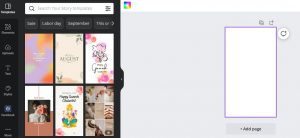
Free template:
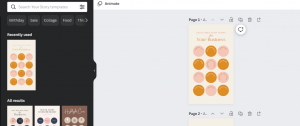
If you see no specific template matching your stories, click on the blank template.
Step 4
Start customizing your highlight cover template using various tools and features the software provides you with.
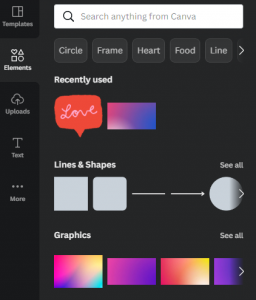
Here is the list of features you can use to edit your Instagram highlight covers:
- Color rainbow
- Background
- Elements
- Text
- Videos
- Audios
- Charts
- Styles
- Photos
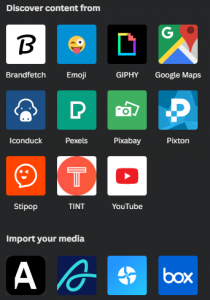
You can also import anything from your social media accounts, like your Facebook Page. Fortunately, working with these tools is really straightforward, and there is no need to explain them separately.
How to make Instagram highlight covers using Visme
Here is a step-by-step guide to making Instagram highlight covers via Visme:
Step 1
Sign into your Visme account or create a free account to be able to use their free features.
Step 2
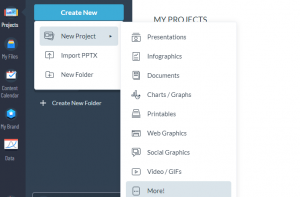
Go to your dashboard, and click on “Create New” to start a new project. A new menu will be opened from which you can click on “More.”
Then you’ll be taken to a new page where you can start a highlight cover.
Step 3
On the new page, type the phrase “Instagram story,” and after appearing the option of “Instagram Stories,” tap on it.
Step 4
On the new page, click on “Custom Size” to be able to align the design with an Instagram story.
Step 5
Type 1080 * 1920 pixels in the boxes, and tap “Create.”
Step 6
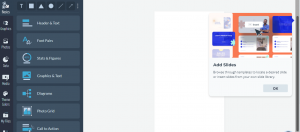
Now, you’re on a page with countless tools and features to make an Instagram highlight cover and customize it.
Remember that you can also download 40 free customizable templates for Instagram highlight covers from their website.
How to upload and edit customized Instagram highlight covers
After creating and customizing your own highlight cover, you have to upload it to your Instagram profile and do a final edit.
Here is how:
- Open your Instagram account.
- Click on the highlight you’d like to edit.
- Tap “More” in the bottom right corner of the opened page.
- Click on “Edit Highlight.”
- Tap “Edit Cover.”
- Tap the image icon to go to your smartphone’s gallery.
- Choose your customized cover.
- Tap “Done.”
Tips for using Instagram highlight covers
Now that you’ve learned how to create Instagram highlight covers, you’d better read the following tips to improve their effectiveness.
Let visitors know your brand’s style
As mentioned, highlight covers should convey your brand’s aesthetic understanding. So try to show off your style and make the covers as beautiful as possible.
Try to use the best color contrast to bold your covers and encourage visitors to click on them.
Don’t forget the importance of consistency
Social media marketing is all about building trust and converting potential leads to loyal customers.
This will happen if only you build a consistent social media appearance so that your visitors memorize you and be sure that for them. In fact, this consistency indirectly makes them believe that your brand is a valid company, and they can trust it.
This is even recommended that you match your highlight covers with other visualizations on your sites or other social media platforms.
This way, your theme, and style will become more memorable.
Emphasize the news items that matter most
Consider what matters most to your audience. What are they looking at here? The line for this season? What time is it today? Or perhaps something more long-lasting, like how to connect your premium earbuds?
For instance, The Met gives priority to prospective guests. A useful list of this week’s exhibits is always displayed at the beginning of the highlight clip.
Get ideas from other accounts but don’t copy
Of course, in each task, you can see what others are doing to get ideas and even think of being better than them, But this does not mean that you can copy their content, style, or theme.
You must create your own style and use it on all your social media platforms. This way, you can appear like a niche leader, not just a spammy account that copies other works.
Conclusion
Instagram highlight covers can play a significant role in your profile’s appearance so that you can take pride in it. Try to come up with a unique style that matches your brand culture. Remember that being creative is key to winning this competition and attracting the attention of more audiences than your competitors. You can even ask your followers’ opinions about new ideas and use them to improve your highlight covers.

Emi Daniel
Buy an Established Instagram Account
Skip starting from zero. Browse Instagram/TikTok accounts with audiences across many niches.
See Available AccountsRelated articles
-

How to Clear Instagram Cache on iPhone, Android & Desktop
Instagram can quietly build up a lot of temporary files while you scroll through Reels, watch Stories, save posts, and upload your own content. You may not…
12 min readEmi Daniel
-

How to See Who Reposted Your Instagram Post (2026 Guide)
Someone reposted your Instagram post, but you have no idea who it was. You check notifications, search through your profile, and still cannot find a clear answer. …
18 min read -

How to Reset Instagram Algorithm in 2026
Instagram can start showing too much of the same type of content. Your Explore page may no longer match your interests, Reels may feel repetitive, or suggested…
12 min read