


Meta is introducing broadcast channels. Do you know what they are?
One of the most important reasons for the popularity of Instagram is the continuous updates and adding new features to this platform.
The newest feature Instagram has recently unveiled is called the Instagram broadcast channels feature, which has drawn users’ attention, especially those who want to earn money from their Instagram accounts.
Buy an Established Instagram Account
Skip starting from zero. Browse Instagram/TikTok accounts with audiences across many niches.
See Available AccountsIn this article, we provide you with all the information you need about the Instagram broadcast channels feature. So, keep reading!
What is an Instagram broadcast channel?
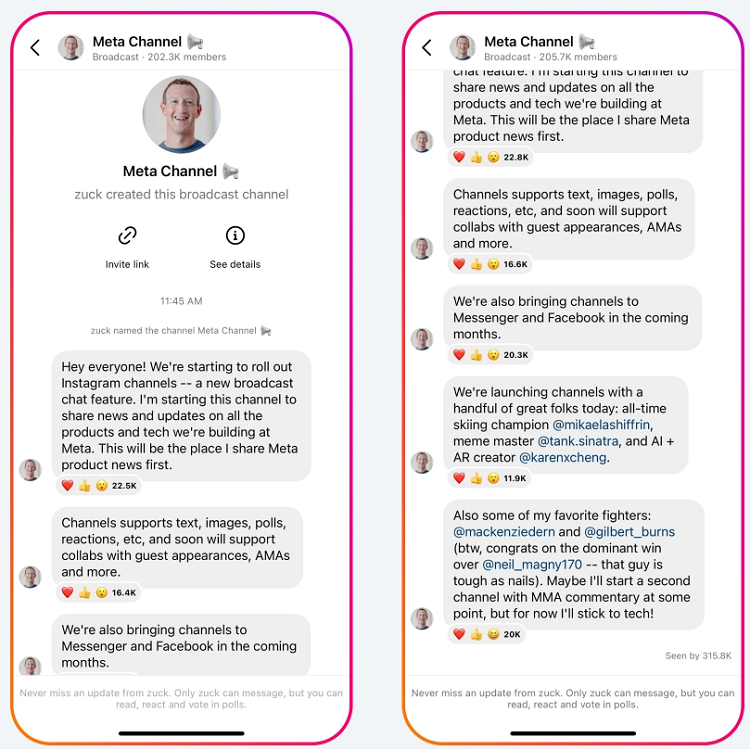
Meta CEO Mark Zuckerberg recently announced a new feature on Instagram known as the broadcast channel, which is almost like Telegram channels.
This brand-new feature allows users and creators to communicate directly with their followers by sharing their latest news and keeping them updated about what’s new and what’s going on.
The Instagram broadcast channels feature is currently only tested by a few selected craters in the United States and will be available for the public in a few months.
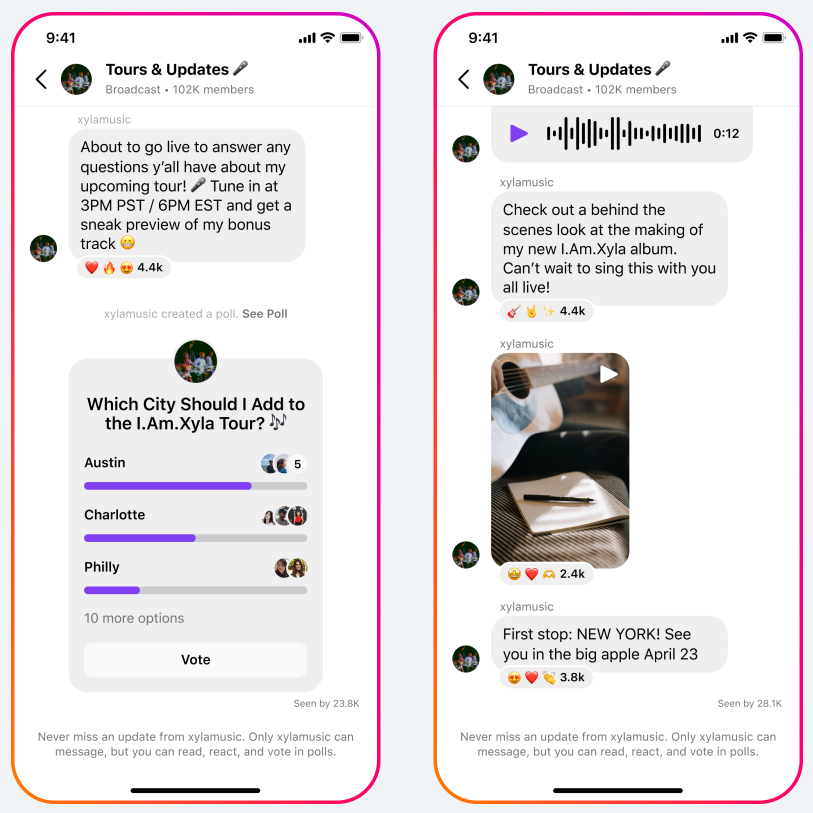
These channels support many chat features like text, polls, videos, pictures, voice notes, reactions, etc.
Moreover, these broadcast channels help creators keep their fans and followers informed and allow them to watch behind the scenes and share the latest announcements.
As mentioned, the broadcast channels support reactions, polls, and other chat tools. Still, the vital thing to notice is that only the channel owner can post on the channel, and the followers can only react to the messages and participate in the polls, so it’s not like a group chat.
But these are not the only features of broadcast channels; Instagram claimed that soon creators will be able to invite other creators to their channel to discuss possible collaboration or run AMA’s etc., which is a great opportunity because this way, creators can quickly inform their followers about news and updates.
Users can easily find and join different channels, mute them, or even leave them. We will explain each of these items later on.
How to create broadcast channels on Instagram?
It is true that this feature is not currently available to the public, and new updates are expected to be added to it soon, but those who have access to this feature can easily create broadcast channels and enjoy using them. You can also learn testing broadcast channels in this article.
To create a broadcast channel, do the following steps:
Step 1) Open the Instagram application
Step 2) Tap on the right of your Instagram feed
Step 3) Choose the “Subscribe broadcast channel” option
Step 4) Pick a name and a photo for your channel. Note that after adding the profile photo, you can’t change it, so make sure you choose a good one.
Step 5) Select “Create broadcast channel”
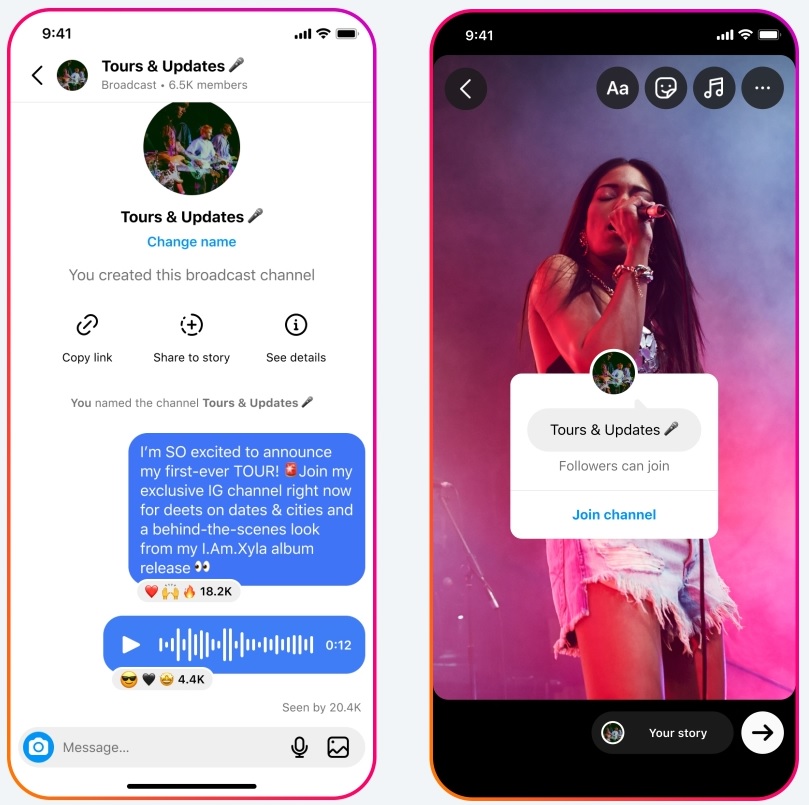
When you select the Create Broadcast Channel option, your broadcast channel will be created, and you can share your first broadcast channel message on the channel so that your followers know about the channel’s existence and join it.
One of the ways through which you can inform your followers and fans that you have created a broadcast channel is to make its link a story so that people can subscribe to your channel through that link.
How to find and join Instagram broadcast channel?
When a creator makes a broadcast channel, there will be a one-time notification informing your followers that you have created a new channel; after that, they can invite followers to join channel.
- The channel owners can copy the invitation link and add it to their story or share it in a post caption, so their followers can join the channel via that link.
- As a channel member, you can copy its link and send it to your friends so that they can subscribe to the channel.
- You can also find the broadcast channel link on the creator’s profile, and by clicking on that, you will join the broadcast channel.
Currently, you can find and join different broadcast channels in these three ways.
What is the use of Instagram broadcast channels?
These broadcast channels are like a giant messaging tool; they are not just some DM group chat that people gather around to talk. It’s for creators to inform their fans and followers about their latest news and announcements.
And as we mentioned earlier, only the author of the channel can send messages to the channel link, which makes it a one-way chat, and members can only react to a broadcast channel message and participate in the polls.
You can send photos, texts, voice messages, polls, etc., to these channels from your Instagram inbox; therefore, the channel feature may have lots of use for creators, and we will examine some of the important ones:
- As a creator on Instagram, you can use these channels to communicate directly and more closely with your followers
- It can increase the engagement of your account
- You can introduce your new products and services to your followers
- You will be more connected with your target audience
- Compared to Direct Messenger, it has more privacy, which makes you feel safe using this feature
In the following, we will explain more about the use of broadcast channels by presenting some simple examples:
- Imagine you have an online shop on Instagram; you can create a broadcast channel specifically for your target audience, the ones who want to be the first to know when you will reveal a new product, when you will offer them a coupon, what are the new limited edition products, etc. So, you can use this amazing feature to communicate with your target audiences.
- If you are an influencer in the beauty field, you can create a channel to inform your followers about new makeup trends and new products of a special brand; you can also share your training course dates with them, etc.
As you can see, using these channels can build a strong communication bridge with your followers and fans, making you more popular and increasing your account’s engagement.
Disadvantages of broadcast channels
Every update and new feature added to a platform, in addition to numerous strengths and advantages, may also have weaknesses, and this new Instagram feature is no exception.
So far, this feature has only one weakness, which can negatively affect the channel itself from different angles.
One of the disadvantages of this feature is having a mute option for channels. Because this makes it easy for people to mute broadcast channels and just be in it but not have any reaction to the messages and not participate in any polls, which causes your channel’s engagement to go down.
Imagine you have created a broadcast channel with 100,000 members, but when you post a message or run a poll, no one or a few people would react to and participate in it; no doubt it is the worst feeling to experience!
So currently, having the mute option is a weakness, but you can’t ignore the positive side of this option, which makes you not receive additional notifications. Still, this option can be considered a disadvantage.
Conclusion
Many users have welcomed this new feature of Instagram and are waiting to be able to use it. Some believe such a feature is unnecessary for this application and prefer to use Instagram as a platform for sharing photos and videos. to use
In this article, we have fully explained the strengths and weaknesses of this feature to you, and by reviewing this article, you can decide whether you agree with adding this feature to Instagram or not. You can also decide whether to join broadcast channel or not.
As we mentioned many times, this feature allows creators to have a closer relationship with their followers and fans and easily share significant issues with them, yet don’t forget that this feature is currently available for some selected creators and not for everyone; therefore, it is too early to judge its performance.
But by using the contents of this article, when this feature becomes available to the public, you can be one of the first people who can easily create a broadcast channel, find and join them.
If you want to know more about this topic and feature, wait for more articles from us, we will keep you updated!

Emi Daniel
Buy an Established Instagram Account
Skip starting from zero. Browse Instagram/TikTok accounts with audiences across many niches.
See Available AccountsRelated articles
-

How to Go Viral on Instagram: A Practical Guide
A viral Instagram post can begin with something very simple, like a clear idea, a familiar feeling, or a moment that makes someone think, ‘I need to…
25 min readEmi Daniel
-
Instagram Hashtags That Actually Work in 2025: Strategy, Research & Reels
Instagram posts with hashtags see 70% higher engagement rates and 12.6% more reach than those without. Yet most Instagram users struggle with hashtag strategy in its complex…
25 min read -
Top 30 Black Instagram Models to Follow in 2025
Black models are among the most followed in the industry on Instagram. A great example is “Naomi Campbell,” who has over 15 million followers. The main reason…
22 min read