

Instagram is among the best social media platforms to share special moments with your friends and followers, but an Instagram post won’t be complete or engaging enough without a good caption.
As you know, adding captions to your posts helps get more interaction from your followers and reach more of your target audience.
However, some users have recently reported that they are encountering issues with Instagram captions. If you have ever faced such an issue or got an error while adding captions to your posts, this article is for you.
Buy an Established Instagram Account
Skip starting from zero. Browse Instagram/TikTok accounts with audiences across many niches.
See Available AccountsThere are different reasons why you face issues with adding captions, but they have specific solutions, which we will fully cover to help you solve the issue of captions not working on Instagram
What Are Instagram Captions

It is true that high-quality visual content is the key to success on Instagram because the photos or videos you share will attract followers and represent your personality on the platform.
But most importantly, you need to know that using correct words to present your content is as essential as sharing quality images, videos, etc.
That is why you need to add the right Instagram captions to your posts; Instagram captions are the text you write to describe your content, which lets you share your brand voice and introduce your business to people.
Writing the right captions for your Instagram posts helps you get new followers, represent your business, build a strong relationship with your followers, etc.
Reasons Why Instagram Captions Disappear

There are various reasons why Instagram post captions disappear and do not show up in the feed. Let’s see the most common reasons:
You are using banned or broken hashtags
As you know, Instagram hashtags help your posts reach more target audiences and will categorize them as well. But if you use banned hashtags that have been blocked by Instagram for violating guidelines, your Instagram captions will disappear from the feed.
Exceeding the mention limits
You are allowed to mention up to 20 accounts on each post, and if you exceed this limit, Instagram considers it as spam and will remove your caption.
Guideline violations
Everyone knows that Instagram is pretty strict when it comes to its guidelines and privacy, so if you violate any of them in your captions, Instagram will remove it from the platform.
Exceeding maximum characters and hashtags limits
Note that Instagram allows you to use up to 2400 characters and 30 hashtags in each post; therefore, if you exceed this limit, the caption will automatically disappear when you upload the post.
How to Fix Instagram Caption Errors

Check the Instagram server status
The first thing that could prevent your Instagram captions from showing up in the feed is Instagram servers.
Therefore, we suggest checking if other users have a similar issue with their Instagram captions. You can download applications that help you see a live map of areas affected by such issues.
If you see people have reported this problem in your region, it means that the reason you get the caption error is because of the Instagram server status.
To solve this problem, you need to wait for a couple of hours or a day at most, and Instagram will solve the issue. The best thing you can do in such situations is to delete your post and reshare it at a better time.
However, if you can’t wait that long, you can use a VPN to upload your post if it’s an emergency.
Update Instagram to the latest version
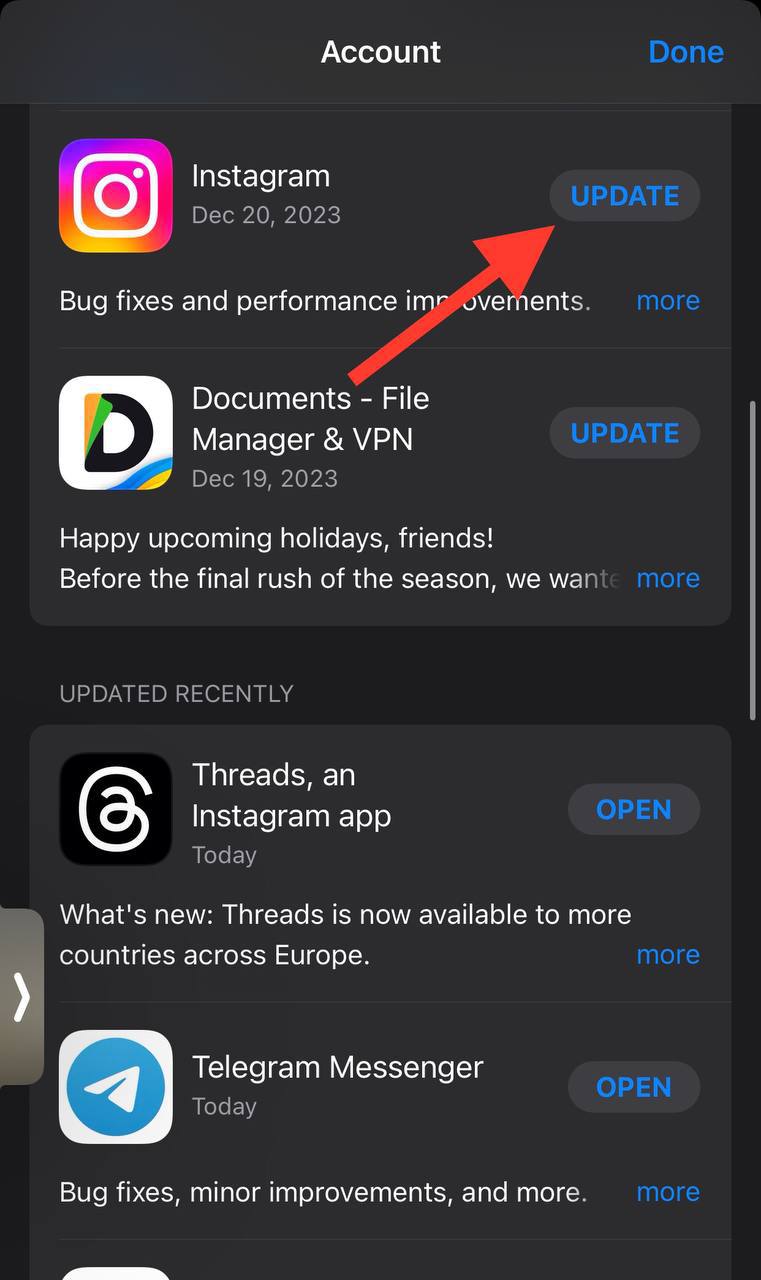
As you may know, outdated applications can lead to errors, so you need to ensure you are using the latest version of Instagram to avoid such issues.
You can check the App Store or Google Play Store for any available updates and install the application again.
Add the caption again
One of the first things you can do is to add the caption once again. To do so, follow the steps below:
Step 1- open Instagram and choose the post you want to add a caption
Step 2- Tap the three-dot icon above your post.

Step 3- Now, tap on Edit.
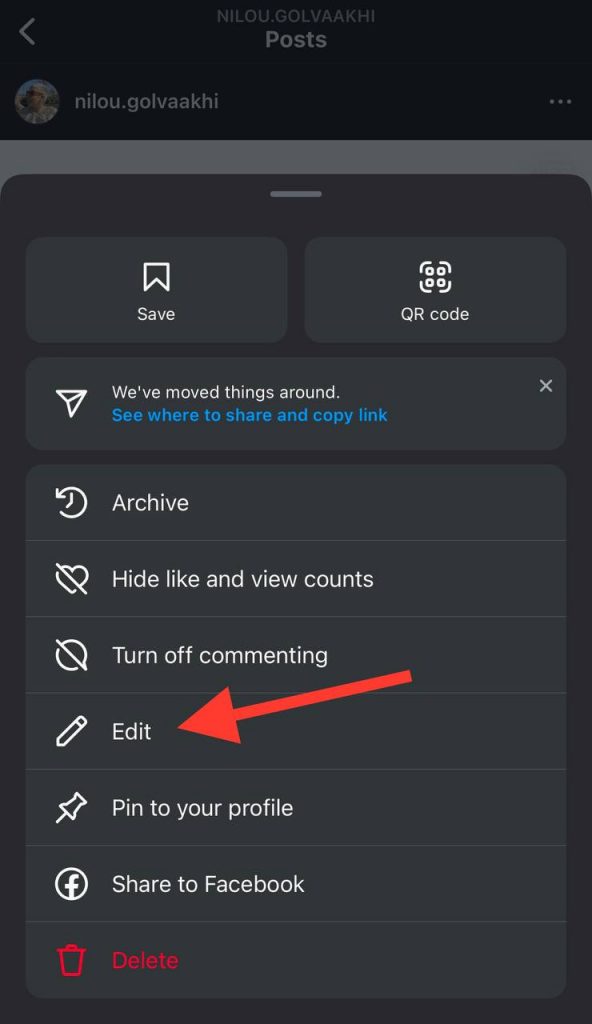
Step 4- Add the caption again and tap Done or Save to finish the process.

Clear cache and data
As you know, cache and data files store specific settings to help the app work faster, but the point is these files can accumulate over time and can lead to displaying messages like “no captions found” and more.
To avoid such issues, it is better to clear the Instagram cache files from time to time to better use the application.
Note that if you are using an iOS device, you don’t have the option to delete the cache on Instagram, so you can try other solutions.
Reinstall the application
Another simple and effective way is to delete Instagram and reinstall it. You can simply reinstall the application and log back into your account.
Instagram can experience occasional bugs from time to time, so this simple method can be your solution to fix Instagram caption errors easily.
Log out and re-login
One of the fastest ways to fix Instagram caption errors is to log out from your account and re-login again. Yes! That’s how easily you can solve such problems.
The following steps show how you can log out and back into your Instagram account:
How to log out your Instagram account on mobile:
Step 1- Go to your profile by tapping the profile icon at the bottom-right of the screen.
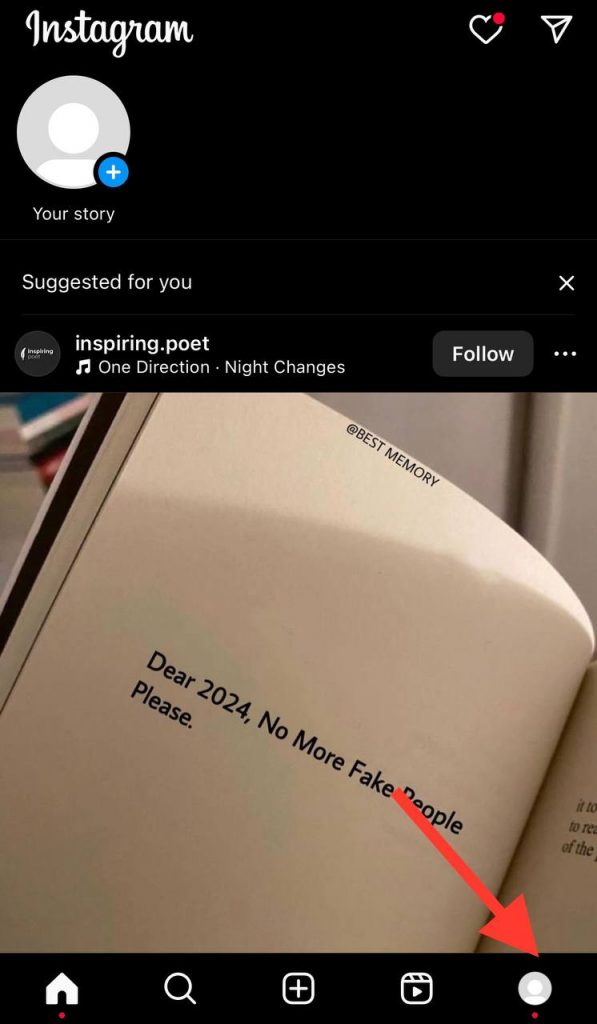
Step 2- Select the three-line symbol to open the menu. Then, select Settings.

Step 3- Scroll the settings menu and tap Log out.
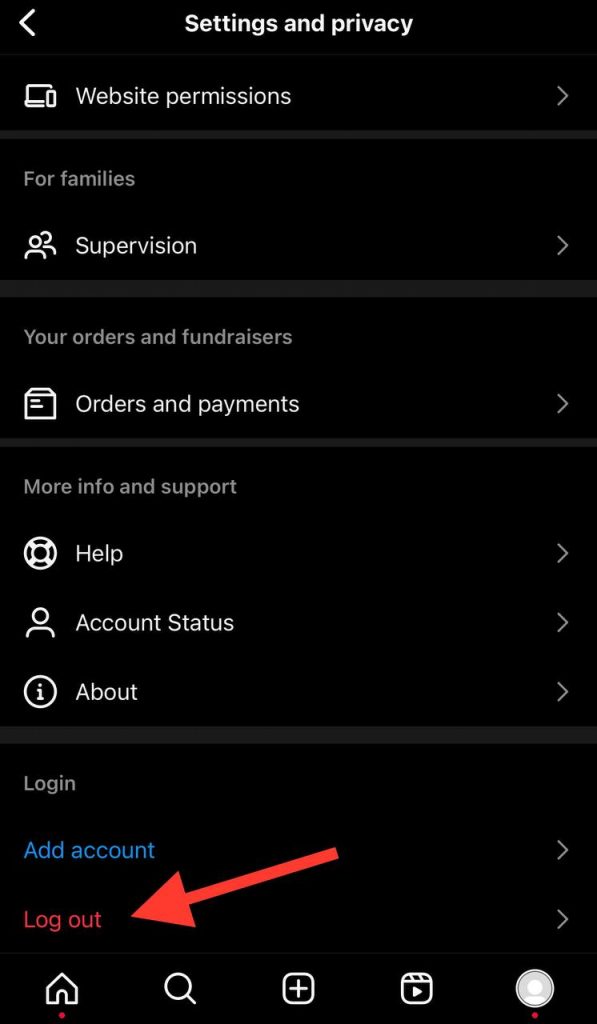
Remember that once you completely log out of your account, you can exit the application and restart your device.
Refresh the Instagram feed
Sometimes, Instagram shows you content from your past session to reduce the feed loading time; this could be one of the reasons you can’t see the captions of some posts.
The only thing you can do is refresh your Instagram feed; it is better to wait a few seconds and check the post captions again.
Report to Instagram
If you tried all the methods mentioned above and still face the same issue, it’s time to report this problem to Instagram.
You can explain the issue in a message and send it to the Instagram support team so they can help you out.
If you are wondering how you can contact Instagram support, follow the steps below:
Step 1- Tap on your profile icon at the bottom-right of the screen.
Step 2- Select the three-horizontal line icon at the top right and choose settings from the menu.
Step 3- Choose Help from the menu and tap on Report a problem.
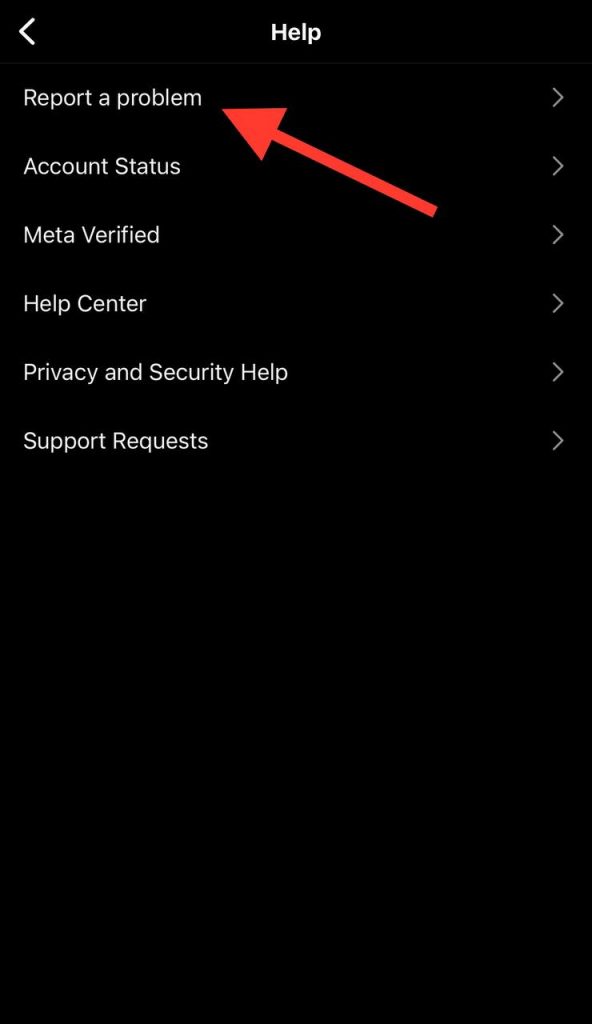
Step 4- Now, you need to tap on Something isn’t working.
Step 5- Describe your Instagram caption problem briefly, note that it is better to mention your device model, and share a screenshot to provide more detailed information.
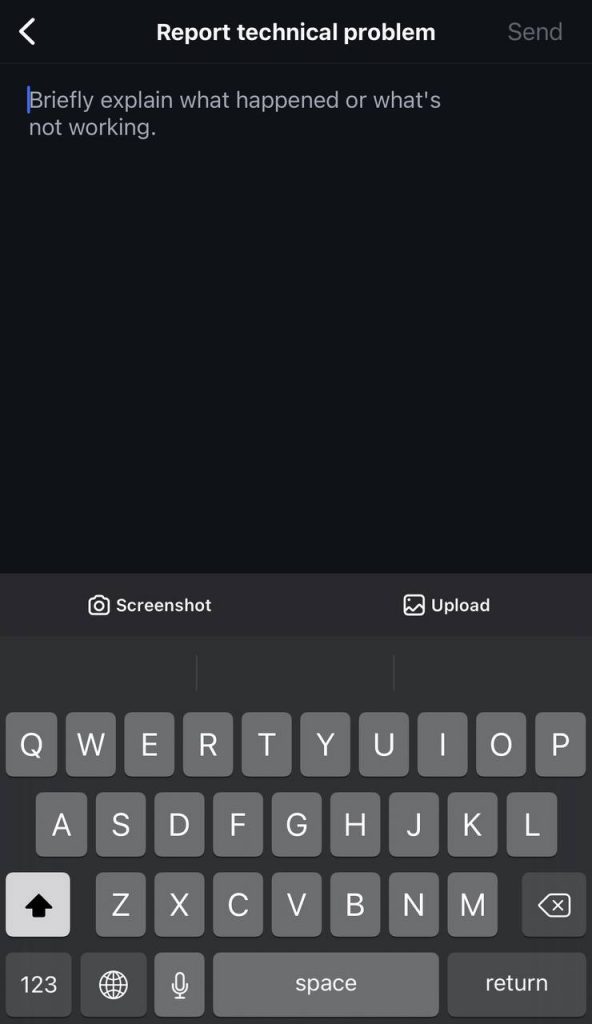
Step 6- Tap send and wait for the Instagram team to solve the issue!
FAQs
1- Why is Instagram blocking my caption?
If you don’t share anything inappropriate in your caption, but Instagram keeps blocking it, it can be because you are exceeding Instagram caption’s limits. For example, you are using more than 30 hashtags or more than 2400 characters.
2- Can I edit Instagram captions after posting?
Instagram allows you to edit your captions easily even after uploading the post. You can add or remove hashtags, information, etc.
Conclusion
In this article, we discussed the most effective ways to help you solve Instagram caption issues.
By following the mentioned methods in this article, you can start sharing your quality content on your account without worrying about getting errors while adding captions.
Last but not least, if you think these methods won’t help you to fix the problem, we suggest checking your Instagram server status in the first place.
If you find this information helpful, make sure you will share it with your friends who may experience the same problem.

Emi Daniel
Buy an Established Instagram Account
Skip starting from zero. Browse Instagram/TikTok accounts with audiences across many niches.
See Available AccountsRelated articles
-

Best Motivational Captions for Instagram to Inspire Success
What was the last Instagram motivational caption or quote that changed your life? Do you remember it? Let me tell you what was mine: “Today is difficult,…
20 min readEmi Daniel
-
700 Gym Captions for Instagram and TikTok
When was the last time you took a picture of yourself at the gym but regretted uploading it to Instagram or TikTok because you couldn’t think of…
37 min read -
370 Self-Love Captions for a Cozy and Confident Fall on Instagram
Fall is the season when most people are kinder, more energetic, and more open to appreciating themselves and the little joys around them; it’s that time of…
20 min readLina Stewart