

So, you opened your friend’s story on Instagram and saw “This Story Is Unavailable” on Instagram?
Yeah, this can be strange. Many ask:” Did they hide their story from me or is it just a glitch?” well, it could be both!
Today, we’re going to tell you all about this situation, why it happens, and how to fix it. So, let’s see why this message popped up in the first place, and what techniques we should use!
Why Do You See “This Story Is Unavailable” on Instagram?

The Story Has Been Deleted
This message can mean that the user who posted the story has deleted it before you get the chance to see it.
Sometimes this happens because your Instagram knows something has been added to the stories, but that specific story is permanently deleted and even the user who posted it can’t access it anymore.
The Story Is Expired

Similarly, “This Story is Unavailable” shows up when the story expires after 24 hours. Instagram lets stories be for 24 hours and after that, the stories just disappear.
Sometimes when the stories expire and disappear, this error pops up!
The Story Is Hidden from You
Well, yeah. Sometimes if the user hides the story from you after they upload it, you may encounter a “Not Available” error.
Instagram lets its users set their privacy settings to allow only specific people to view their stories.
If you’re not included in the selected group, you’ll receive the “This Story Is Unavailable” message when trying to view it.
If you want to make sure this is the case, open the user’s profile and see if any story highlights that you used to see have vanished. If not, you’re receiving the error due to other reasons. But if you can’t see the story highlights you used to see, then they’ve hidden their content from you.
The User Has Switched to a Private Account
Another reason for seeing the “This Story Is Unavailable” message is that the user who posted the story has changed their Instagram account’s privacy settings to “Private.” When an account is private, only approved followers can view their stories. If you’re not one of these approved followers, you’ll see the “This Story Is Unavailable” message when attempting to view their content.
You’re Blocked by Them
If you’ve been blocked by the user whose story you’re trying to access, you’ll see the “This Story Is Unavailable” message. Being blocked means that the user has restricted your access to their profile, including their stories. It’s essentially a way for users to prevent specific individuals from viewing their content.
Instagram Has Deleted the Story

Sometimes, Instagram itself may remove a story due to violations of its community guidelines or content policies. When this happens, users who attempt to view the deleted story will be met with the “This Story Is Unavailable” message. Instagram takes such actions to maintain a safe and respectful environment for its users.
Poor Internet Connection
Occasionally, technical issues related to your internet connection can lead to the “This Story Is Unavailable” message. If your internet connection is slow, unstable, or experiencing disruptions, it can prevent Instagram from loading and displaying stories properly. In such cases, resolving your internet connection issues should resolve the problem.
Instagram Glitches
Instagram, like any other app, can encounter technical glitches from time to time. These glitches may affect various features, including the display of stories. If you see the “This Story Is Unavailable” message and suspect it’s due to a glitch, it’s a good idea to wait a while and try again later. Instagram often addresses these issues swiftly through updates or fixes on their end.
How Can You Fix the “This Story Is Unavailable” Error?
If you’ve encountered the “This Story Is Unavailable” error on Instagram, don’t worry; there are several steps you can take to resolve it:
Clear Instagram’s Cache
Over time, Instagram accumulates data that can sometimes lead to glitches. Clearing the app’s cache can help refresh it and potentially resolve the error. Here’s how you can do it:
For Android Users
– Go to your phone’s “Settings.”
– Scroll down and select “Apps” or “Applications.”
– Find and tap on “Instagram.”
– Select “Storage.”
– Tap “Clear Cache.”
For iPhone Users
– Open the “Settings” app.
– Scroll down and tap on “Instagram.”
– Tap “Clear Cache.”
Relogin Your Instagram Account
It may seem strange but sometimes, all you need to do is log out of your Instagram account and log back in again! In many cases, this way works.
Let’s see how we can do it!
-Open Instagram on your first step. Then tap the profile icon (it’s right at the bottom right) to go to your profile.

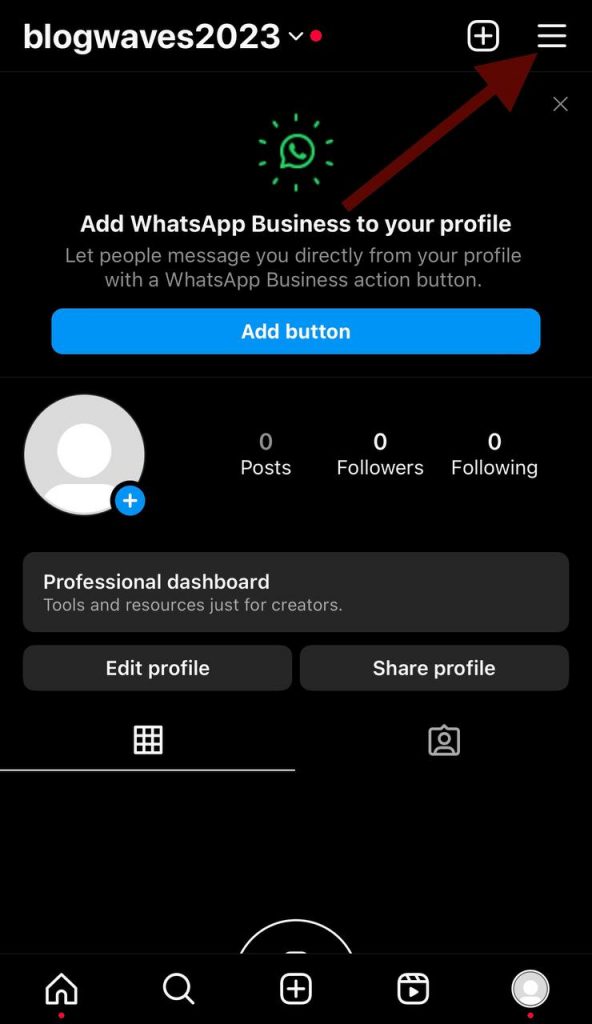
-By tapping the three horizontal lines at the top right, you’ll see the “Settings” option. Tap it, too!
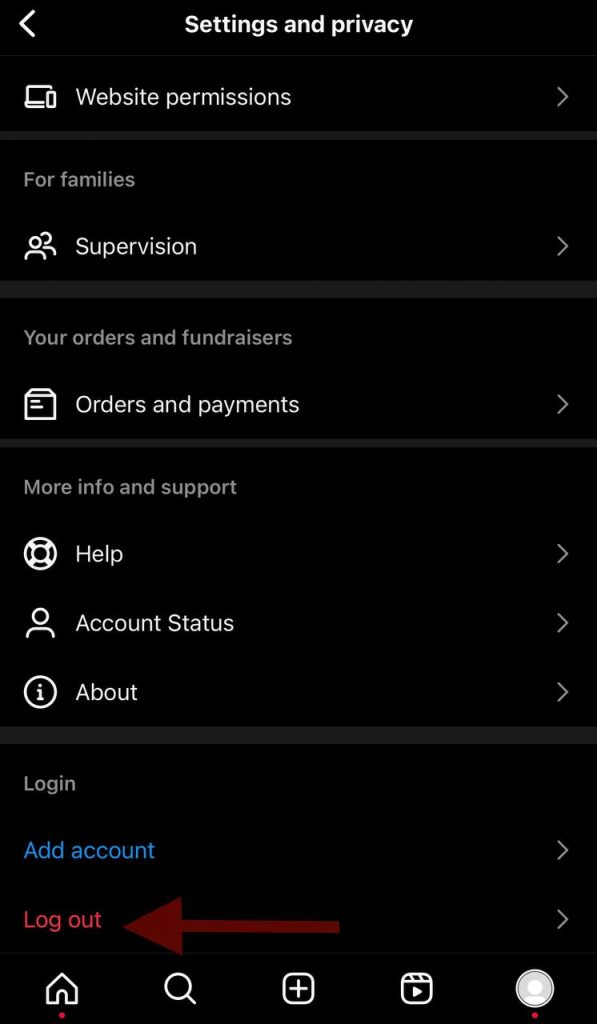
-Now, scroll down in the settings. You must see a “Log Out” option. Tap on it and confirm logging out.
-After logging out, log back in with your credentials. Did it solve the problem? Check it out now!
Update the Instagram App
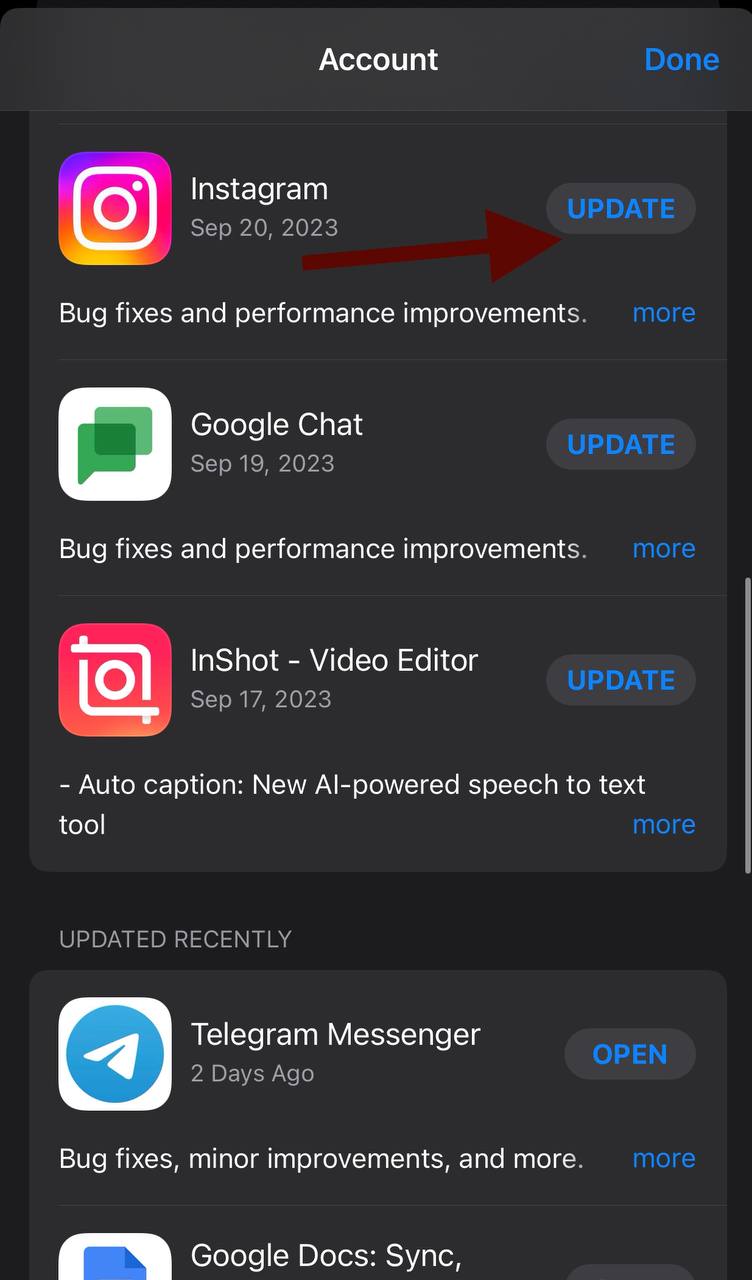
Instagram crashes often when it goes out of date. So, the first thing to do when you get one error over and over again is to check if you have the app’s latest version.
To check that out and download the latest version, go to Google Play Store (on Android) or the App Store (on iPhone). Search for “Instagram”.
If you have the latest version, the “update” option won’t be available for you. But if your apps need to get updated, you can choose it right there by tapping on “update”.
After the update and installation are complete, check and see if the error is still there. In most cases with the old Instagram version, this method solves the problem!
Refresh Your Instagram Feed
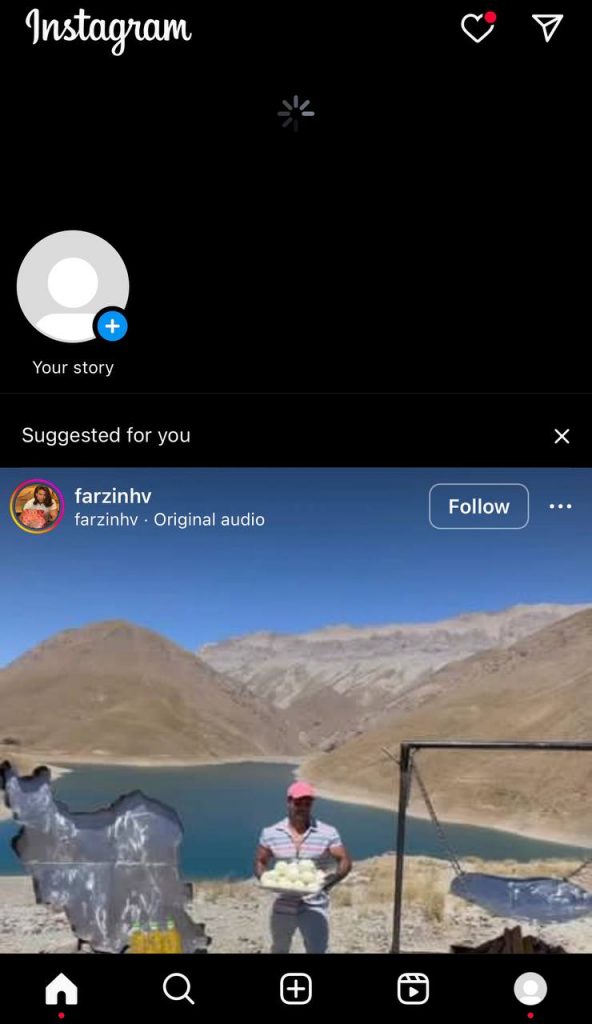
This is a very simple, fast, and interesting way of resolving the error. You just need to scroll up to the top of your Instagram feed when you’re in the Instagram app, and then swipe down to refresh the content.
After refreshing your feed, open the user’s story again. Is it still unavailable?
Frequently Asked Questions
What does it mean when you see “This Story Is Unavailable” on Instagram?
This means that you don’t have access to a user’s stories and you can’t view them. Encountering this error can have different reasons. For example, the user could delete their story, or it may expire. It could also happen due to Instagram glitches, full Instagram cache, or technical issues like this.
Can you recover a story that has been deleted?
No! When you delete a story, it’s gone forever and no one, even the user who posted it can recover it. So, think well before deleting your story.
What does it mean when a story has expired?
Instagram stories have a 24-hour lifespan. It means that from the moment you post them, they’ll be available to view for one day. When a story reaches this time limit, it expires, and users can no longer view it.
How can I tell if someone has blocked me from viewing their story?
If you’re blocked from viewing someone’s story, you’ll see the “This Story Is Unavailable” message when you try to access it. You can also check their story highlights on their profile. If you can no longer see the highlights, it means that the stories have been hidden from you.
What should I do if I suspect an Instagram glitch is causing the error?
The best way to fix Instagram glitches is to close and reopen the app or refreshing the feed. Many of the glitch-based errors also fix after updating the app, so make sure that you have the latest version of Instagram on your phone.
Can I still view a story if the user switches their account to private?
After a user switches their account to private, you won’t be able to view it anymore unless you’re an approved follower. The only way to watch someone’s story as a private user is to follow them and wait for them to confirm you.
What should I do if none of the suggested fixes work to resolve the error?
If none of the suggested fixes work for you and you still see “Story Not Available” error, you should probably reach out to Instagram’s support or wait for a app update that fixes the issue.
Conclusion
It could be very devastating to see “This Story Is Unavailable” when you’re curious to watch someone’s story! We understand that and today, we had a guide prepared to teach you why you see this error, and how you can fix it!
First of all, it could be due to the disappearance of the story. Sometimes the user deletes a story, and Instagram doesn’t get it red circle around their profile back, and sometimes the story expires but Instagram understands it hours later!
In this case, all you can do is wait for Instagram to figure out that the story doesn’t exist anymore!
Another possible reason for the error is that the user may have blocked you from viewing their stories. If they do that, you could still see a story notification, but you won’t be able to view it. It’s the same for the accounts that have changed their settings and become private!
But sometimes, it doesn’t really matter what the user has done and the error occurs because of Instagram glitches. You may be able to fix these glitches with very simple tricks like logging out and back into your Instagram or simply refreshing your feed.
Always make sure that you’re working with the latest version of Instagram. If you’re using an old version, updating it will fix the Not Available error!
Understanding the meaning behind “This Story Is Unavailable” on Instagram is important if you’re after a whole experience on the platform. But now that you know all about it, you can just fix it without any hesitations and make the most of your Instagram surfing!
