

Wanna know how to verify a Facebook business page?
Presently, social networking accounts have become a powerhouse for almost every business out there, irrespective of their status. Whether you’re producing, selling, or offering a service, having one or two social media accounts on different platforms should be a priority if you want your business to flourish.
Facebook is one of those social media outlets in the discussion. Facebook is known to be one of the oldest existing social networking platforms, and it has over a billion active users monthly.
Since this digit has continued to increase, millions of companies have made this platform a go-to outlet to promote their business online. However, many of these businesses are yet to get a blue verification badge on their Facebook page.
However, there has been a big surge of Facebook Business Profile Pages and Ads being deactivated by Facebook, and one reason is the lack of verification status. But you might ask, what’s a Verification Badge? How can verified pages help in being deactivated? And how verifying your Facebook Page could help your Business?
Well, don’t fret; here in this article, we will tell you what’s being verified on Facebook, why you would have to verify your Facebook Page, and How to verify a Facebook Business Page? So if you want to learn, keep on reading.
What is a Facebook Business Page?
A Facebook business page is a free account that businesses can easily build on Facebook to enhance their online presence. This Business Account is mainly used as a drive to increase sales. As a normal Facebook Page, companies can use it to get notifications, send and receive messages, like, comment, share posts to Facebook users, and post important updates about their business. To create your official business accounts, you would be targeting a few marketing and business tactics that would be advantageous in a number of ways, including:
The Advantages of Facebook Business Accounts
- If you wish to access and manage Facebook Ads, you would need to have a Business Account.
- You’d have access to your Likes, Comments, followers, engagement, views, and business events.
- Through a Business Account, you would have access to Facebook Business Insights, Reporting, and Management Assets.
- You’d have access to the new Facebook Business Manager.
- You could add other employees, agencies, and stakeholders to become the account manager.
- You’d enhance your target audience,
- You could magnify your customers’ target location leads.
- You could use your viewers’ engagement on Facebook and Instagram to increase your website traffic.
- And ultimately, you can amplify sales and business revenue through your accounts’ activities on Facebook and other Social networking Platforms like Instagram.
Page Verification Factors
Verifying a Facebook business page isn’t a walk in the park, as Facebook will consider a wide range of factors to determine whether your page is worth having a blue verification badge. This means you’ve got to meet up with the specific criteria to get that coveted verification status.
Fortunately, you’ve stumbled into the right page to get the heads up on how to verify your Facebook business page without hassles. We will outline everything, and that includes the Page Verification Factors.
This is especially true since we know that to verify your Facebook Page and gain your Business Verification is a huge deal. Particularly, since the verification process will justify your legitimacy and official status as a large or small business.
However, many brands and businesses may never get this official Business Verification Blue Badge checkmark that would put them in the elite Profile Pages with the blue badge. The Page Verification Factors include:
The Page Verification Process Criteria
- A Credible ID of Official Document verifying your business or brand name. Suppose a brand is a person; it would have to be a legal personal identification, like; a passport, birth ID, or driving license, all with a Photo. But, if it’s a business, you would need to submit an official seal from the organization with the publicly listed phone number, business name, and address included within the document data.
- Show related documents like; utility bills, phone bills, or any bill with a clear address and business or manager name present on the document.
- Website name and Address in line with your verification details.
- Certificate of Business Formation includes details like name and address, publicly listed phone number, post details, website domain, and any other legal data on the document.
- Tax Documents belonging to the Organization.
- Once you have attached all your related documents, you can confirm and complete the application.
- Then click “Verify this Page” and wait for Facebook to Verify your page and verify you as the business manager.
In other words, to get started with the verification process both as a personal brand or a business page, you would need to prove your identity and legitimacy as a Facebook Page Manager and an authorized official individual or business manager looking for Facebook Page Business Verification.
Keep in mind without the write documents as a business manager or page management team; you wouldn’t be able to verify your page. Moreover, without a proper phone number, you wouldn’t be able to get the 4-digit verification code before your account is put through the verification process of Facebooks’ Management Team.
Why Is it Important to Verify Your Facebook Page?
There are many reasons why someone wants to verify a Facebook business page, but here are the top three reasons why it’s vital to go through the business verification process and get a blue badge verification code and the badge on your Facebook business page. These three important reasons are:
Increased Credibility
As we all know, Facebook is the biggest and most popular social networking domain online. So, to verify your page and business, you would not only be able to build an online presence, but through being verified on Facebook, you will justify your big or small business as a legitimate organization.
In addition, it’s a great way for the business manager to use the business verification as a professional bridge between your products and services with your potential customers.
Increased Sales And Audience
Perhaps the main objective of building an online presence and having a business account verified on Facebook is increasing sales and creating more traffic towards your business and website.
As a Business Manager, you should know that if you wish to create increased sales and more audience, the best tactic would be to have a verified Facebook Page.
Facebook can drive over a million traffic to your Facebook page, website, other social domains like Instagram, your physical address, or any other external assets; if you verify your page, you would be able to attract those audiences and ultimately increase your sales.
Improved Search Footprint
One great way to stand out in the online domain is by having standard SEO management in place, which is easier on Facebook than other social networking platforms like; Instagram.
With a domain like Facebook, you can create a path to enhance your chances of being shown on the first page of a Google search, especially since it gives you more content space. If you get verified, this will double your chances even further.
How to Verify Your Facebook Business Page
The Verification Process of Verifying your Business Page is as simple as 1-2-3. Firstly, ensure your page is categorized under the business section to get verified.
It doesn’t matter whether you’re a business manager of a small local business, organization, or company. Afterward, follow the steps outlined below to get verified. Just ensure you have all the complete Verification Factors above to help you get verified.
Step 1:
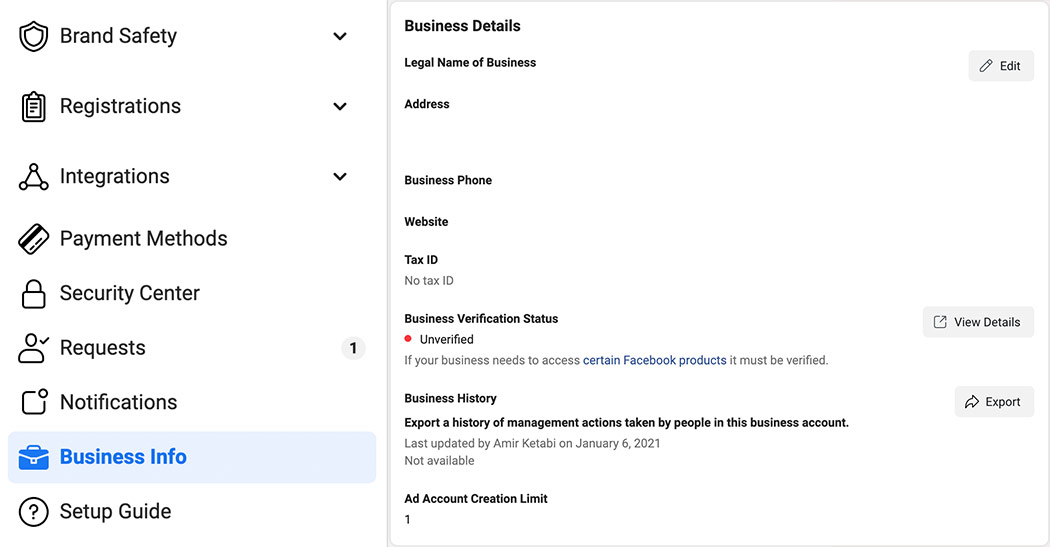
Hit the settings button on the menu of your Facebook Business page and select “Business Info”. This section has business details, business options, and my info.
Step 2:
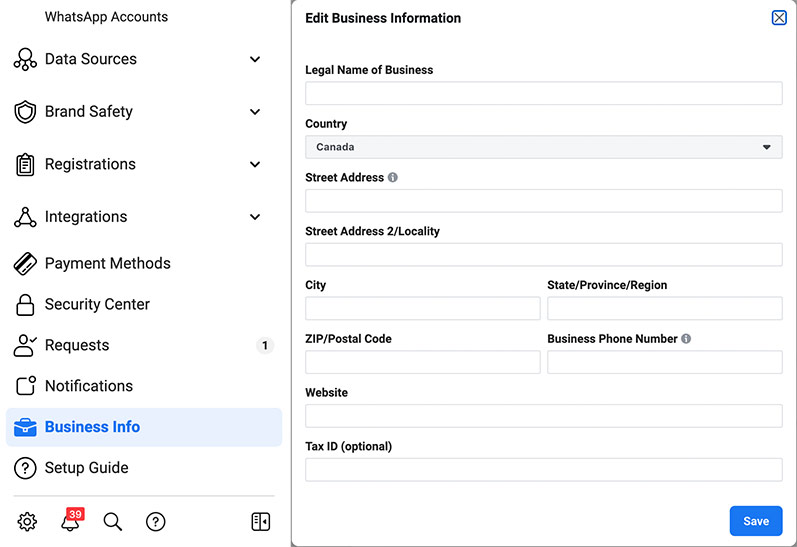
Click on the edit button in the “Business Details Box” to edit all your business information like Legal business name, address website, and Tax ID (optional). Once you have entered all the information click on save.
Step 3:
Then go to the “Security Center” in the left nav menu bar.

Step 4:
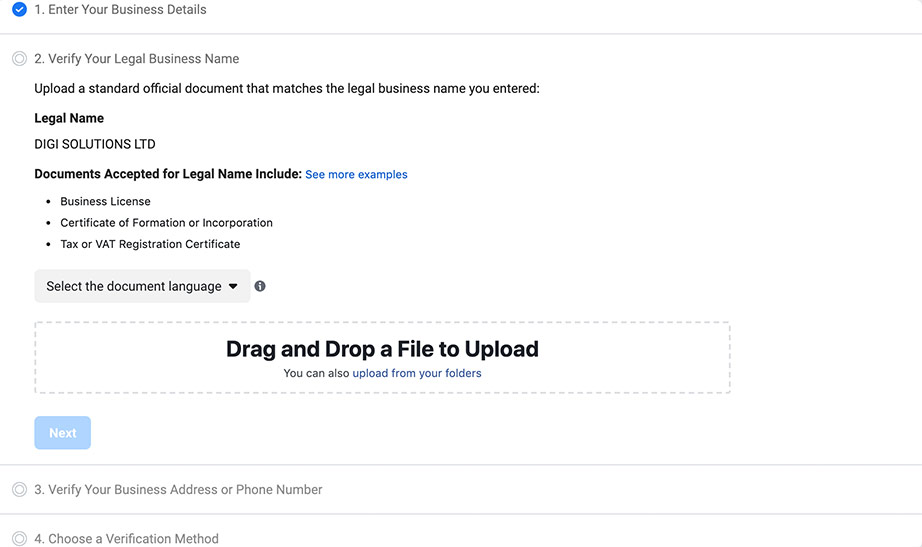
The first section is done since we have filled out the business details. The second section is to verify your Legal Busines Name by providing these docs below.
- Business License
- Certificate of Formation or Incorporation
- Tax or VAT Registration Certificate
Step 5:
The third box is “Verify Your Business Address or Phone Number”. We need to provide a piece of document with an address or phone number and the legal business name should be also there otherwise Facebook won’t accept it.
Step 6:
The last section is the verification method it can be through the phone number of your business email. You can choose the one which is more convenient for you.
Step 7:
Then, Hit the “Call Me Now Button.” Facebooks’ Management will then contact you via phone call message with a verification code.
Step 8:
Input the 4-digit verification code sent to you and click on “Continue” to proceed.
Note:
If you don’t have an active phone number or have issues with your number, you can verify your Facebook business page using the documentation method. You’ll need to provide the documents like:
- Business place utility bill
- License (issued by your city, county, or state)
- Business Tax document
- Certificate of formation (for a partnership)
- Articles of incorporation (for a corporation)
- Or News Posts that verify your existence
However, whether you have a phone number or not, your Photo ID or Business Official Documentation would still be necessary.
Now that you’ve finalized the process, you need to wait while Facebook reviews your request to complete your verification process and make your blue certification badge available to you.
All In All
As you can see, verifying your page on Facebook is simple and straightforward. You just need to post the right documents as a Business Manager to ensure the verification status goes through. Now, You know how to verify a Facebook Business Page, so Good Luck, and May the Force Be With You!
